
Livraison le jour même ou le lendemain

Qualité garantie

Débloquez vos offres de bienvenue: Livraison GRATUITE | Jusqu'à -80 % | 30 jours d'essai gratuits à JoyPlus
Téléchargez l'application
Want to expand your work or gaming space anywhere? It's no longer science fiction, thanks to the portable monitor. Whether you're a remote worker, student, or mobile gamer, slipping a second PC screen into your backpack can be a productivity game-changer. The problem: the market is flooded with marketing promises that often don't hold up.
As a Product Expert at Joybuy, my role is to help you navigate this jungle. Before you dive in, let's review the most common pitfalls to help you avoid a purchase you might regret.
To ensure you're making a sound investment, focus on the features that directly impact your daily user experience.
The keyword is versatility. A good external laptop monitor should offer at a minimum:
Having both guarantees maximum compatibility with all your devices, both current and future.
Don't be blinded by the '4K' marketing hype alone.
A portable monitor must, by definition, be easy to carry and set up.
Let's get practical with a few models that meet specific needs, all selected according to the criteria we've just established.
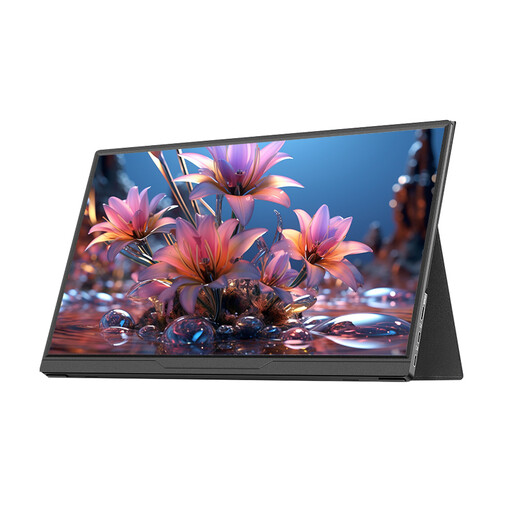
Why it stands out: Perfect for anyone looking for a simple and effective solution to extend their display on the go. Its 15.6-inch Full HD format is a timeless classic for office work, presentations, or watching shows.
It features versatile connectivity with a true USB-C port, avoiding the frustration of a power-only port. Its FHD resolution is a reliable standard with no false promises.
Its broad compatibility (PC, Mac, Switch, etc.) and its driver-free, "plug-and-play" simplicity. Its feather-light weight makes it incredibly easy to transport.
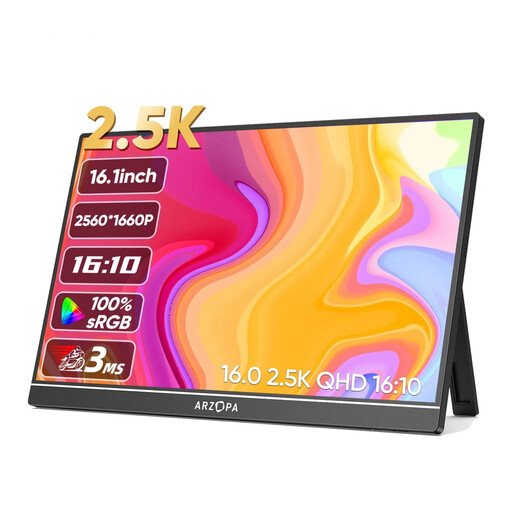
Why it stands out: For photographers, designers, or developers who need more space and precision. Its 2.5K (2560x1600) resolution and 16:10 aspect ratio provide a very welcome vertical screen real estate boost for daily tasks.
It delivers 350 nits of brightness, exceeding the comfort threshold for versatile use. Its high resolution is a genuine functional asset here, not just a marketing gimmick.
Its QHD+ resolution for superior image sharpness and an expanded workspace. Its comprehensive connectivity includes 2 USB-C ports and 1 HDMI port.

Why it stands out: This gaming portable monitor is built for performance. It combines a high 2K resolution with a 144 Hz refresh rate—the essential duo for a smooth and responsive gaming experience on PC or compatible consoles.
It isn't just "portable." It boasts true gaming specs (144 Hz) that make all the difference compared to a standard 60 Hz office monitor—goodbye to stuttering and screen tearing.
Its 144 Hz refresh rate for flawless gaming fluidity. Its high brightness (450 nits) and VESA compatibility make it a highly versatile model.
We have curated a complete selection of products that meet our selection criteria and European safety standards.
Yes, provided your laptop has a USB-C port that supports "DisplayPort Alternate Mode" and can deliver enough power (typically 10-15W). This is the case for most recent laptops (MacBooks, Dell XPS, etc.). If your port isn't powerful enough or if you're connecting the monitor to a smartphone, an external power source may sometimes be necessary.
Yes, the impact on battery life is noticeable. Power consumption depends on the screen size and, most importantly, the selected brightness level. On average, expect a 25% to 40% decrease in battery life. It's best to keep your charger handy for long work sessions.
As with any electronic device, it all depends on the build quality and how you use it. A well-built model that is carefully maintained (transported in its case, protected from shocks and moisture) can work flawlessly for many years. The panel technology (IPS) is now mature and reliable. The most common point of failure is often the connectors, which should be handled with care.