Whether you're working remotely, studying, or are a digital nomad, adding a second screen to your laptop can literally transform your productivity. But with an overwhelming number of options on the market, it's easy to get lost or fall for marketing traps. As a product expert at Joybuy, my mission is to help you cut through the noise and choose the portable monitor that will truly meet your needs—with no unpleasant surprises.
The 3 Pitfalls to Avoid When Buying a Portable Monitor
The portable monitor market is full of promises. Unfortunately, some features that look great on paper often prove disappointing in practice. Here are the key things to watch out for.
- The Single USB-C Port Illusion: Many models proudly feature a USB-C port, but be careful—not all are created equal. Some are for power only and cannot transmit a video signal. The result: you're forced to use an additional HDMI cable, which complicates your setup and negates the benefit of a quick, single-cable connection.
- Brightness Unsuited for Mobility: Low brightness (below 250 cd/m?) makes the screen nearly unreadable in a brightly lit environment like a café, train, or outdoors. The spec sheet might look fine, but the user experience suffers dramatically. Your portable monitor then becomes almost useless outside of a dimly lit office.
- "Gaming" Features Without the Performance: A high refresh rate (120 Hz or 144 Hz) is a common marketing ploy. The problem: if it isn't paired with a very low response time and accurate colour reproduction, the gaming experience will be ruined by stuttering or washed-out colours. A good portable gaming monitor must offer a balanced set of performance features.
The Technical Specs That Make a Difference
To make an informed choice, you need to focus on a few key technical specifications. These are what will guarantee the versatility and quality of your future portable monitor.
1. Connectivity: The Key to Simplicity
Connectivity is the very first thing to check. For a truly "plug-and-play" experience, look for a model equipped with at least one USB-C port that supports DisplayPort Alt Mode.
- USB-C (DisplayPort Alt Mode): This is the holy grail of simplicity. A single cable is all you need to transmit video, power, and even data (for touchscreens). Just remember to check that your laptop or smartphone also has a compatible USB-C port.
- Mini-HDMI: A plus for broader compatibility, especially with older computers or game consoles. Be aware, however, that using HDMI requires a separate power source for the monitor, most often via a second USB-C port.
2. Display Quality: Beyond Resolution
Resolution isn't everything—far from it. For optimal viewing comfort, several factors come into play.
- Size and Resolution: A 15-inch portable monitor with Full HD (1920 x 1080 pixels) resolution offers an excellent balance between portability and screen real estate. For creatives or high-definition enthusiasts, QHD (2560 x 1440) or 4K models provide superior sharpness but are often more power-hungry.
- Brightness: Measured in candelas per square meter (cd/m?, or nits), this is absolutely crucial for on-the-go use. Aim for at least 300 cd/m? for good readability in most situations.
- Panel Technology:IPS (In-Plane Switching) technology remains the best choice. It ensures wide viewing angles (up to 178°) and faithful colour reproduction—two essential factors for mobile use.
3. Performance for Gaming and Creative Work
If you plan to use your monitor for gaming or creative tasks, there are two indicators to watch:
- Refresh Rate: Measured in Hertz (Hz), this is the number of images displayed per second. A standard monitor is fine with 60 Hz. For a portable gaming monitor, a rate of 120 Hz or 144 Hz is essential to ensure perfect fluidity in fast-paced games.
- Colour Gamut: The sRGB percentage indicates the range of colours the monitor can display. A score of 100% sRGB (or higher) is a prerequisite for photo or video editing to ensure accurate and true-to-life colours.
Portable Monitor Recommendations
To put theory into practice, here are a few models that stand out and perfectly meet specific needs.
IDEAL FOR: THE EFFICIENT MOBILE WORKER
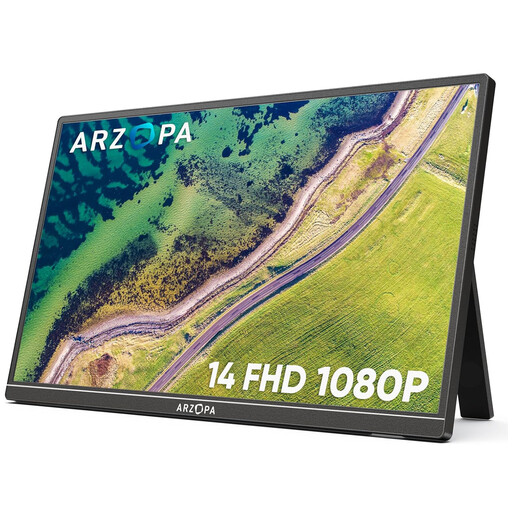
Why it's a match: With its feather-light 600g weight and compact 14-inch size, it's designed for those who need a functional second screen without the bulk. Perfect for office work, presentations, and multitasking on the go.
How It Avoids the Pitfall
It includes two full-featured USB-C ports, ensuring both video and power are delivered over a single cable (if your device is compatible). This sidesteps the "power-only" USB-C port trap.
Key Advantage & Highlights
Lightweight and simple: Its weight and connectivity make it the ultimate discreet and effective travel companion. The built-in stand is a real plus for a quick setup.
IDEAL FOR: THE CREATIVE ON THE GO
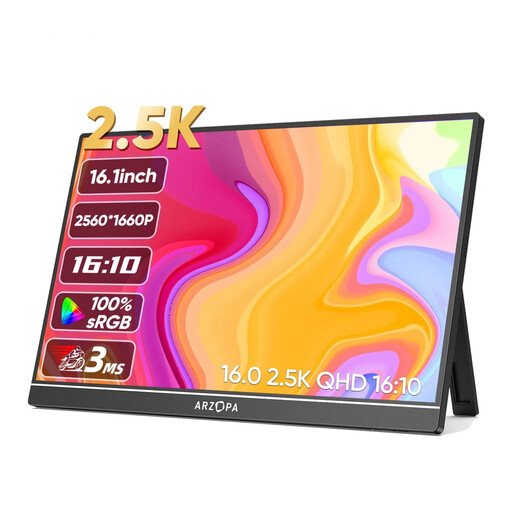
Why it's a match: Designed for mobile graphic designers, photographers, and videographers, this 16-inch monitor combines 2.5K (2560x1600) resolution with a very wide colour gamut (123% sRGB) for impressively precise visuals.
How It Avoids the Pitfall
With its 350 cd/m? brightness, it avoids the pitfall of screens that are too dim. It ensures excellent visibility even in challenging lighting conditions—a crucial point for creative work where every nuance counts.
Key Advantage & Highlights
High resolution and faithful colours: The combination of 2.5K resolution and a wide colour gamut makes it a first-rate tool for tasks that demand absolute visual precision.
IDEAL FOR: THE MOBILE GAMER
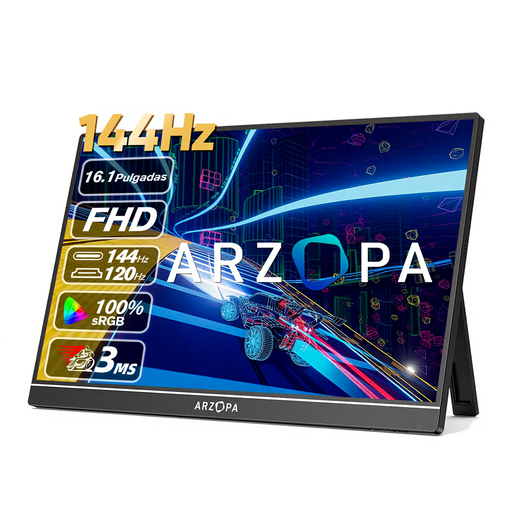
Why it's a match: Built for laptop, console (Switch, PS5), or mobile gamers, this 16.1-inch screen combines FHD resolution with a 144 Hz refresh rate for ultra-smooth action, wherever you are.
How It Avoids the Pitfall
It doesn't just boast a big number. Its 144 Hz rate is smartly paired with an IPS panel and 106% sRGB coverage, avoiding the "gaming" monitor trap of washed-out colours and lacklustre performance.
Key Advantage & Highlights
Fluidity and responsiveness: The 144 Hz refresh rate offers a decisive advantage in competitive games, delivering sharper motion and increased responsiveness.
Looking for other options?
We have curated a complete, up-to-date selection of products that meet our strict selection criteria and current safety standards.
Frequently Asked Questions
How do you power a portable monitor?
It all depends on the connectivity of the monitor and your device.
- With a full-featured USB-C port (video + power): This is the ideal scenario. A single USB-C cable between the monitor and your computer (or smartphone) is enough for both power and display.
- With an HDMI port: You will need to connect the monitor with an HDMI cable for the picture and use a second cable (often USB-C to USB-A) connected to a USB port on your computer or a power adapter to power it.
Is a portable monitor compatible with all devices?
Compatibility primarily depends on the ports available on your device.
- For laptops: The vast majority of recent models equipped with USB-C (Thunderbolt 3/4 or USB 3.1/3.2 supporting DisplayPort Alt Mode) or HDMI ports are compatible.
- For smartphones: Only models whose USB-C port supports video output (like those compatible with Samsung DeX or certain flagship models) can connect directly.
- For game consoles: The Nintendo Switch, PS5, or Xbox Series can be connected via the monitor's Mini-HDMI port. An external power supply will then be essential.
What is the lifespan of an external USB-C monitor?
The lifespan of a USB-C external monitor is similar to that of a standard desktop monitor, as they share the same panel technologies (IPS, VA, etc.). Its longevity will mostly depend on the build quality and the care you give it. To maximize its life, transport it in a protective sleeve to prevent bumps and scratches, and always handle the connectors with care.