
Livraison le jour même ou le lendemain

Qualité garantie

Débloquez vos offres de bienvenue: Livraison GRATUITE | Jusqu'à -80 % | 30 jours d'essai gratuits à JoyPlus
Téléchargez l'application
Driving an older car doesn't mean you have to miss out on modern technology. If your vehicle isn't equipped with a next-generation infotainment system, installing a portable CarPlay screen is the simplest and most affordable way to safely enjoy GPS navigation, your music, and hands-free calls. But be warned: the market is flooded with models making tempting promises, and it's easy to fall for the most common pitfalls.
This guide is here to help you decode the spec sheets, avoid the pitfalls, and choose the plug-and-play CarPlay solution that truly meets your expectations.
Before you take the plunge, be aware of these three recurring problems that can turn a great deal into a major headache.
To make the right choice, here are three technical specifications you absolutely must verify. They are your guarantee of quality and ease of use for your future portable car stereo.
How the screen communicates with your phone and your car is fundamental.
The quality of the touchscreen directly impacts your safety and comfort behind the wheel.
Often overlooked, these practical details are essential for a smooth, hassle-free daily experience.
To help you navigate the options, here are a few models that exemplify these criteria, tailored to different types of users.
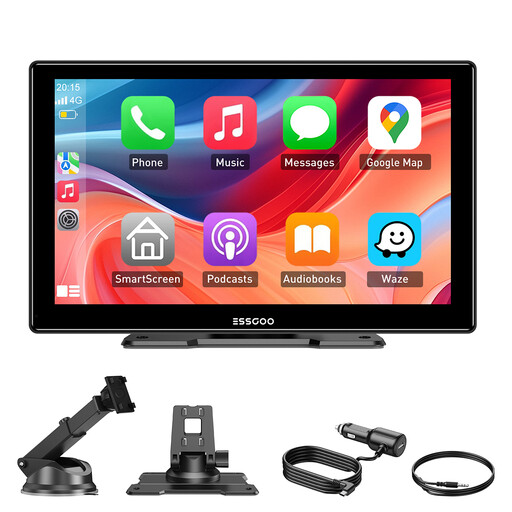
Why we chose it: Ideal for those who want to add CarPlay to their car simply and without frills. It gets straight to the point: quick installation and universal compatibility (car, truck, RV).
It offers four audio outputs (Bluetooth 5.3, FM, AUX, built-in speaker), giving you multiple options to get the clearest possible sound. The installation is true "plug-and-play" thanks to its sturdy suction cup and long power cable.
Its 9-inch HD IPS screen offers an excellent balance of size and visibility without being too intrusive. The dual-band Wi-Fi connectivity ensures a stable connection for wireless CarPlay and Android Auto.
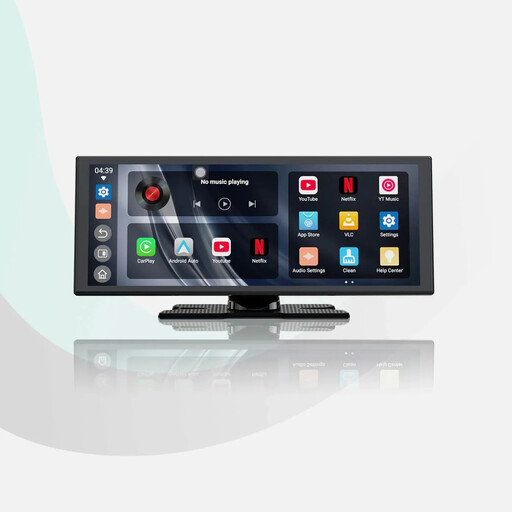
Why we chose it: For those who spend a lot of time on the road and want more than just a remote GPS. This screen transforms the cabin into a true multimedia centre when parked, with pre-installed apps like YouTube or Prime Video.
It integrates "Audio Mixing" technology that keeps music playing in the background during GPS instructions, thus avoiding frustrating audio interruptions. The dual-band Wi-Fi and Bluetooth combination is designed for maximum stability.
Its large 11.4-inch HD screen (1920x720) and integrated Android 13 operating system offer a complete multimedia experience, going far beyond a simple remote display. The 2-second fast boot is a significant convenience.
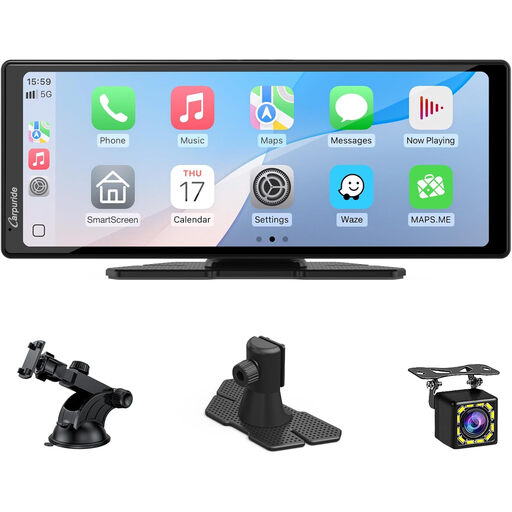
Why we chose it: Perfect for drivers who not only want to modernise their multimedia setup but also add an essential driving aid. This bundle includes a reversing camera, offering an all-in-one solution.
By directly integrating a reversing camera, it eliminates the compatibility issues often encountered when buying a camera separately. Its wide 10.26-inch screen is perfect for simultaneously displaying GPS and the camera feed.
The included 720p reversing camera, which activates automatically when shifting into reverse, makes parallel parking and manoeuvring much easier. A real safety boost, especially for older or larger vehicles.
We have curated a complete and up-to-date selection of products that meet our selection criteria and safety standards.
1. How is a portable CarPlay screen powered? The vast majority of these devices plug directly into your vehicle's cigarette lighter socket (12V and 24V compatible). The adapter and cable are almost always included.
2. Can the screen's audio play through my car's speakers? Yes, and that's actually the best way to get high-quality sound. Good models offer several options: a wired connection via an AUX cable (the most stable), a wireless connection via Bluetooth if your car stereo supports it, or via an FM transmitter that broadcasts the audio over a radio frequency you tune into on your head unit.
3. Is the installation truly tool-free? Yes, for most models. Installation typically involves attaching the suction cup mount to the windscreen or dashboard and then plugging in the power cable. No permanent modifications to the vehicle are required. The only step that requires a bit of care is routing the cable along the trim for a clean and discreet finish.