
Livraison le jour même ou le lendemain

Qualité garantie

Débloquez vos offres de bienvenue: Livraison GRATUITE | Jusqu'à -80 % | 30 jours d'essai gratuits à JoyPlus
Téléchargez l'application
Upgrading your car with the latest navigation and safety technology shouldn't mean a complex installation or a huge budget. The portable CarPlay screen with dash cam is emerging as the ideal all-in-one solution to transform your driving experience. The problem: the market is flooded with models making enticing promises, but their performance is often disappointing.
As a lead editor and product specialist for our publication, my mission is to guide you through this crowded market. This guide gets straight to the point: helping you avoid the most common pitfalls and giving you the technical keys to make an informed choice that meets your real needs, not just the marketing hype.
Too many drivers regret their purchase due to flaws that only become apparent with use. Here are the three most frequent problems and, more importantly, how to anticipate them.
To avoid falling into these traps, focus on a few objective technical specifications.
For a wireless CarPlay or wireless Android Auto experience that won't let you down, two points must be scrutinised:
Don't be fooled by the "4K" label. Dig a little deeper:
The goal is simple: to be able to add CarPlay to your car in under five minutes, flat.
Here are a few products that meet these criteria, each suited to a specific user profile.

Why it's the right choice for this profile: This is the quintessential all-in-one solution for anyone looking to modernise their vehicle with a hassle-free upgrade. It ticks all the boxes: navigation, multimedia, and safety (front and rear dash cam), all without any permanent modifications to the vehicle.
It counters the classic connectivity and video pitfalls. On one hand, dual-band Wi-Fi (2.4G/5G) ensures a stable connection. On the other, you get a true 4K front camera, not a cheap imitation. The 1080p rear camera is a real bonus, not just a marketing gimmick.
Ready to go out of the box thanks to the included 64GB memory card. The combination of a 4K front dash cam and a 1080p rear-view camera provides comprehensive road monitoring.
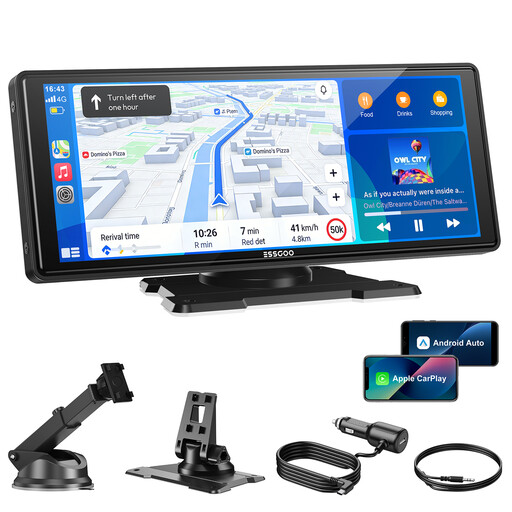
Why it's the right choice for this profile: Perfect for those who primarily want to add CarPlay to their car and enjoy a large, comfortable screen, without the extra feature of an integrated dash cam. Here, the focus is on the core function: navigation and multimedia.
By focusing on its primary mission, it delivers flawless performance. The wireless CarPlay connection is fortified by the combination of dual-band Wi-Fi and Bluetooth 5.3, putting an end to the nightmare of frequent disconnects.
Its large 10-inch screen (1600x600 resolution) offers superb viewing comfort. Its audio versatility is a real plus: with four output options (built-in speaker, Bluetooth, FM transmitter, AUX jack), it adapts to any car's sound system.

Why it's the right choice for this profile: The perfect solution for drivers whose cars already have wired CarPlay or Android Auto (most models after 2016) and just want to say goodbye to the cable.
Its job is singular and focused: eliminating the constraint of a wire. By leveraging 5 GHz Wi-Fi, it transforms the wired connection into a stable and responsive wireless CarPlay experience, with no noticeable latency in music or GPS.
Ultra-compact (barely larger than a USB stick), it installs in under a minute. It's a discreet and incredibly effective upgrade. The initial pairing is all that's needed; after that, everything is automatic.
If you don't need CarPlay but simply want a reliable way to mount your smartphone, our selection of mounts has been curated with the same demanding criteria for reliability and safety.
This is one of their key strengths: simplicity. They are all powered via a simple cable that plugs into your vehicle's cigarette lighter socket (12V or 24V). This makes them universal and compatible with almost all cars, SUVs, and even heavy-duty trucks, without any electrical work required.
Yes, and that's the whole point. The mounting systems are designed to be non-permanent. Suction cup mounts attach to the windshield or dashboard and can be removed without leaving a single trace. As for adhesive bases, they typically use a 3M-type adhesive that can be removed cleanly, which is a boon for company or leased cars.
Absolutely. A good device is designed for multitasking. Its processor is powerful enough to handle displaying Waze or Maps via CarPlay while recording video from the dash cam in the background, without any slowdown. Some models even offer a split-screen display, with the map on one side and the camera feed on the other.