
Livraison le jour même ou le lendemain

Qualité garantie

Débloquez vos offres de bienvenue: Livraison GRATUITE | Jusqu'à -80 % | 30 jours d'essai gratuits à JoyPlus
Téléchargez l'application
Upgrading an older car with a state-of-the-art multimedia system can seem complex, not to mention expensive. Fortunately, the portable CarPlay screen has emerged as a simple and affordable solution to enjoy GPS navigation, stream your music, and make hands-free calls. The problem? The market is flooded with products making tempting promises that often hide deal-breaking flaws. To prevent your purchase from turning into a nightmare, here are the pitfalls to avoid before you buy.
Here are the three most common pitfalls to steer clear of:
wireless CarPlay or wireless Android Auto compatibility but are equipped with low-end Bluetooth or Wi-Fi chips. The result: frequent disconnections, skipping audio, and a GPS that drops out at a critical intersection.To add CarPlay to an old car without regrets, focus on a few key technical points. These are what will make all the difference in performance and reliability.
A smooth experience with wireless CarPlay and wireless Android Auto depends above all on a robust dual-band connection. A good portable car screen must include both Bluetooth 5.0 (or newer) for pairing and calls, and dual-band Wi-Fi (2.4 GHz and 5 GHz) for data transfer. The 5 GHz band, which is less prone to interference, ensures a faster and more stable connection, essential for seamless navigation and streaming.
The screen size (usually between 7 and 10 inches) should be chosen based on your dashboard layout. A screen that's too large might obstruct your view, while one that's too small will be hard to read. Beyond the diagonal size, check the resolution (at least 1024 x 600 pixels) for comfortable viewing of maps and menus. An IPS panel will offer better viewing angles and more accurate colours. Adjustable brightness and an automatic day/night mode are a real bonus for visual comfort in any light.
A portable car stereo worthy of the name must offer several ways to play sound through your car's speakers, which will always be light-years ahead of the tiny built-in speaker:
Some models take the concept further by integrating a screen with a backup camera or even a dashcam. The device then becomes a true hub for in-car safety and entertainment.
Rather than an endless list, we've selected models that meet specific needs while adhering to our criteria for performance and reliability.
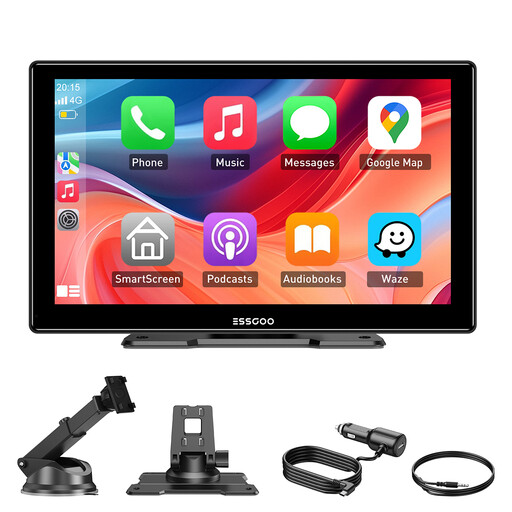
Why we chose it: A balanced, all-around solution perfect for daily use. Its 9-inch screen offers an excellent compromise between readability and size. The dead-simple installation and universal compatibility (12-24V) make it a smart choice for modernising any vehicle, from a city car to a commercial van.
It tackles the problem of mediocre audio by offering four output options (Bluetooth, FM, AUX, and built-in speaker). You can choose the one that works best for your car.
Its wireless connectivity is stable thanks to dual-band Wi-Fi and Bluetooth 5.3, ensuring automatic and fluid pairing for both CarPlay and Android Auto.
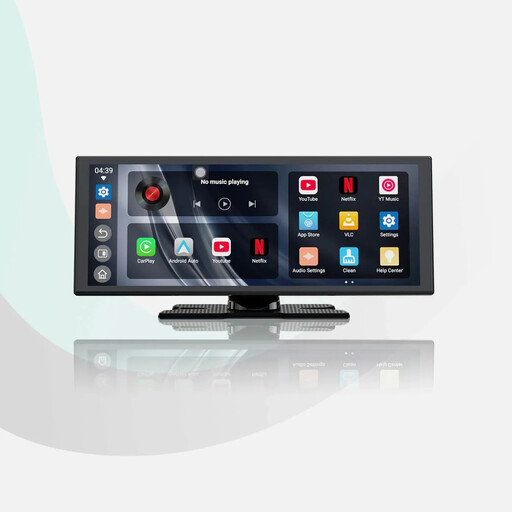
Why we chose it: For those who want more than just GPS. With its native Android 13 system and apps like YouTube and Netflix, it turns your car into a pocket-sized movie theatre during breaks. Its large 11.4-inch screen guarantees an immersive viewing experience.
It counters the unstable connection trap with dual Wi-Fi and Bluetooth connectivity designed to limit interference—a crucial point when running bandwidth-hungry streaming apps.
Its built-in Android 13 operating system allows it to run entertainment apps completely independently, without relying on your smartphone.
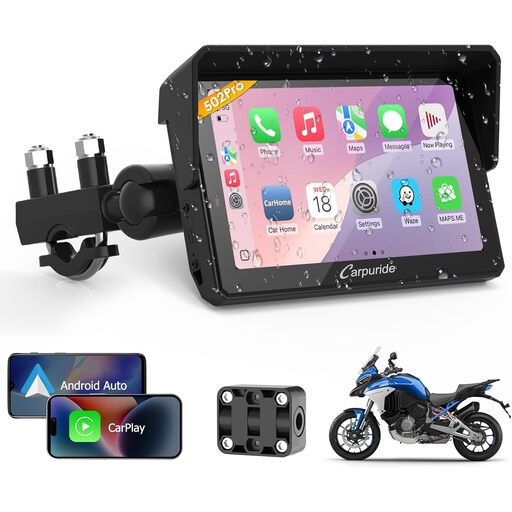
Why we chose it: A `motorcycle CarPlay` solution designed for riders. Its compact 5-inch format, glove-friendly touchscreen, and waterproof design are built for the demands of two-wheeled travel. It brings GPS and music to your handlebars, safely.
It solves the durability problem with a rugged, waterproof build and, most importantly, an anti-vibration mounting system specific to motorcycles. A standard car screen wouldn't last a single ride.
Its dual-channel Bluetooth allows you to connect your phone and an intercom headset at the same time. The result: GPS navigation and calls come directly to your helmet.
We've put together a complete and up-to-date collection of products that meet our selection criteria and safety standards.
Yes, in the vast majority of cases. These devices simply plug into the cigarette lighter socket (12V-24V), which is standard equipment on almost all vehicles, from small city cars to heavy-duty trucks. Compatibility, therefore, doesn't depend on the age or model of your car, but only on the presence of this socket.
You generally have four options. The best quality is achieved with an AUX cable, if your car has one. Next are a Bluetooth connection to your car stereo (if it's compatible) and the FM transmitter. As a last resort, the built-in speaker on the screen will do the job, but its quality is very basic.
No, and that's the whole point. The installation is designed to be "plug-and-play." You just need to attach the mount (suction cup on the windshield or adhesive on the dashboard), plug the power into the cigarette lighter, and connect your smartphone. No permanent modifications to the vehicle are necessary.