
Livraison le jour même ou le lendemain

Qualité garantie

Débloquez vos offres de bienvenue: Livraison GRATUITE | Jusqu'à -80 % | 30 jours d'essai gratuits à JoyPlus
Téléchargez l'application
Is your car a few years old??That doesn't mean you have to miss out on the comfort and safety of modern technology. If it isn't equipped with an infotainment system, adding GPS, music streaming, or hands-free calling can quickly become a costly headache. This is precisely where a portable CarPlay screen is a game-changer.
This guide is here to help you choose a simple and effective solution to modernise your driving experience. We'll review the essential buying criteria before presenting a selection of products perfect for giving an older car a modern upgrade, without any permanent installation.
Before you dive in, let's review the key features that truly make a difference.
The main appeal of these screens is bringing wireless CarPlay and wireless Android Auto to vehicles that lack them. A wireless connection, via Wi-Fi and Bluetooth, offers unmatched convenience:?your phone connects automatically as soon as you get in the car. For a perfectly seamless experience, look for devices with dual-band Wi-Fi (2.4?GHz/5?GHz) connectivity. This ensures a more stable and faster transmission, which minimises lag during navigation or music playback.
A larger screen isn't always better. A 10-inch car screen offers excellent readability for navigation, but be careful that it doesn't obstruct your field of view. Resolution is also a critical factor. An HD (High Definition) resolution, such as 1600?x?600 pixels, guarantees a sharp image and vibrant colours, making your external car GPS much more enjoyable to use. Also consider brightness adjustment options (day/night modes) for optimal viewing comfort in all conditions.
One of the biggest advantages of a portable car display is its simple installation. Most models plug directly into the cigarette lighter socket (12V-24V) and attach to the dashboard or windscreen with a simple suction cup. For audio, you have several options:?
Here is a selection of products that meet different needs, whether you're looking for an all-in-one solution or a simple adapter.
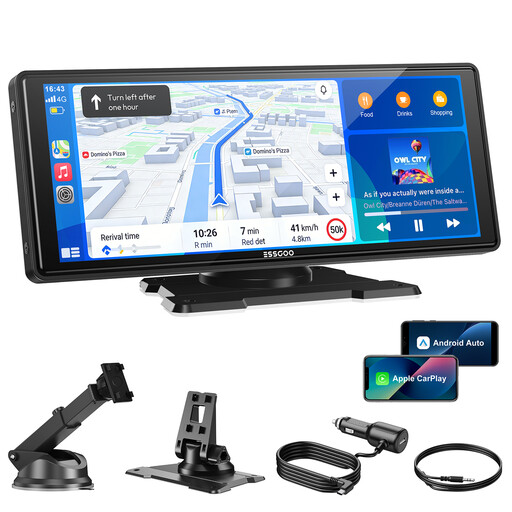
Why it stands out
This model stands out with its very large 10.26-inch HD screen and stable wireless connectivity. It's designed for those who want an immersive visual experience and seamless smartphone integration, all with an installation that takes just a few minutes.
Pros
Who is it for?
Drivers of any vehicle type (cars, SUVs, trucks, thanks to its 12V-24V compatibility) looking for a complete, removable solution to add a large, multi-function screen to their cabin. It's an excellent choice for those who prioritise ease of installation and a large display area for navigation.

Why it stands out
The OTTOCAST Mini isn't a screen, but an adapter. Its mission is highly focused:?to convert a wired CarPlay or Android Auto system into a wireless one. Its ultra-compact size makes it nearly invisible once plugged in.
Pros
Who is it for?
Owners of recent vehicles (generally post-2016) who already have CarPlay or Android Auto but are tired of plugging in their phone for every trip. It's the simplest upgrade solution for going wireless without changing your screen.
And if your search for the perfect find doesn't stop with car tech, our other selections might surprise you. For example, take a look at our collection of men's eighties punk clothing.
Yes, in almost all cases. The compatibility of these devices doesn't depend on your car model, but simply on the presence of a cigarette lighter socket (12V or 24V) for power. On the software side, the only thing that matters is your smartphone:?you'll need an iPhone compatible with CarPlay or an Android phone compatible with Android Auto.
There are several solutions. The simplest is the screen's built-in speaker, but its quality is often very limited. For better sound, you can use an AUX cable to connect the screen to your car stereo's auxiliary input. Another wireless option is the FM transmitter, which broadcasts the audio over a radio frequency. Finally, some models allow a direct Bluetooth connection to the car's audio system.
Yes and no. CarPlay and Android Auto use your smartphone's navigation apps (Apple Maps, Google Maps, Waze, etc.). To get real-time traffic information or search for new addresses, your phone will need a data connection (4G/5G). However, most of these apps allow you to download maps for offline use. This means you can continue navigating even without a cell signal.