
Livraison le jour même ou le lendemain

Qualité garantie

Débloquez vos offres de bienvenue: Livraison GRATUITE | Jusqu'à -80 % | 30 jours d'essai gratuits à JoyPlus
Téléchargez l'application
A portable 4K projector can turn a living-room wall, bedroom or patio into a proper home cinema. But with native resolution, 4K decoding, brightness and smart features to consider, spec sheets don’t always make choosing easy. Some buyers end up with a dull picture, a fiddly focus adjustment or a streaming app that simply won’t work.
Here are the things to check before choosing a mini projector for films, gaming, presentations or simply bringing a get-together at home to life.
A device advertised as “4K” may simply play a 4K signal before displaying it at a lower resolution. A native 1080p projector produces an image of 1,920 × 1,080 pixels, while a native 720p model shows less detail, even if it accepts 4K files.
For a genuinely sharp picture, always look for the words native resolution. Terms such as “4K compatible” or “4K decoding” don’t guarantee that the projector’s imaging panel actually displays 3,840 × 2,160 pixels.
A diagonal of 50 to 200 inches may sound impressive, but picture quality depends mainly on the projection distance, the surface you’re using and the ambient light. The larger the image, the dimmer it will generally appear. In a typical living room, an image of 60 to 100 inches is often a more comfortable compromise than pushing the projection to its maximum size.
Choose a light-coloured, smooth wall with plenty of clear space. A suitable projection screen can improve contrast and readability, but it won’t make up for insufficient brightness.
Automatic keystone correction straightens the image when the projector is tilted, but it can slightly reduce the usable image area. Some models only correct the vertical axis, with no horizontal correction or four-point adjustment.
The same goes for focusing: “autofocus” and “manual focus” are two very different features. If you set up your projector often, autofocus can save valuable time. For occasional use, a simple adjustment ring may be all you need.
ANSI lumens and ISO lumens are measured using more clearly defined methods than the simple term “lumens”, which is often used in the vaguest product listings. A brightness rating of 250 to 380 ANSI is best suited to a dimly lit room or evening use. During the day, it’s better to close the curtains and reduce other light sources to keep details clear.
A smart projector may come with Android, Google TV or another app interface. Be sure to check the following:
HDCP restrictions can prevent some services from streaming directly from a mobile phone. Even with an Android projector, an external TV stick is sometimes the simplest solution.
A compact model should be stable and have adequate ventilation. Check its weight, rotation angle and whether it comes with a mains power supply. “Portable” doesn’t necessarily mean the mini projector has a built-in battery.
If you’re choosing a projector for a PS5, look for a stable HDMI input. As latency isn’t always listed, check the detailed specifications if you play fast-paced or competitive games. The built-in speaker will do for occasional use; for a proper home cinema experience, a soundbar or Bluetooth speaker will be much more convincing.
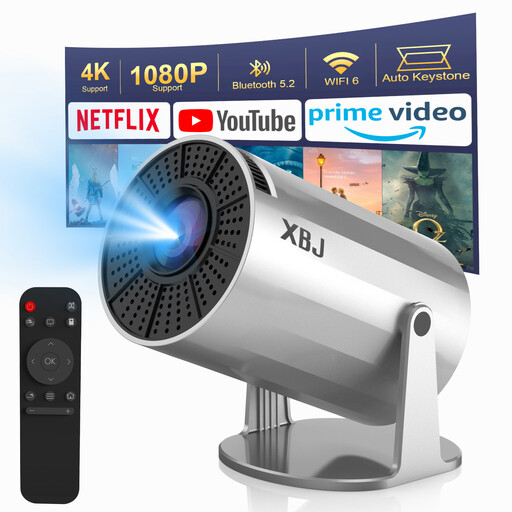
Why it’s a good fit for this user: Its compact design, 180° rotation and Android 11 system make it a handy companion for film nights in a bedroom or small living room.
The listing clearly states its native 720p resolution, despite supporting 1080p and 4K decoding. That means buyers know what to expect before placing an order.
Advertised brightness of 300 ANSI, dual-band Wi-Fi 6, HDMI, USB and automatic vertical keystone correction.
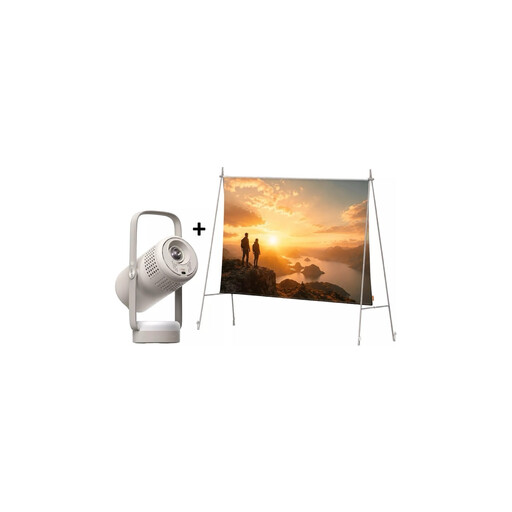
Why it’s a good fit for this user: This bundle brings together a portable projector, Google TV, a freestanding screen and JBL audio for a much more complete setup than a standalone device.
The specifications clearly distinguish native 1080p resolution from the 250 ISO brightness rating, and explain the limitations of the built-in battery.
1,920 × 1,080-pixel resolution, automatic keystone correction and autofocus, an included screen and JBL speakers.
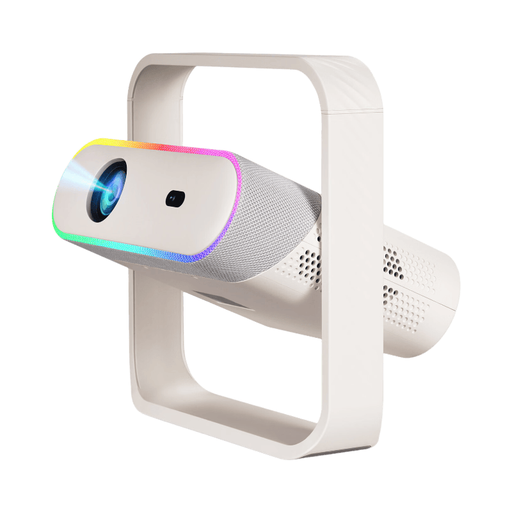
Why it’s a good fit for this user: Its HDMI and USB ports, PS5 compatibility and smart features suit a household that switches between films, games and online content.
The listing clearly separates native 1080p resolution from 4K decoding, and details the autofocus and keystone correction features.
380 ANSI, Wi-Fi 6, Bluetooth 5.4, built-in Android, 180° rotation and a 2 × 10 W stereo sound system.
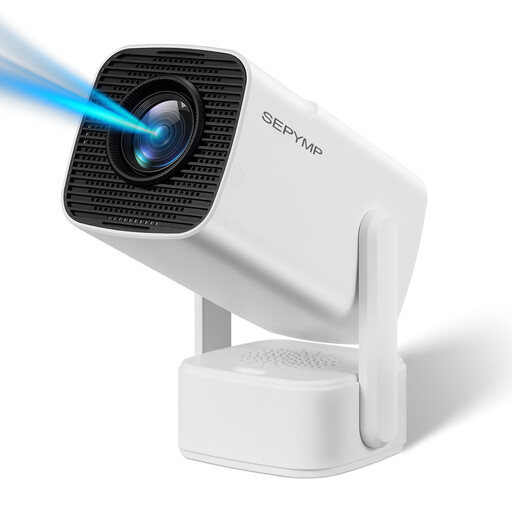
Why it’s a good fit for this user: Its rotating base, smart system and compact design make it easy to move between rooms, use for presentations or set up for film nights.
Electronic focusing and vertical correction mean less manual adjustment, while HDMI and USB ports still let you connect external devices.
Native 1080p resolution, 4K decoding, Wi-Fi 6, Bluetooth 5.2, a built-in speaker and advertised compatibility with PS5 and computers.
We’ve put together a comprehensive selection, updated in real time, of products that meet these demanding criteria and European safety standards.
Not necessarily. A native 1080p projector works very well at a typical viewing distance and generally requires fewer resources. 4K is most worthwhile with a large screen, highly detailed content and enough distance from the screen.
Yes, as long as the model has compatible apps and a working Wi-Fi connection. Digital rights restrictions can, however, limit streaming from a phone. An HDMI-connected TV stick is a more reliable and predictable option.
Its lifespan depends on the light source, ventilation, dust build-up and how often you use it. Keep the ventilation grilles clear, avoid soft surfaces and let the device cool down before putting it away. Never look directly into the lens while the projector is switched on. Before buying, check the warranty and the safety guidance that applies in France.