Let's be honest: the speakers built into a monitor or laptop get the job done in a pinch, but they're hardly impressive. For gaming, music, or movies, a flat, lifeless sound quickly ruins the enjoyment and immersion. Equipping yourself with good PC speakers can transform your experience, but it's easy to get lost in the jungle of technical specs: connectivity, power, form factor...
This guide is here to break down the criteria that truly matter and present our selection of the best models available today. The goal: to help you find the perfect match that will elevate your setup.
How to Choose Your Desktop Speakers?
Before diving into our selection, take a moment to define your needs based on three key points.
1. Connectivity: Wired, Bluetooth, or Both?
The connection type of your speakers affects not only the sound quality but also the layout of your workspace.
- Wired Connections (USB, 3.5mm AUX): These guarantee a stable connection and lossless audio transmission. USB has the dual advantage of powering the speakers while carrying the audio signal, which greatly simplifies cable management.
- Wireless Connection (Bluetooth):Bluetooth PC speakers free your desk from cables and offer maximum flexibility. However, pay attention to latency (the delay between sound and video): for gaming or movies, opt for recent standards like Bluetooth 5.3 or 5.4 for perfect synchronisation.
- Hybrid Solutions: Most recent models opt for versatility by offering both, leaving you free to choose based on your devices and preferences.
2. Primary Use: Gaming, Music, or All-Purpose?
Your intended use will dictate the sound characteristics to prioritise.
- For Gamers: Aim for gaming speakers with punchy bass and good spatial audio to pinpoint your enemies. Virtual 7.1 surround sound technologies are a major plus for immersion, simulating 360° audio. Customisable RGB lighting is the final touch to perfect a gaming setup.
- For Music Lovers: Audio fidelity is key. Look for models with a balanced frequency response, ideally with Hi-Res Audio certification. PC speakers with bass that is deep yet remains clean and defined will delight fans of many musical genres.
- For All-Purpose Use (Movies, TV shows, YouTube…): A good 2.0 (stereo) or 2.1 (two satellites + a subwoofer) system is the ideal compromise. It will ensure clear dialogue and add punch to action scenes.
3. Size and Design: Optimising Your Workspace
Space on your desk is not infinite. Compact small PC speakers are perfect for tight spaces. Design also matters for a successful integration: some models feature a sleek, minimalist aesthetic, while others embrace a more assertive look, typical of the gaming world.
Our Recommended PC Speakers
Let's get down to business with a few models that caught our attention, each catering to different needs and budgets.
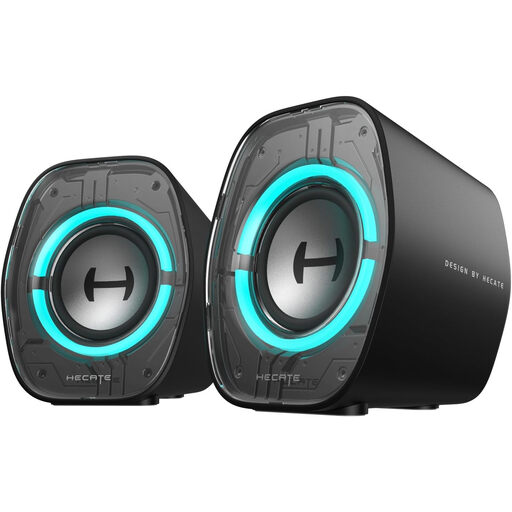
EDIFIER G1000 II: Compact and Gaming-Focused
Why They Stand Out
The Edifier G1000 II are aimed at those who want quality sound without cluttering their desk. With their futuristic look and RGB lighting, they tick all the boxes for gamers, but their versatility is equally impressive thanks to three EQ modes (Music, Game, Movie).
Pros
- Complete Connectivity: Low-latency Bluetooth 5.4, USB-C, and a 3.5mm auxiliary input.
- EQ Modes: Three audio presets (Game, Movie, Music) to adapt the sound to your activity.
- Desk-Friendly Ergonomics: Very compact (9.25 cm wide), they are angled at 10° to direct sound towards the listener and limit unwanted reflections.
- Customisable Ambiance:9 dynamic RGB lighting modes to match the speakers to your setup's style.
Who is it for?
For gamers and anyone with a modest-sized desk who doesn't want to compromise on style and sonic versatility.
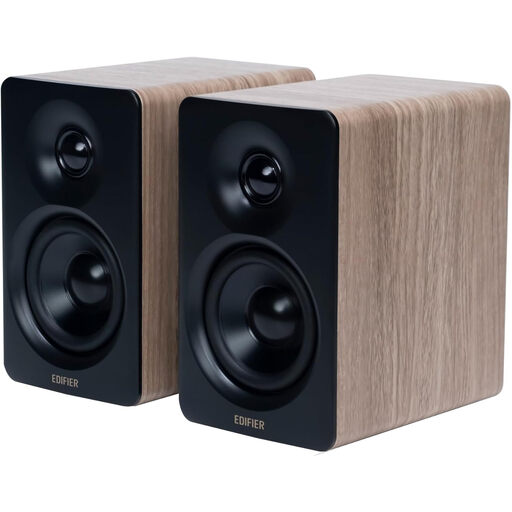
Edifier M60: For High-Fidelity Sound Enthusiasts
Why They Stand Out
Here, the absolute priority is audio quality. The Edifier M60 system, with its dual Hi-Res Audio and Hi-Res Audio Wireless certifications, is engineered to reproduce music with surgical precision. Its clean design and premium materials make it as elegant as it is powerful.
Pros
- High-Fidelity Sound: Dual Hi-Res certification (wired and wireless) and support for the LDAC codec for Bluetooth streaming at CD-quality or even better.
- Meticulous Acoustic Design: Total power of 66W RMS, with 1-inch silk dome tweeters and 3-inch mid-bass drivers for clear, detailed sound.
- Optimised Stands Included: Comes with a pair of 15°-angled aluminium stands, perfect for directing sound to your ears and reducing desk vibrations.
- Intuitive Controls: Touch control panel with automatic backlighting.
Who is it for?
For demanding music lovers and audiophiles seeking high-fidelity sound reproduction in a compact form factor that won't detract from their desk's aesthetic.
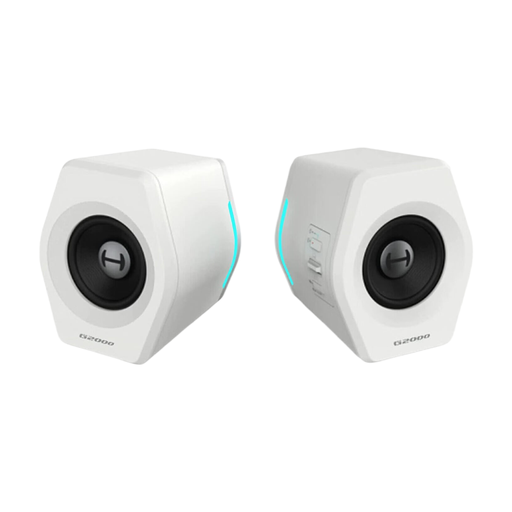
Edifier G2000: Gaming Immersion Above All
Why They Stand Out
The Edifier G2000 speakers are built for gaming. Their key feature: a digital signal processing (DSP) chip that simulates 7.1 surround sound, offering a significant tactical advantage in-game for better situational awareness.
Pros
- Virtual Surround Sound: The integrated DSP chip creates a 7.1 surround sound effect for a more immersive gaming experience.
- Reinforced Bass: The acoustic architecture combines two active drivers with two passive radiators to give more body and impact to low frequencies.
- Wide Compatibility: Connect via USB, Bluetooth 5.3, or 3.5mm auxiliary for guaranteed compatibility with PCs, Macs, consoles, and smartphones.
- Customisable Lighting: RGB effects can be adjusted via the Edifier software to synchronise the lighting with your gaming setup.
Who is it for?
For gamers who want maximum sound immersion through virtual surround sound and a customisable design, all without the bulk of a true home cinema system.
Looking for Other Options?
Did none of these models catch your eye? Or do you simply want to explore other avenues? The market is full of alternatives, from 2.1 systems with dedicated subwoofers to ultra-compact soundbars.
? Discover our complete collection of Desktop Speakers to find the right model for your setup.
FAQ: Your Questions About PC Speakers
What power (in watts) is recommended for desktop speakers?
RMS power indicates the true, continuous power the speakers can deliver. For near-field listening at a desk in a standard-sized room, 10 to 20 watts RMS is more than enough. If you like to feel the bass and crank up the volume, aim for 30 watts RMS or more.
How do I connect Bluetooth PC speakers?
It couldn't be simpler. Activate Bluetooth on your speakers. On your computer (Windows or macOS), open the Bluetooth settings and start a search. Select your speakers from the list of detected devices and click "Pair" or "Connect." That's it! Your computer will automatically use them as the audio output.
2.0, 2.1, or 7.1 Surround Sound Speakers: Which to Choose?
- 2.0: The classic stereo system (two speakers). Perfect for music and daily use, especially if space is limited.
- 2.1: A 2.0 system with an added subwoofer. Essential for those who want deep, punchy bass for movies, games, or certain music genres (EDM, hip-hop...).
- 7.1 Surround Sound (Virtual): A technology that simulates 360° audio. This is the domain of gamers and cinephiles seeking total immersion. On desktop speakers, this effect is always created digitally through software processing (DSP).


