
Livraison le jour même ou le lendemain

Qualité garantie

Débloquez vos offres de bienvenue: Livraison GRATUITE | Jusqu'à -80 % | 30 jours d'essai gratuits à JoyPlus
Téléchargez l'application
A PC mouse may seem simple to choose… until differences in connectivity, shape and precision make things more complicated. Whether you work from home, study, travel or play games, a poorly matched model can lead to connection dropouts, an uncomfortable grip or higher-than-expected battery consumption.
Some marketing claims should also be taken with a pinch of salt. A high DPI count does not automatically make a mouse more precise for office work. A wireless mouse does not necessarily work via Bluetooth. And a shape described as ergonomic may simply not suit the size of your hand or the way you hold the mouse.
Here are the criteria to consider before buying, followed by a selection of models suited to different types of user.
A wireless mouse can communicate in two ways:
Before placing your order, check the ports available on your device. If your computer only has USB-C ports, a model fitted with a USB-A receiver may require an adapter. Bluetooth avoids this issue, but you will need to pair the mouse through the system settings the first time you use it.
Adjustable DPI refers to cursor sensitivity. A setting of 1,000 DPI is generally sufficient for browsing, working on documents and carrying out everyday tasks. Higher settings can be useful for gamers or people working across multiple screens, but they may take some time to get used to.
A mouse advertising 12,800 or 26,000 DPI is therefore not necessarily the most suitable choice for writing emails. Instead, check whether you can adjust the sensitivity, how consistent the tracking is and where the dedicated DPI button is positioned.
A compact mouse slips easily into a bag, but it may feel narrow during extended use. A standard-sized model offers more support, at the cost of taking up more space.
For a battery-powered wireless mouse, check the stated battery life and the type of battery used. With a rechargeable model, look at how long it takes to recharge and whether you can continue using it while it is charging. A wired USB mouse avoids any need to manage power, but its cable must be long enough and should not restrict your movements.
A wired USB mouse connects in seconds and generally requires no driver for its essential functions. It is perfectly suited to a fixed workstation, a family computer or any environment where reliability is the priority.
Bluetooth is convenient with a laptop, a compatible tablet or a desk where you want to minimise cables. 2.4 GHz with a USB receiver remains a simple solution for PCs and devices with a USB-A port. Also remember to check the stated compatibility with Windows, macOS, ChromeOS and Linux.
Optical sensors are suitable for most flat surfaces. A resolution of around 1,000 DPI is common on office mice. For photo editing, gaming or a multi-screen setup, several sensitivity levels can provide greater flexibility.
If your desk is highly reflective, uneven or dusty, use a mouse mat. This will give you more consistent tracking and reduce the build-up of dirt underneath the mouse.
An ambidextrous mouse with a symmetrical shell is suitable for both right- and left-handed users. By contrast, an ergonomic right-handed model can provide more pronounced thumb support. The three standard controls — left click, right click and scroll wheel — are sufficient for most users.
Side buttons are useful for browsing the web or assigning shortcuts in games. However, they must be easy to reach without forcing you to change your grip.
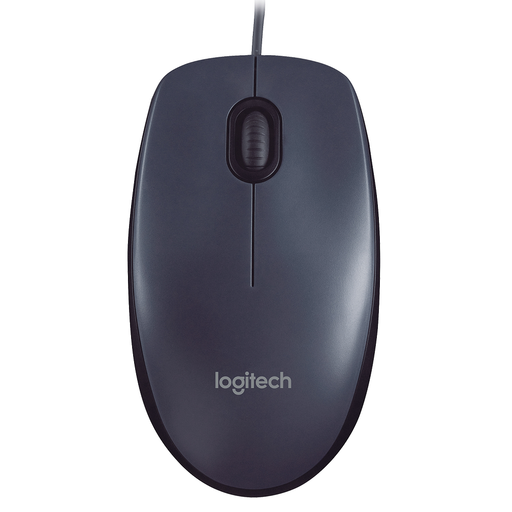
Why this choice suits this type of user : This USB-A wired mouse is aimed at beginners, students and desktop users who want a solution that works straight away.
The wired connection means no batteries, pairing or interruptions caused by limited battery life.
1,000 DPI optical sensor, three buttons, ambidextrous shape and 1.5 m cable.
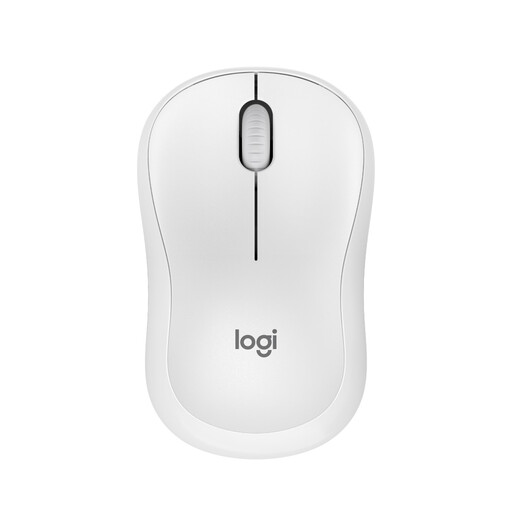
Why this choice suits this type of user : Its receiver-free Bluetooth operation and compact design meet the needs of laptop users, whether at home, in the office or on the move.
It uses no USB port and promises a 90 % reduction in click noise, according to the product information provided.
Bluetooth, 1,000 DPI sensor, three buttons and a stated battery life of up to 18 months with one battery.

Why this choice suits this type of user : This model is designed for users who want to combine customisation, mobility and advanced features, whether gaming or working on creative projects.
Its three modes — wired, Bluetooth and 2.4 GHz — let you switch between devices without being restricted to a single type of connection.
Sensor rated at 26,000 DPI, five customisable buttons, 79 g weight and a 1,000 Hz polling rate.
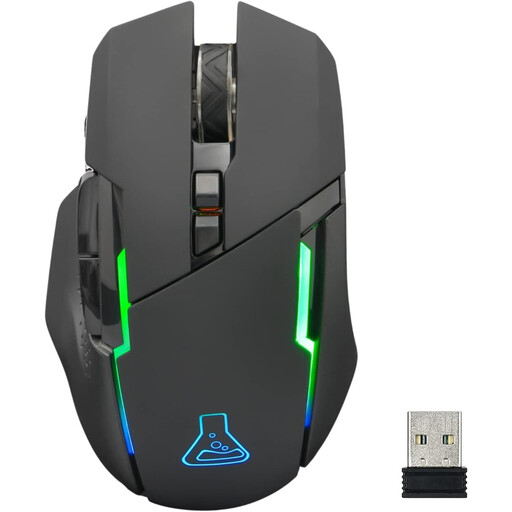
Why this choice suits this type of user : This wireless gaming mouse is aimed at players looking for several sensitivity levels, additional buttons and compatibility with certain consoles.
Adjustable DPI levels and the 2.4 GHz connection let you fine-tune sensitivity while avoiding the inconvenience of a cable.
Five settings from 400 to 7,200 DPI, six buttons, switchable RGB lighting and a stated battery life of up to 32 hours without lighting.
We have put together a complete, real-time updated selection of products that meet these demanding criteria, while complying with European safety regulations.
No. The computer must have built-in Bluetooth and a compatible operating system. If not, choose a model with a USB receiver or use a suitable adapter. Also check the number of available ports before buying.
It depends on its power source, how often it is used and the quality of its components. Battery-powered models often offer several months of battery life, while rechargeable mice need to be charged regularly. A wired mouse has no battery to replace, but its cable should be handled with care.
Choose a compact, lightweight model that is easy to carry. Bluetooth means you do not have to worry about losing a nano receiver, while a 2.4 GHz mouse may be preferable if you want immediate setup on a PC with a USB-A port. In a shared space, a silent mouse will also help to reduce noise.