
Livraison le jour même ou le lendemain

Qualité garantie

Débloquez vos offres de bienvenue: Livraison GRATUITE | Jusqu'à -80 % | 30 jours d'essai gratuits à JoyPlus
Téléchargez l'application
A PC mouse may seem easy to choose… until differences in connectivity, shape and precision make the decision more complicated. Whether you use it with a desktop computer, laptop or gaming setup, the right model depends above all on your environment and habits.
A few mistakes come up regularly when buying:
A wired mouse generally connects via USB and works immediately with most systems. It needs neither batteries nor charging, and provides a consistently stable connection. However, its cable can clutter your desk or restrict movement.
A wireless mouse with a 2.4 GHz receiver communicates with your computer through a small USB adapter. Its range often reaches 10 metres in good conditions, but metal surfaces and certain electronic devices can interfere with the signal.
A Bluetooth mouse, on the other hand, does not need a USB receiver. It is particularly convenient with a compatible laptop, as it leaves the ports free for other accessories. Before placing your order, however, check compatibility with Windows, macOS, ChromeOS or Linux, depending on your equipment.
Most mice intended for office use feature an optical sensor, which analyses the surface beneath the device. A resolution of 1,000 DPI is generally enough for browsing the web, working on documents or using spreadsheets.
A mouse with adjustable DPI lets you adapt the cursor speed. A lower setting makes precise movements easier, while a higher setting lets you move across the screen with less physical movement. For gaming, drawing or photo editing, also remember to check the polling rate, the number of available profiles and whether the buttons can be customised.
DPI is not everything, though. The surface you use, the mouse’s weight and shape, and the stability of the connection also have a direct impact on comfort.
An ambidextrous mouse is suitable for both right- and left-handed users. An ergonomic shape can provide a more supportive grip, but it is sometimes designed for a particular hand or grip style. When this information is available, look carefully at the dimensions and weight.
Three buttons — left click, right click and scroll wheel — are enough for everyday tasks. Side buttons speed up navigation or can be used as shortcuts in some software. For a gaming mouse, check whether they are programmable and whether the configuration software is compatible with your system.
Finally, a silent mouse can make a real difference in a shared space, library or home office. The Logitech M240 Silent product page states that click noise is reduced by 90% compared with its design references. This figure is a characteristic communicated by the manufacturer; it is not a universal measurement valid in every environment.
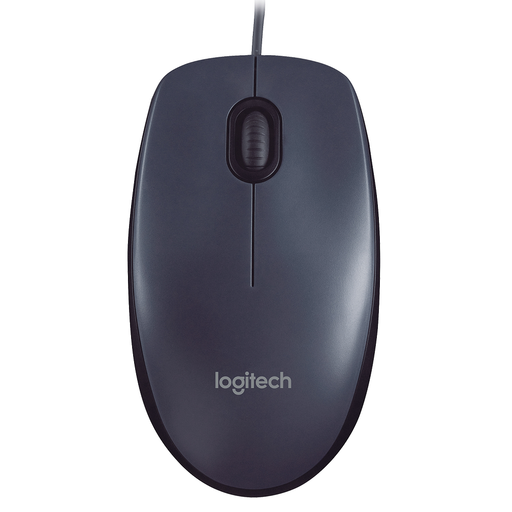
Why it suits this profile : This wired USB-A mouse keeps things simple: plug it in and start using it, with no battery required. It features three buttons, a 1,000 DPI optical sensor and a symmetrical shape.
The cable removes the need to worry about batteries and wireless pairing. You will, however, need a free USB-A port and have to accommodate the 1.5 m cable.
An immediately ready-to-use connection, an ambidextrous design and stated compatibility with Windows, macOS, ChromeOS and Linux.
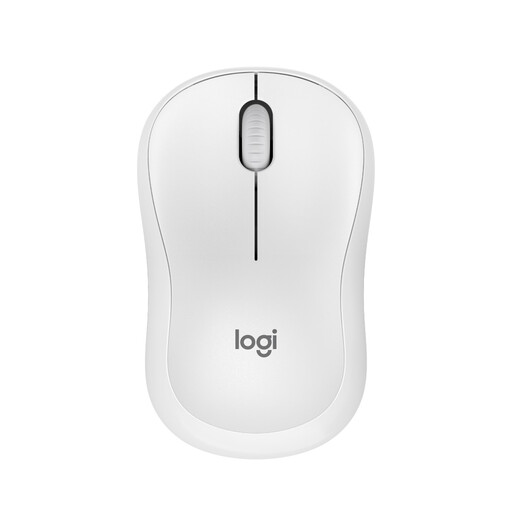
Why it suits this profile : Its Bluetooth connection frees up a USB port, while its compact design makes it easy to carry between home, the office and work trips.
It does not require a USB receiver, which is useful with laptops that have few ports. You will still need to check that Bluetooth is available and have a suitable battery to hand.
A 1,000 DPI optical sensor, three buttons, compatibility with Windows, macOS and ChromeOS, plus a stated battery life of up to 18 months.
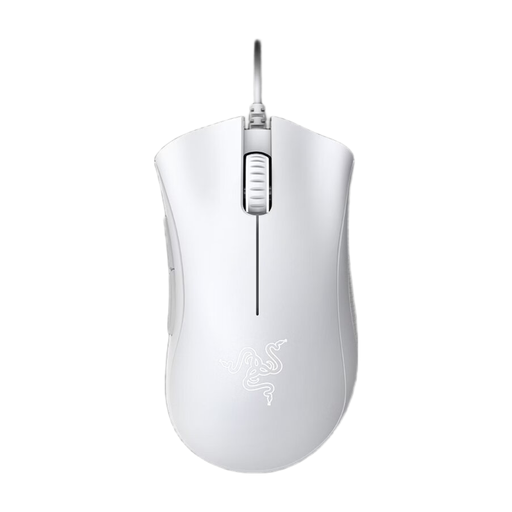
Why it suits this profile : This wired gaming mouse is designed for those looking for multiple buttons and high sensitivity, whether for gaming or creating shortcuts.
The USB connection means you do not have to rely on a battery. However, its right-handed shape should be taken into account if you use your left hand.
An optical sensor rated at 6,400 DPI, five programmable buttons and a textured scroll wheel, according to the product listing.
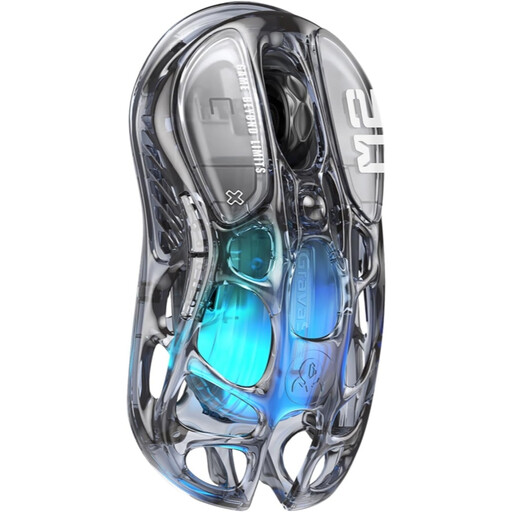
Why it suits this profile : Its tri-mode operation lets you switch between a cable, Bluetooth or a 2.4 GHz connection, depending on the device and situation.
This versatility may save you from buying several mice for different devices. However, its advanced features mean you should check which software is supported.
A PAW3395 sensor rated at 26,000 DPI, five buttons, a 1,000 Hz polling rate and a stated weight of 79 g.
To extend your mouse’s lifespan, regularly clean the shell and scroll wheel with a soft cloth. Avoid liquids, abrasive products and repeatedly bending the cable. With a battery-powered model, use the recommended battery type and remove the battery if storing the mouse for a long period, to help minimise the risk of leakage.
At the end of its life, a PC mouse must be taken to a collection point suitable for electrical and electronic equipment, in accordance with French regulations. Batteries must be returned separately to the designated collection points.
We have put together a complete, real-time updated list of products that meet these strict selection criteria, as well as European safety regulations.
No. The computer must have built-in Bluetooth and use a compatible operating system. If not, a mouse with a USB receiver may be easier to set up, provided there is a free port.
For documents, browsing and emails, a resolution of around 1,000 DPI is suitable for many users. A mouse with adjustable DPI offers greater flexibility if you switch between office work, photo editing and gaming.
It depends entirely on its power source. A battery-powered mouse may work for several months before the batteries need replacing, depending on the model and intensity of use. A rechargeable mouse avoids the regular cost of batteries, but requires you to monitor charging and battery condition. A wired mouse, meanwhile, incurs no additional power costs.