
Livraison le jour même ou le lendemain

Qualité garantie

Débloquez vos offres de bienvenue: Livraison GRATUITE | Jusqu'à -80 % | 30 jours d'essai gratuits à JoyPlus
Téléchargez l'application
Choosing a new PC monitor can quickly become a real headache. Between spec sheets filled with jargon and sometimes misleading marketing claims, it's easy to feel lost or end up with buyer's remorse. As a product expert at Joybuy, my mission is to help you make sense of it all. Let's break down the criteria that really matter to find the perfect monitor for your needs, without breaking the bank.
The PC monitor market is a jungle of technical specifications often designed to mislead you. Here are the three most common traps.
To avoid making a mistake, focus on this trio of features that define the entire user experience.
Rather than aiming for a "jack-of-all-trades" model that's often a master of none, it's better to find the one that perfectly matches your profile.
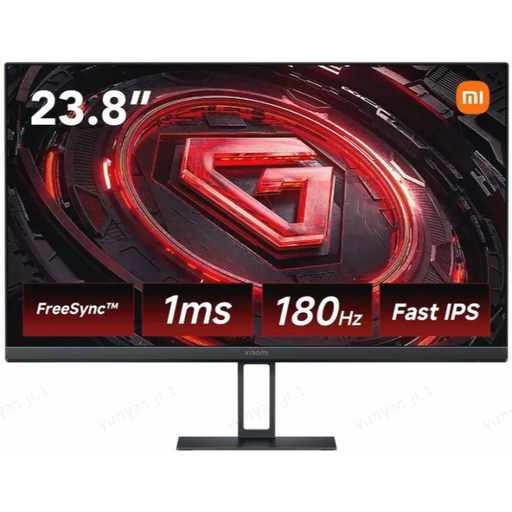
Why we chose it: This profile demands maximum fluidity and responsiveness. This monitor combines a Fast IPS panel with a 180 Hz refresh rate and a 1 ms GTG response time, all in Full HD to avoid overwhelming the graphics card.
It doesn't fall for the siren song of 4K on a small screen. It focuses on the essentials for competitive gaming: a high refresh rate and a true GTG response time.
The combination of 180 Hz / 1 ms GTG on a Fast IPS panel guarantees top-tier performance on a reasonable budget.
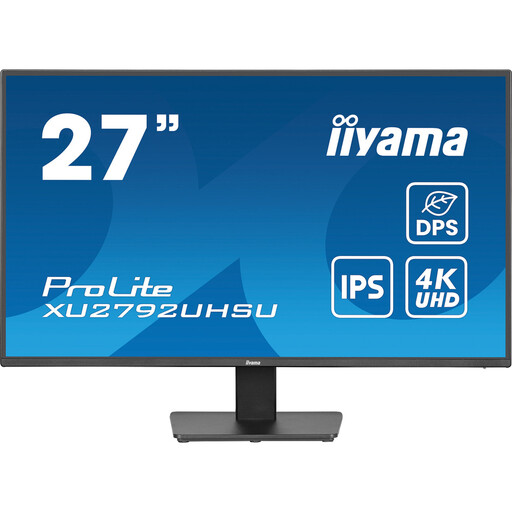
Why we chose it: For video editing, photo retouching, or graphic design, colour fidelity and pixel density are non-negotiable. This screen combines an IPS panel, 4K resolution, and a comfortable 27-inch size for a workspace that is both expansive and ultra-detailed.
It intelligently pairs high 4K resolution with a 27-inch screen, where the gain in sharpness is obvious. The IPS panel ensures colour accuracy, a non-negotiable criterion for creatives.
The combination of an IPS panel and 4K resolution delivers the clarity and colour precision essential for demanding professional work.
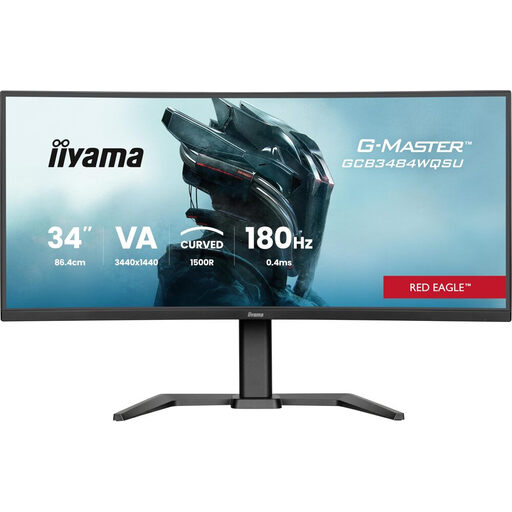
Why we chose it: For open-world games, simulations, or movies, a widescreen format is a game-changer. This 34-inch curved monitor with a 21:9 aspect ratio wraps around your field of view for spectacular immersion, enhanced by the native contrast of its VA panel.
This curved monitor leverages its VA panel to deliver deep, inky blacks—a key asset for immersion. It includes the essential DisplayPort connection to take advantage of its 180 Hz refresh rate, avoiding the frustration of a port that would bottleneck performance.
The UltraWide 21:9 format paired with a 1500R curvature and a high refresh rate creates a breathtakingly smooth and panoramic experience.
A great setup doesn't end with the monitor. For tech enthusiasts who like to be prepared for any eventuality, certain high-tech gadgets quickly become indispensable, both on the road and at home.
To perfect your work or gaming space, good lighting is also essential. It reduces eye strain and enhances immersion.
We have selected a complete list of products for you that meet our quality criteria and safety standards.
What is the average lifespan of a PC monitor? A monitor's lifespan is primarily determined by its backlighting system, which is generally rated for 30,000 to 60,000 hours of use. For 8 hours of use per day, this represents well over 10 years. In practice, people replace their monitors more often to take advantage of the latest technological advancements (resolution, refresh rate) than because they have failed.
Is a curved monitor a good choice for office work? It depends on the use case. For gaming and multimedia, the curve enhances immersion. For standard office work, especially on large ultrawide formats, it can even be an asset: it helps keep the edges of the screen within your field of view, which reduces head movement. However, for creative professions (graphic design, architecture) where the perception of straight lines is crucial, a flat screen is preferable to avoid any visual distortion.
Is 4K resolution essential for a 27-inch monitor? No, it's not essential, but it is a real bonus. For office and web use, QHD (1440p) resolution on a 27-inch monitor already offers impeccable sharpness and great reading comfort. 4K on the same screen size provides a visible increase in sharpness, which is particularly appreciated for photo/video editing or if you have a keen eye for pixels. It's a choice of comfort and precision, but not a requirement for everyone.