
Livraison le jour même ou le lendemain

Qualité garantie

Débloquez vos offres de bienvenue: Livraison GRATUITE | Jusqu'à -80 % | 30 jours d'essai gratuits à JoyPlus
Téléchargez l'application
A PC keyboard might seem simple to choose… until a US QWERTY layout slows down your typing, the numeric keypad is missing for spreadsheets, or a wireless connection hogs a USB port you actually need. Product listings often highlight backlighting, the number of keys or radio range, but these features don’t necessarily match your everyday use.
Before you place an order, check three things above all: the layout actually printed on the keys, the space available on your desk, and the connectivity that works with your computer. Here are the main criteria to consider to avoid a disappointing purchase.
A US QWERTY keyboard doesn’t have the same layout as an AZERTY keyboard used in France. Accented characters, as well as the position of ‘A’, ‘Q’ and several punctuation marks, differ. Windows and macOS can change the input language, but not the physical markings on the keys.
If you mainly write in French, carefully check for ‘US International’ or ‘QWERTY US’ before ordering. This precaution applies just as much to a wireless keyboard as to a USB keyboard or a model intended for a laptop.
A compact 60% keyboard frees up desk space, but usually removes the numeric keypad and dedicated function keys. A 75% keyboard keeps more controls in a smaller chassis, at the cost of frequently using combinations with the ‘Fn’ key.
For accounting, spreadsheets or regular number entry, a keyboard with a numeric keypad remains far more practical. In a small space, for study or gaming, a reduced format makes mouse movements easier instead.
A spill-resistant design does not mean the keyboard can be submerged or rinsed under water. The conditions covered are limited and vary between models. If liquid is spilled, quickly unplug a USB keyboard or turn off a wireless model, turn it upside down, then let it dry completely following the manufacturer’s instructions.
A keyboard and mouse combo simplifies setup by using a single receiver. In a living room, a keyboard with a built-in touchpad, like the K400 Plus, also avoids multiplying peripherals.
Membrane keyboards are generally quiet and well suited to everyday work. A mechanical gaming keyboard offers a different typing feel and sometimes allows you to replace the switches. However, the term ‘mechanical’ doesn’t guarantee a specific noise level or better comfort for all users.
Also look at adjustable tilt, key height, the presence of a wrist rest and cable length. An ergonomic keyboard should above all encourage a natural position, with relaxed wrists and shoulders.
An RGB keyboard can improve visibility in a dimly lit room and personalise your desk, but it doesn’t make up for hard-to-read characters. For professional use, prioritise layout, comfort and stability over lighting effects.
Finally, check the supported systems: Windows, macOS, ChromeOS, Android or iPadOS. An iPad keyboard must also be compatible with the exact size and generation of your tablet. Special keys and shortcuts can differ between Windows and Mac.
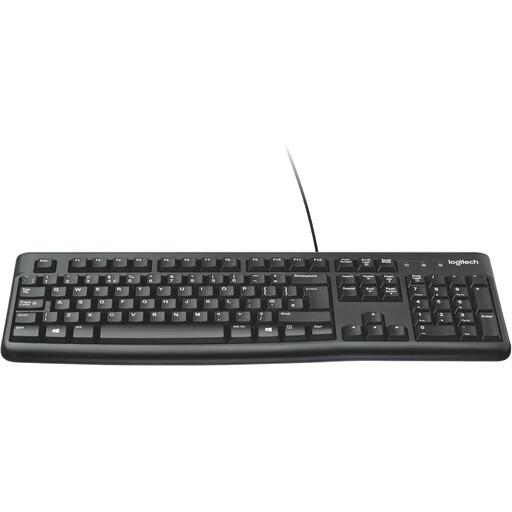
Why this choice suits this profile: This standard-format USB keyboard works equally well at a workstation or a family computer. It sets up immediately and requires no batteries.
The listing mentions a USB connection, a standard format and spill resistance under limited conditions. It doesn’t promise full waterproofing.
Numeric keypad, low-profile keys, 1.5 m cable and an advertised lifespan of up to 10 million keystrokes for most keys.
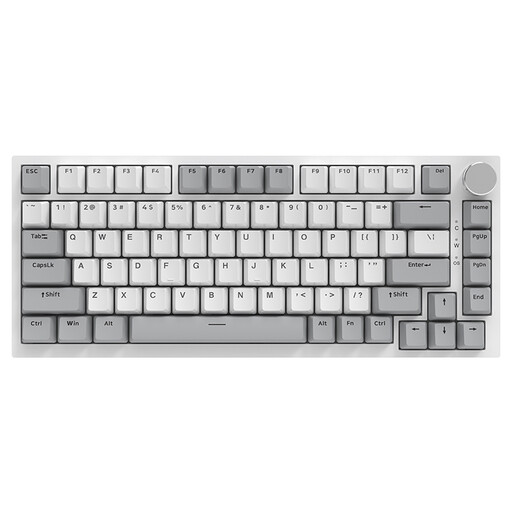
Why this choice suits this profile: Its 75% format is aimed at those looking for a compact mechanical gaming keyboard for both work and play, without sacrificing all the navigation keys.
The listing details the Type-C wired connection, 82 keys, adjustable feet and compatibility with Windows and macOS.
Hot-swappable switches, PBT keycaps, volume wheel and RGB backlighting with multiple modes.
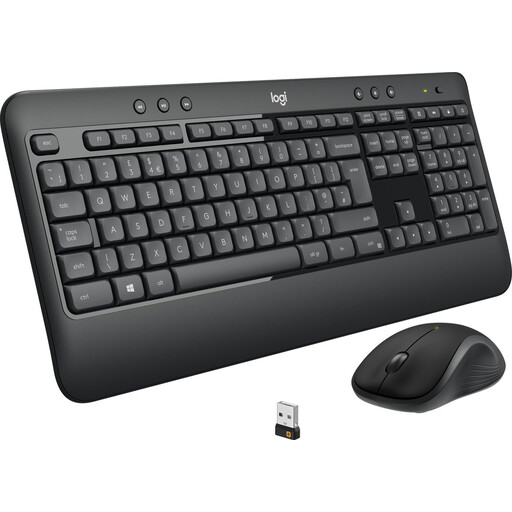
Why this choice suits this profile: This keyboard and mouse combo is ideal for remote work and data entry when freedom of movement and a numeric keypad matter more than compactness.
The Unifying USB receiver is included and the advertised radio range reaches 10 m. However, note that the keyboard remains in a US QWERTY International layout.
Full-size format, 15 shortcut keys, ambidextrous mouse and an advertised battery life of up to 36 months for the keyboard.

Why this choice suits this profile: This iPad keyboard transforms a compatible tablet into a proper mobile writing setup, handy for lessons, travel or occasional work.
Compatibility is limited to certain 11-inch iPad Pro and iPad Air models. Check your tablet’s exact generation before buying.
Multi-touch trackpad, Bluetooth connection, detachable case and use in portrait or landscape orientation.
We’ve put together a comprehensive, real-time updated list of products that meet these strict selection criteria and European safety requirements.
Plug the connector into a compatible port. Most models are automatically recognised by Windows, macOS or ChromeOS. If the keyboard is US QWERTY, also select the appropriate layout in the system settings.
It depends on the mechanism, frequency of use, maintenance and storage conditions. Some listings indicate a guaranteed number of keystrokes for certain keys, but this value doesn’t allow you to predict the exact lifespan of each individual unit.
Power consumption varies depending on the technology used, the lighting and how often it’s used. A battery-powered model can last a very long time, while a rechargeable Bluetooth keyboard needs to be charged regularly. Turning the device off when not in use helps to limit its power consumption.