
Livraison le jour même ou le lendemain

Qualité garantie

Débloquez vos offres de bienvenue: Livraison GRATUITE | Jusqu'à -80 % | 30 jours d'essai gratuits à JoyPlus
Téléchargez l'application
A PC keyboard might seem simple to choose… until the key layout doesn't match your habits, the wireless connection plays up, or the compact format leaves you without useful features. Whether it's for remote work, the family computer, gaming or use with a tablet, every detail can make a difference.
Before comparing a gaming keyboard, a mechanical keyboard, a wireless keyboard or a keyboard and mouse combo, here are the most common pitfalls to avoid.
In the UK, the QWERTY layout is the standard for everyday typing. However, many imported models are offered in AZERTY, particularly those intended for the French and Belgian markets.
Remember to check:
An AZERTY keyboard will work on a UK computer, but the characters printed on the keys won't necessarily correspond to the software configuration.
Mentions of "splash-resistant" or "protected circuit" do not mean the keyboard can be submerged. Whether it's USB or wireless, it should be kept away from liquids. If you spill something, unplug it immediately, then let it dry completely following the manufacturer's instructions.
The claimed resistance also depends on the test conditions. The Logitech K120, for example, is described as being able to withstand a limited amount of liquid, up to 60 ml under specific conditions. That doesn't make it a waterproof keyboard.
A compact keyboard frees up space for your mouse, but it often removes the numeric keypad, dedicated function keys or separate arrow keys. Conversely, a full-size keyboard takes up more depth and can quickly feel cumbersome on a small desk.
60%, 65% or 68-key formats are mainly aimed at setups where every centimetre counts. For accounting, spreadsheets or regular number entry, a keyboard with a numeric keypad remains far more practical.
A USB keyboard generally works as soon as it's plugged in and doesn't rely on any batteries. It's the simplest choice for a desktop PC or when connection stability is the priority.
A Bluetooth keyboard is more versatile with a laptop, Mac, tablet or multiple compatible devices. However, you'll need to check the supported version and the claimed battery life.
Wireless models equipped with a 2.4 GHz radio receiver usually connect via a USB dongle. They're handy with a desktop computer, but they occupy a USB-A port. The Logitech MK540, for instance, claims a range of up to 10 metres with its Unifying receiver.
For a Windows keyboard, check for the presence of Windows keys and compatibility with your version of the operating system. For a Mac keyboard, make sure it supports macOS and has the correct Command key layout.
Product pages may also mention Android, ChromeOS or iPadOS. This compatibility doesn't guarantee that all shortcuts will work exactly the same way on every device.
A membrane keyboard typically focuses on quiet typing and a lower price. A mechanical keyboard uses individual switches, which offer a more pronounced typing feel. The noise, key travel and actuation force vary depending on the switch type.
The linear mechanical keys of the Lofree OE907 are said to feature MX Jellyfish switches. The MageGee TS91, on the other hand, is described as a membrane keyboard with a mechanical feel. The distinction is important: a mechanical imitation is not a mechanical keyboard in the technical sense.
Finally, an ergonomic keyboard cannot correct poor posture on its own. Adjust its height, keep your wrists in a neutral position and avoid working with your shoulders constantly raised.
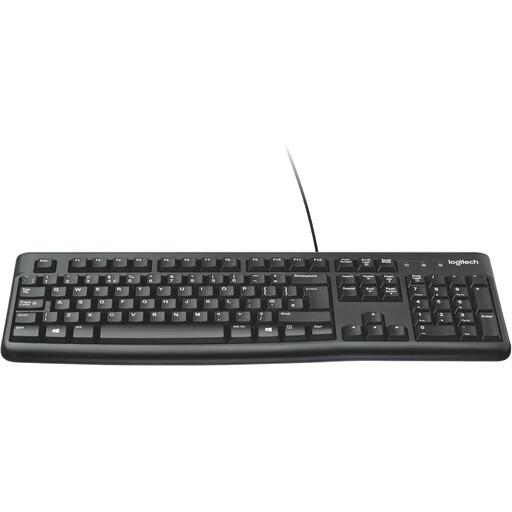
Why this choice suits this profile: Its full-size format, USB connection and low-profile keys are ideal for everyday office work on a computer with a USB port.
The wired connection eliminates recharging and pairing issues. Its splash resistance is, however, limited to very specific conditions.
QWERTY US International layout, numeric keypad, 1.5 m cable and a claimed lifespan of up to 10 million keystrokes.

Why this choice suits this profile: Its transparent design, 68-key format and dual Bluetooth 5.1 or USB-C connection will appeal to those seeking a setup that's both stylish and versatile.
The product page specifies compatibility with macOS, Windows, iPadOS, iOS and Android. Its QWERTY US layout should still be checked before purchase.
MX Jellyfish linear switches, 2,000 mAh battery, white backlighting with 7 modes and 4 brightness levels.
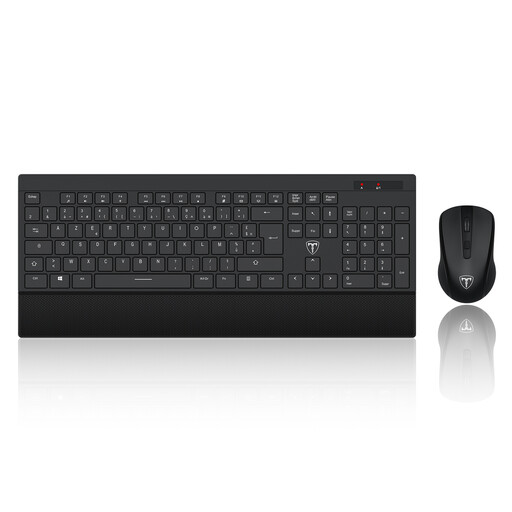
Why this choice suits this profile: This set, comprising a QWERTY UK keyboard and a mouse, meets the needs of a remote worker or a household looking to reduce cables on the desk.
The UK layout is clearly stated on the product page, reducing the risk of buying an unsuitable AZERTY keyboard. The model is still sensitive to liquids despite its splash-resistant design.
105 keys, wrist rest, 2.4 GHz connection with a single receiver and a claimed range of up to 10 metres.
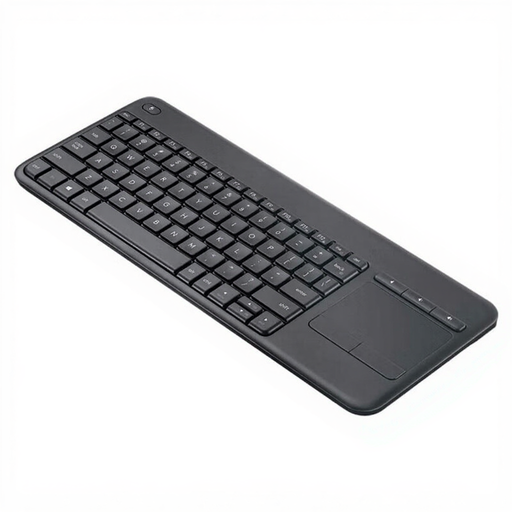
Why this choice suits this profile: Its built-in touchpad lets you control a computer connected to a TV, browse from the sofa or enjoy home use without a separate mouse.
It avoids buying a separate mouse to control a media centre PC. However, check that your device uses a system compatible with the information on the product page.
3.5-inch touchpad, multimedia shortcuts, wireless receiver and claimed battery life of up to 18 months.
We've put together a comprehensive, real-time updated selection of products that meet these strict criteria and European safety requirements.
For everyday typing in English, start by checking for a QWERTY layout. An AZERTY model may suit programming, gaming or users who are accustomed to it, but it requires an adjustment period for accented characters and shortcuts.
The lifespan depends on the mechanism, build quality, usage and maintenance. Some manufacturers quote a number of keystrokes, but this figure doesn't accurately predict how long it will last for each individual. Keep liquids away, clean the keyboard with a dry cloth and never force the keys.
A USB keyboard is perfect for a desktop PC and avoids the hassle of batteries. A wireless model offers more freedom and is handy with a laptop or TV. For a Bluetooth keyboard, check compatibility with your device and plan for regular recharging.