
Livraison le jour même ou le lendemain

Qualité garantie

Débloquez vos offres de bienvenue: Livraison GRATUITE | Jusqu'à -80 % | 30 jours d'essai gratuits à JoyPlus
Téléchargez l'application
Choosing a new PC keyboard can quickly become a headache. Between the technical jargon, marketing promises, and an overwhelming number of options, it's easy to make the wrong choice and regret your purchase. Our mission? To help you see things more clearly. Let's break down the pitfalls to avoid and the criteria that truly matter to find THE keyboard that fits your needs, whether you're a typing professional, a die-hard gamer, or a digital nomad.
Before diving into features, it's crucial to know the most common mistakes that lead to disappointment.
To make an informed decision, focus on these three fundamental parameters that define a keyboard's quality and suitability for your needs.
This is THE criterion that will define your daily comfort and feel.
The choice of connectivity depends on your environment and your priorities.
Once the AZERTY layout issue is settled (non-negotiable, we repeat!), the keyboard's form factor is a key criterion.
To help you visualise how these criteria apply, here are a few recommended options for specific uses.
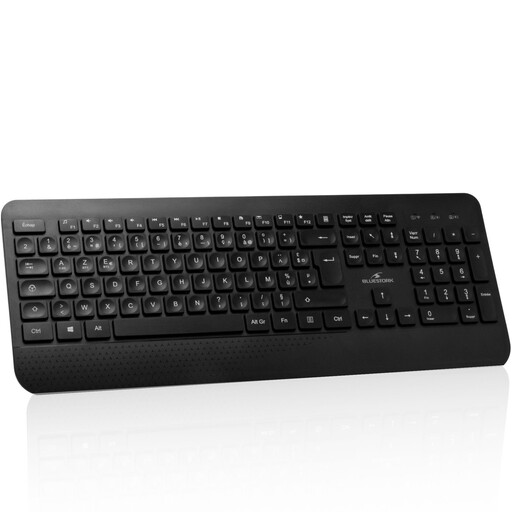
Its profile: Perfect for remote work or a clean desk setup, this keyboard combines versatile wireless connectivity, the comfort of an AZERTY layout, and a convenient rechargeable battery that will make you forget about disposable ones.
It offers stable dual wireless connectivity (2.4 GHz + Bluetooth), a far cry from the frustrating disconnections of low-end models. Its AZERTY layout is native, designed for the French market.
Its battery is rechargeable via USB-C, a convenient standard. The ability to easily switch between multiple connected devices.
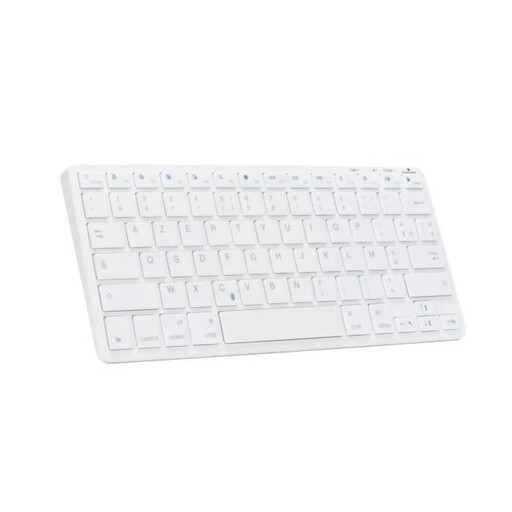
Its profile: The ideal companion for those in the Apple ecosystem (Mac, iPad, iPhone). Its ultra-compact form factor and Bluetooth connection make it a prime choice for digital nomads or tight workspaces.
This Mac keyboard is tailored for the Apple ecosystem, with dedicated function keys (Command/Option). No more compatibility issues from generic PC keyboards.
Its compact 75% form factor is easy to slip into a bag. Multi-device pairing lets you switch between a Mac, iPad, and iPhone with a single click.
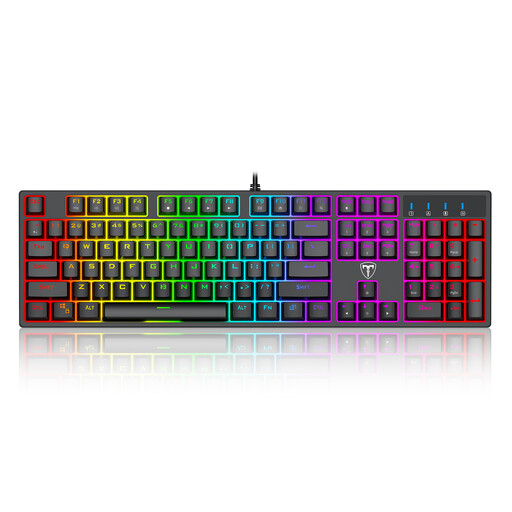
Its profile: Built for competition, this wired mechanical keyboard is all about performance, with the responsiveness and precision of its blue switches. The backlighting is perfect for long, late-night gaming sessions.
Its wired connection guarantees zero latency, a must-have for gaming. Note that this is a QWERTY model. This is a trade-off often accepted by gamers who prioritise the pure performance of the switches and standard game keybinds.
Its blue mechanical switches provide very distinct tactile and audible feedback. Its full anti-ghosting technology ensures every command is registered, even in the heat of the action.
Explore our full selection of keyboards, all chosen for their quality and adherence to the essential criteria in this guide.
It all comes down to the technology under the keys. A membrane keyboard uses a rubber sheet to register keystrokes, making it quieter and more affordable. In contrast, a mechanical keyboard is equipped with individual switches for each key, offering much crisper tactile feedback, superior precision, and an unmatched lifespan.
Absolutely, as long as you choose the right one. For gaming, opt for a wireless keyboard with 2.4 GHz technology (via a USB dongle). This connection is much more stable and responsive than standard Bluetooth. Many professional gamers have adopted high-end wireless models with no compromise on performance.
Regular maintenance is simple and makes all the difference. Unplug your keyboard (or turn it off). Turn it upside down and shake it gently to dislodge crumbs and dust. A blast of compressed air between the keys will work wonders. For the surface, a slightly damp, soft cloth is sufficient. Most importantly, never apply liquid products directly to the keyboard.