
Livraison le jour même ou le lendemain

Qualité garantie

Débloquez vos offres de bienvenue: Livraison GRATUITE | Jusqu'à -80 % | 30 jours d'essai gratuits à JoyPlus
Téléchargez l'application
Choosing PC gaming speakers can quickly become a daunting task. Between promises of immersive surround sound, flashy lighting, and complex spec sheets, it's easy to get lost. The goal is simple: to get clear, impactful audio that plunges you into the heart of the action, without cluttering your desk or emptying your wallet for useless gadgets.
As the Head of Product Recommendations at Joybuy, my role is to help you cut through the noise. Let's forget the marketing jargon and focus on what really matters. Here are the most common pitfalls to avoid and the criteria that are crucial for making the right choice.
Before jumping on specific models, it's critical to recognise the seemingly good ideas that often lead to disappointment.
To find the best PC gaming speakers for your needs, focus on these three key points.
Most compact 2.0 PC speakers (stereo) feature full-range drivers, designed to cover the entire sound spectrum. For a balanced experience, take a look at the frequency response, expressed in Hertz (Hz). A wide range, such as 75 Hz – 20 kHz, indicates that the speakers can reproduce both bass (explosions, engines) and treble (footsteps, dialogue) with clarity. The presence of ports (bass reflex) can also enhance the low end without needing a subwoofer.
A good pair of speakers should adapt to your devices, not the other way around. Here are the options to prioritise:
On a desk, every square inch counts. Fortunately, small PC speakers don't necessarily mean subpar sound. Measure the space you have available and check the dimensions of the speakers. A killer ergonomic detail: the angle. Speakers tilted slightly upwards direct the sound straight to your ears rather than your chest, which radically improves clarity and the perception of audio details, while also reducing reflections from the desk surface.
Rather than a random laundry list, here are models that cater to specific gamer profiles, based on the criteria we've just covered.
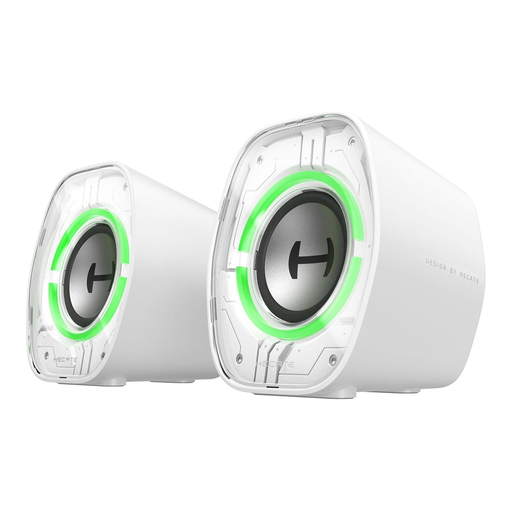
Why it's a great choice: It offers an excellent balance for those just starting out or on a tight budget. Its compact form factor fits on any desk, while its features (EQ modes, RGB) enrich the gaming experience without sacrificing comprehensive connectivity.
It doesn't just settle for RGB lighting. It offers EQ modes (Game, Movie, Music) that genuinely adapt the sound to the use case, and its triple connectivity (USB-C, Bluetooth 5.4, AUX) protects you from any compatibility surprises.
2.5-inch drivers with enhanced bass performance and a 10° upward-angled design for better sound projection. Bluetooth 5.4 connectivity ensures low latency, even for wireless gaming.
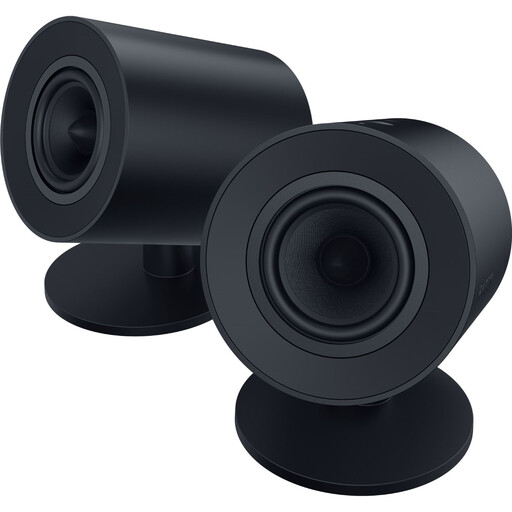
Why it's a great choice: Designed by an iconic gaming brand, this system is built around a renowned spatial audio technology. It's tailored for gamers seeking a competitive edge through precise sound localisation and high-end immersion, all in a 2.0 format that packs a punch.
It avoids the gimmicky "surround sound" trap by integrating THX Spatial Audio technology. This isn't just a simple effect, but an advanced algorithm, customisable via Razer Synapse software, for authentic and devastatingly effective in-game sound spatialisation.
THX Spatial Audio technology for ultra-immersive 3D sound. The two 3-inch full-range drivers deliver powerful, clear audio up to 96 dB, perfect for feeling the full intensity of the action.
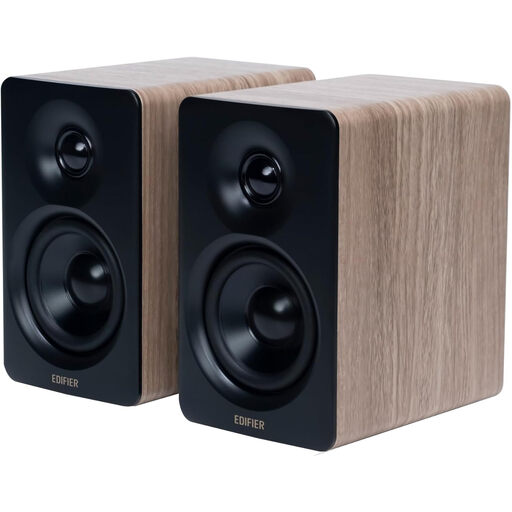
Why it's a great choice: For those whose PC is both a gaming arena and a creation tool, audio fidelity is not optional. This model offers certified Hi-Res sound quality, both wired and wireless, making it ideal for video editing, critical music listening, and, of course, intense gaming sessions.
It puts audio quality first, well ahead of gaming aesthetics. The Hi-Res Audio certification and support for the LDAC codec are true guarantees of acoustic performance, far from flashy marketing claims. The included angled stands are a real functional bonus, not a gimmick.
Two-way architecture (1-inch tweeter + 3-inch mid-bass driver) for rich, detailed sound. 66W RMS power and included 15° angled aluminium stands for an optimised soundstage.
Discover our full selection of PC speakers, all tested and approved according to the criteria in this guide.
Rest assured: no. The LED lighting used in RGB gaming speakers is very energy-efficient. Its impact on your electricity bill is therefore negligible. The bulk of the power consumption comes from the audio amplifier, not the lights.
For competitive gaming, the answer is a firm yes. A wired USB connection offers near-zero latency (the infamous lag), which is crucial for the sound to be perfectly synchronised with the action. That said, modern Bluetooth PC speakers (versions 5.3 and higher) have very low latency, which is perfectly acceptable for solo games or watching movies. It all depends on your level of demand.
It all depends on your expectations and the space you have. Many quality 2.0 PC speakers, like those in our selection, integrate ports or passive radiators to produce a solid bass presence, which is more than enough for a desk setup. Now, if you're looking for earth-shaking bass that makes the walls tremble, a 2.1 system (with a separate subwoofer) will be necessary. To keep your desk clear, a good 2.0 system remains the ideal compromise.