
Livraison le jour même ou le lendemain

Qualité garantie

Débloquez vos offres de bienvenue: Livraison GRATUITE | Jusqu'à -80 % | 30 jours d'essai gratuits à JoyPlus
Téléchargez l'application
In a video game, immersion is about more than just stunning graphics. Precise audio that can reveal an opponent's footsteps or the origin of an explosion can be the difference between victory and defeat. The problem is, the PC gaming speaker market is a jungle of often misleading marketing promises. Before you invest, it's crucial to know how to avoid the most common traps so you don't end up sacrificing audio quality at the altar of design.
As the Head of Product Curation at Joybuy, my mission is to help you cut through the noise. Here are the three most common pitfalls and, more importantly, how to avoid them.
To avoid falling into these traps, focus on a few key technical specifications that guarantee performance and versatility.
How your speakers connect to your computer is a crucial point. A good pair of speakers should offer multiple options to adapt to all your needs.
Power (expressed in watts RMS) is an indicator, but it's far from the whole story. True sound quality lies in the design of the drivers themselves.
Desk space is rarely unlimited. Small gaming speakers can absolutely deliver powerful sound without monopolizing your workspace.
Here are a few options that meet these criteria, suited for different user profiles.
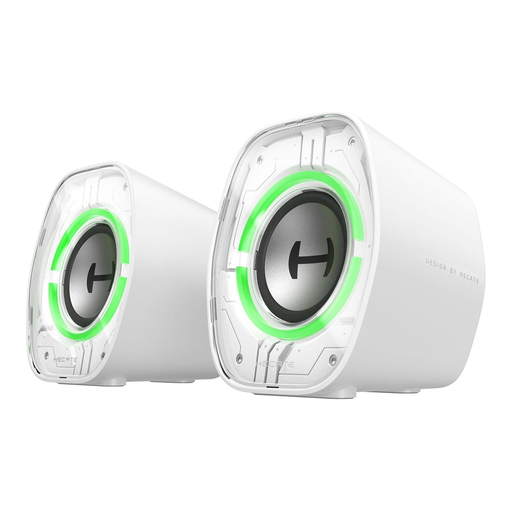
Why It's a Great Choice: Perfect for gamers seeking the best performance-to-price ratio for a modest-sized desk. Its compact form factor and futuristic design integrate beautifully into a student setup or first battlestation.
It doesn't bet everything on Bluetooth. Its triple connectivity (USB-C, Bluetooth 5.4, AUX) ensures low latency for gaming via USB while offering the flexibility of wireless for music. The RGB lighting is a bonus, not the main selling point.
Its EQ modes (Game/Movie/Music) allow you to tailor the sound for any use case. Its 10° upward tilt was designed for optimal desktop listening.
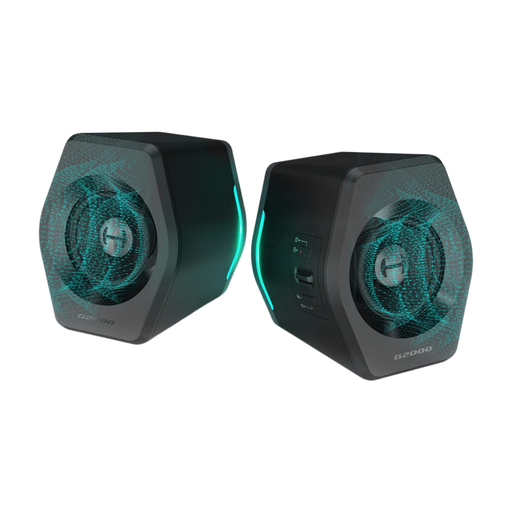
Why It's a Great Choice: For the gamer seeking total audio and visual immersion. This model offers more power and virtual spatialization for a more enveloping gaming experience, with customizable RGB lighting to match their setup.
It offers virtual 7.1 surround sound managed by a DSP chip and dedicated software. The approach is honest: it leverages the quality of the stereo drivers to create convincing spatialization, without the unrealistic promise of "true" physical 7.1, which is impossible in this form factor.
The 32W of power and passive bass radiators deliver a fuller, more impactful sound. Its broad compatibility (USB, Bluetooth, AUX) makes it ready for PC, Mac, and consoles.
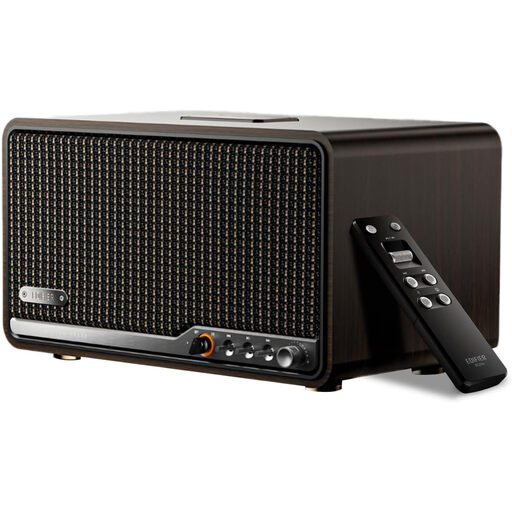
Why It's a Great Choice: For the discerning user who uses their PC as much for high-quality music and movies as for gaming. This is an investment in superior audio quality that goes far beyond typical gaming use.
This model skips gimmicks like RGB to focus 100% on audio performance. Certified for Hi-Res Audio, it supports the LDAC codec over Bluetooth, ensuring near-CD quality wireless transmission and solving the latency vs. quality dilemma.
The build quality (MDF wood cabinet) and choice components (dome tweeters, mid-bass drivers) deliver a rich, detailed sound with deep bass and crisp highs, far beyond what standard gaming speakers offer.
We've curated a complete, up-to-date selection of products that meet our strict selection criteria and current safety standards.
Gaming speakers are often calibrated differently. Their sound profile (equalization or EQ) is designed to enhance frequencies useful in games, like mids (footsteps) and bass (explosions). They also integrate specific features: low-latency connectivity (USB), dedicated game modes, and aesthetics (RGB lighting) designed to harmonize with a gamer's setup.
Not necessarily. For a desktop setup where the speakers are close to you, an excellent stereo (2.0 or 2.1) sound already provides very convincing spatialization. Virtual surround sound, if handled by good software, can enhance immersion, but it's better to invest in excellent stereo speakers than in an entry-level 7.1 system with disappointing performance.
For pure gaming, USB is the definitive choice. A USB connection offers near-zero latency, which is crucial for audio-visual sync. While Bluetooth has improved significantly, it still has a slight delay that can be a handicap in fast-paced games. The ideal setup is to have both: use USB for your gaming sessions and Bluetooth for the freedom to stream music from your phone.