
Livraison le jour même ou le lendemain

Qualité garantie

Débloquez vos offres de bienvenue: Livraison GRATUITE | Jusqu'à -80 % | 30 jours d'essai gratuits à JoyPlus
Téléchargez l'application
Navigating the vast market of 7.1 PC gaming headsets can be a daunting task. Between tempting marketing promises and jargon-filled spec sheets, it's easy to end up with a disappointing product. Our goal? To help you decode the criteria that truly matter so you can make the right choice, focusing on real-world performance rather than advertising slogans.
Let's review the three most common pitfalls and, more importantly, how to avoid them.
To ensure you don't make a mistake, focus on these fundamental features. They are what separate a good PC gaming headset from a marketing gimmick.
A 7.1 surround sound headset aims to simulate eight audio channels to create a 360° sound bubble. The problem? The quality of this virtualisation varies wildly from one model to the next.
Comfort is a non-negotiable criterion. Here are the points to inspect:
The connection type has a direct impact on the headset's performance and versatility.
Rather than an endless list, here is a selection of products that meet specific needs, all validated against our performance and quality criteria.
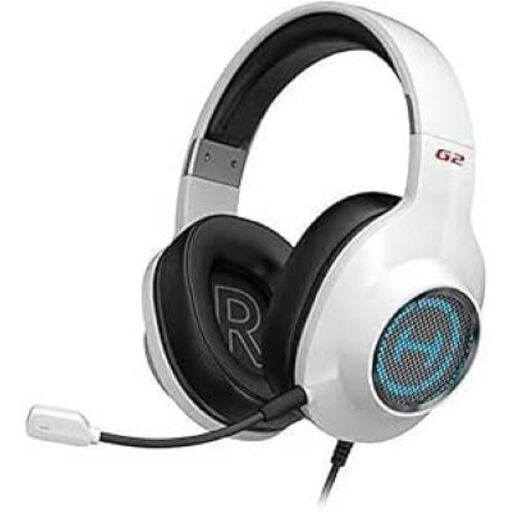
Who is it for? This headset is for the PC or PS4 gamer who wants total sound immersion without sacrificing long-term comfort or communication clarity. It checks all the important boxes: 7.1 sound, a quality microphone, and a feather-light weight.
It avoids the pitfall of fake 7.1 sound thanks to its dedicated software that allows for fine-tuned customisation. Its feather-light weight (266g) and plush earcups prevent discomfort, while its detachable noise-cancelling microphone ensures clear communication with your team.
50mm transducers for punchy sound, customisable 7.1 surround sound software, and wide compatibility (PC, PS4, Mac) thanks to its USB connection.
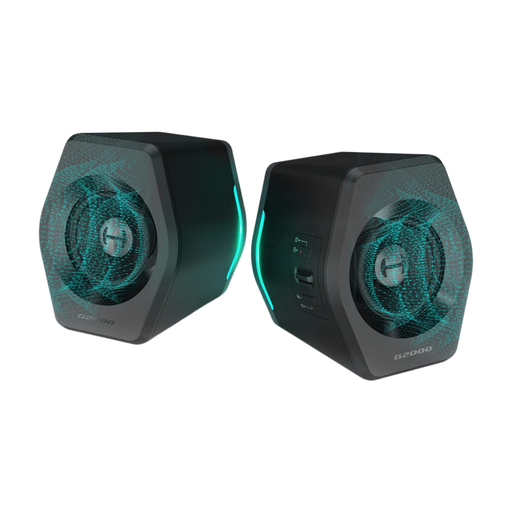
Who is it for? For the gamer who can't stand wearing a headset or is looking for a powerful and versatile audio solution for their desk, equally adept for gaming, music, or movies. An excellent alternative to a traditional headset.
By definition, this speaker system sidesteps the discomfort pitfall. It also offers a convincing 7.1 surround effect thanks to its integrated DSP chip, delivering total immersion with nothing on your head.
Compact form factor but powerful sound (32W), ultra-versatile connectivity (Bluetooth, USB, AUX), and RGB lighting effects to integrate into any setup.
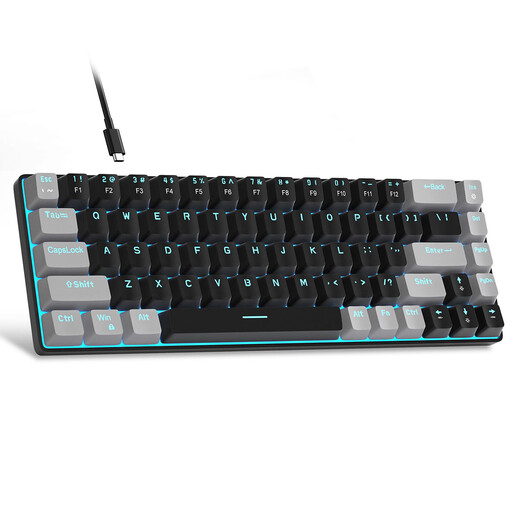
Who is it for? For the gamer who knows that sound isn't everything. A responsive mechanical keyboard is just as crucial for performance. This compact model frees up desk space, a decisive advantage for players who need wide mouse movements.
It tackles the unbalanced setup pitfall. After all, what good is perfect sound if your keyboard lags behind? Its mechanical switches and full anti-ghosting technology ensure every keystroke is registered without the slightest latency.
Compact 60% format that preserves the arrow keys, mechanical switches (Red) for fast and quiet actuation, and full anti-ghosting technology.
A great gaming setup is about more than just sound. Lighting plays a key role in immersion. Take a look at our selection of lighting fixtures to create the perfect atmosphere.
Yes, in compatible games, quality 7.1 surround sound offers a real advantage. It allows you to precisely locate the origin of sounds (gunfire, footsteps), which is a major asset for both immersion and competitive performance. Be aware, however, that its effectiveness depends entirely on the quality of the headset's virtualisation technology.
To extend its lifespan, a few simple habits are all it takes. Always unplug it by holding the USB connector, never by pulling on the cable. Clean the earcups regularly with a soft, dry cloth. And when you're not using it, storing it on a headset stand will help it maintain its shape and protect the earpieces.
Not at all. The power consumption of RGB lighting is minimal. It is supplied by the USB port and has no perceptible impact on your PC's performance. It's a purely aesthetic touch whose energy impact is completely negligible.