
Livraison le jour même ou le lendemain

Qualité garantie

Débloquez vos offres de bienvenue: Livraison GRATUITE | Jusqu'à -80 % | 30 jours d'essai gratuits à JoyPlus
Téléchargez l'application
Building a powerful rig isn't just about stacking the most impressive-sounding components together. A top-tier graphics card can be held back by an underpowered processor, an underspecced power supply, or a case that's too cramped. For demanding gamers, content creators, and users working with artificial intelligence, it's the overall balance of the build that counts — not just the spec sheet of each individual part.
An RTX 5090, RTX 5080 or RTX 5070 Ti graphics card can suit very different uses depending on its power consumption, form factor and amount of onboard video memory. An ASUS ROG Astral RTX 5090, for example, comes with 32 GB of GDDR7, draws 600 W and occupies 3.8 slots. It therefore needs a spacious case, an anti-sag bracket and a power supply of at least 1,000 W, according to its product listing.
Conversely, an 8 GB RTX 5060 Ti or an 8 GB Radeon RX 7600 will be far simpler to integrate into a compact build. The resolution you're targeting, the software you use and the games you plan to play should guide your choice.
The wattage printed on a power supply isn't everything. You also need to check its standard, its connectors and its ability to handle the power spikes of modern graphics cards.
A PC ATX 3.1 power supply with a native 12V-2x6 connector simplifies the installation of modern graphics cards. For a build with an RTX 5080, an 850 W 80 Plus Gold power supply provides a solid foundation, provided the other components stay within the manufacturer's recommendations. A 750 W 80 Plus Bronze unit may suit a Radeon RX 7600 or a less power-hungry build, but not a card whose official recommendation is higher.
An NVMe PCIe 4.0 SSD delivers impressive sequential read speeds, but the real-world benefit you'll notice depends on your system, your games and the tasks you're performing. To breathe new life into an older computer, an NVMe PCIe 3.0 SSD like the Lexar NM620 512 GB is already enough to cut loading times significantly compared to a SATA drive.
The same logic applies to memory: 32 GB of DDR5 is generally sufficient for gaming and streaming simultaneously. Demanding creative software, virtual machines or certain AI workflows may, however, justify 128 GB of DDR5, provided your motherboard and processor can handle that capacity.
The AMD Ryzen 9 9950X3D processor featured in this selection uses the AM5 socket. It has 16 cores, 32 threads, a frequency of up to 5.6 GHz and a stated thermal design power of 120 W. It must be paired with a compatible AM5 motherboard and a sufficiently capable cooler. The product listing recommends a cooling capacity of at least 240 W: check this before choosing your cooler.
AM5 B850 and B650 motherboards support Ryzen 7000, 8000 and 9000 series processors, depending on the model. Exact compatibility, however, depends on the BIOS version. Always consult the official list of supported processors.
At 170 × 170 mm, a Mini-ITX motherboard fits easily into a compact case. On the other hand, it offers fewer memory slots and expansion slots. The COLORFUL CVN B850I has two DDR5 slots and supports up to 96 GB, according to its spec sheet.
An M-ATX B650 or B850 model gives you more flexibility with its four memory slots, multiple fan headers and, on some models, two M.2 slots. Also remember to check the dimensions of your graphics card: a Palit RTX 5080 GamingPro measures roughly 332 mm in length and occupies three slots.
120 mm PC ARGB fans aren't just there to add a splash of colour. Their orientation and placement directly determine how much cool air comes in and how much hot air is expelled. The Corsair RS120-R ARGB White pack includes three reverse-flow fans with PWM control, a 3-pin 5 V ARGB connection and daisy-chain capability.
Before installation, make sure your motherboard has 5 V ARGB headers. Never plug a 5 V ARGB lighting strip into a 12 V RGB header: you risk damaging the components.
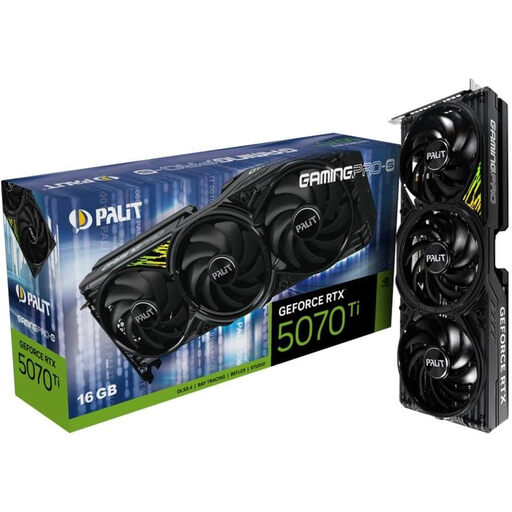
Why this model works: its 16 GB of GDDR7 and stated 300 W power draw make it a versatile card for gaming, provided you have a case long enough and a recommended 750 W power supply.
The dual BIOS and 0 dB technology let you adapt its operation, but they don't replace the need for good case ventilation.
PCIe 5.0 interface, 16 GB of GDDR7, three DisplayPort 2.1b outputs and a 2.5-slot thickness.
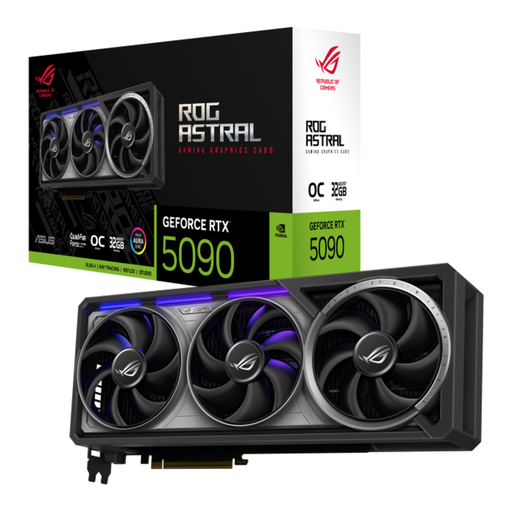
Why this model works: creators and AI professionals can rely on its 32 GB of GDDR7, provided they plan for a power supply of at least 1,000 W and a case that accommodates its 357.6 mm length.
A card this large won't fit in every case: check its length, its thickness and plan for an anti-sag bracket.
32 GB of GDDR7, PCIe 5.0 x16 interface and DisplayPort 2.1b and HDMI 2.1b outputs.
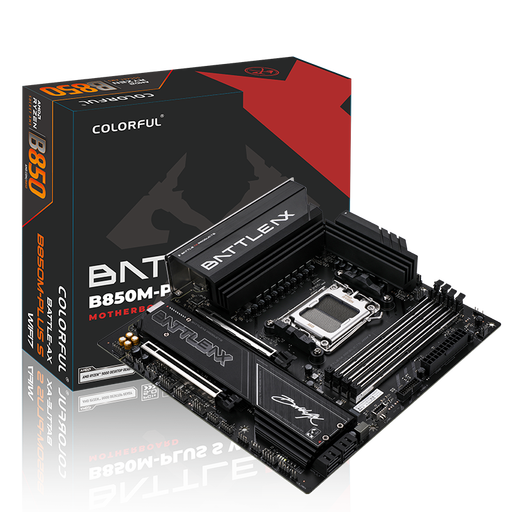
Why this model works: its M-ATX form factor, four DDR5 slots, two M.2 slots and Wi-Fi 7 connectivity make it a solid foundation for an upgradable gaming and creation build.
Check your Windows and BIOS versions: the listing states that full Wi-Fi 7 features require Windows 11 24H2 or later.
B850 chipset, PCIe 5.0 x16, 5 Gbit/s networking and stated support for AM5 Ryzen 7000, 8000 and 9000 processors.
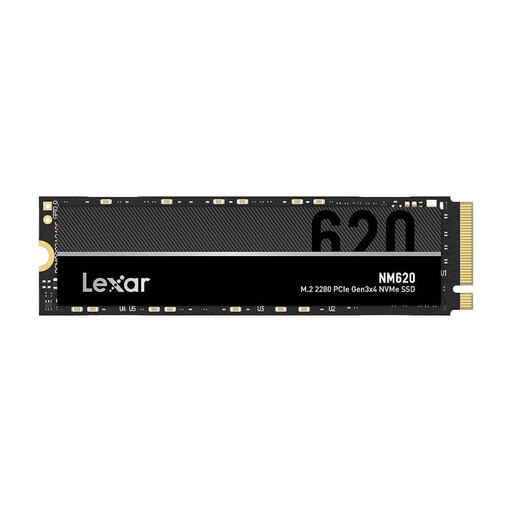
Why this model works: this M.2 2280 SSD is ideal for upgrading a desktop or laptop that has an NVMe PCIe 3.0 slot.
Check the type of M.2 slot before buying: an M.2 SATA slot doesn't offer the same capabilities as an NVMe PCIe slot.
PCIe Gen3 x4 interface, NVMe 1.4 protocol and 512 GB capacity.
We've put together an up-to-date selection of components that meet these criteria, as well as the safety requirements applicable in France and the European Union.
Start by checking the graphics card manufacturer's recommendation. According to the Palit listing, an RTX 5070 Ti can be paired with a 750 W power supply, while an RTX 5080 requires 850 W. The ASUS ROG Astral RTX 5090, meanwhile, recommends 1,000 W or more. Also allow some headroom for the processor, fans, SSDs and any future upgrades to your build.
For gaming, browsing the web and streaming, a 32 GB kit made up of two 16 GB sticks remains a perfectly suitable choice. The Kingston FURY Beast RGB DDR5 rated at 6,000 MT/s supports both AMD EXPO and Intel XMP 3.0. For demanding creative software or AI-related applications, 64 GB or even 128 GB may be more appropriate, subject to motherboard compatibility.
It can be worthwhile for transferring large files, editing video or using applications that put heavy demands on storage. The Lexar NM790 1 TB claims sequential read speeds of up to 7,400 MB/s. For everyday use or an older PCIe 3.0 platform, the Lexar NM620 512 GB already represents a worthwhile upgrade. Just check the type of M.2 slot you have available and whether a heatsink is needed.