
Livraison le jour même ou le lendemain

Qualité garantie

Débloquez vos offres de bienvenue: Livraison GRATUITE | Jusqu'à -80 % | 30 jours d'essai gratuits à JoyPlus
Téléchargez l'application
Building or upgrading a computer isn't simply about picking the PC gaming components with the highest clock speeds. A successful build relies first and foremost on balance and compatibility between the motherboard, processor, RAM, graphics card, power supply and case.
The most costly mistakes often hide in details you check too late:
So before you place your order, it's better to think in terms of a complete PC gaming build rather than products bought separately.
A high clock speed alone doesn't guarantee a smooth experience. Performance also depends on resolution, cooling, the amount of available memory and graphical power. For high-definition gaming, content creation or AI applications, the graphics card and its video memory can matter more than a few extra hundred megahertz.
Some modern graphics cards take up 2.5 to 3 slots and exceed 300 mm in length. You need to compare their dimensions with the actual space available inside the case, taking into account any fans or a radiator at the front.
The Cooler Master Elite 302 accepts a graphics card up to 365 mm without fans or a radiator at the front, while the Cooler Master Elite 600 allows up to 425 mm of clearance. A difference that can be enough to render the entire build incompatible.
An 850 W PC power supply isn't chosen solely on its rated wattage. Modern graphics cards can use a 12V-2x6 connector, associated with the ATX 3.1 standard. A model with native cables avoids risky connections and simplifies cable management.
Also, only use the modular cables supplied with the power supply in question. Those from a different range or brand may have a different pinout, with potentially serious consequences for your components.
The gaming motherboard must be compatible with the processor you've chosen. The MSI B760 GAMING PLUS WIFI uses the LGA 1700 socket and supports 12th, 13th and 14th Gen Intel Core processors. Its ATX form factor therefore requires a compatible case.
For a more compact build, Micro-ATX motherboards like the COLORFUL BATTLE-AX B650M-E WIFI V14 or the COLORFUL COLORFIRE B850M-MEOW WIFI7 V14 need a case that accepts the M-ATX form factor. Also remember to check the number of memory slots, M.2 slots and fan headers.
DDR5 memory rated at 6,000 MT/s or higher doesn't necessarily reach that speed from the first boot. You usually need to enable an XMP or EXPO profile in the UEFI. Without this setting, the sticks may remain at their default SPD frequency.
The Kingston FURY Beast RGB DDR5 32 GB kit, made up of two 16 GB sticks at 6,000 MT/s, supports Intel XMP 3.0 and AMD EXPO. Still, check the motherboard's compatibility list and install the sticks in the recommended slots, usually A2 and B2.
For video editing, virtual machines or certain AI-related tasks, a 64 GB or 128 GB kit may be more suitable. The Kingston FURY Renegade Pro 128 GB runs at 6,000 MT/s, but its configuration of eight modules and registered format means you must carefully check compatibility with your chosen platform.
An M.2 NVMe SSD PCIe 4.0 significantly reduces system and software load times. The MSI B760 GAMING PLUS WIFI has two M.2 Gen4 slots, the main one benefiting from a Shield Frozr heatsink. The COLORFUL COLORFIRE B850M-MEOW WIFI7 V14 also offers several M.2 NVMe slots, depending on the version and specifications provided by the manufacturer.
On the power supply side, an 80 Plus Gold model like the MSI MAG A750GL delivers 750 W and includes a 16-pin PCIe 5.0 connector rated up to 450 W. For a more demanding graphics card, an 850 W ATX 3.1 power supply, such as the Corsair RM850e, offers more headroom and a native 12V-2x6 connector.
The 80 Plus Gold certification indicates electrical efficiency under certain load conditions. It doesn't replace the need to check the actual power available on the 12 V rail, the electrical protections and the connectivity.
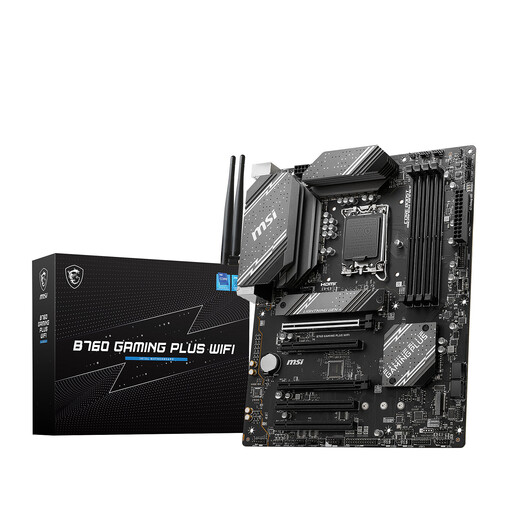
Why this choice makes sense: This ATX motherboard brings together the essential features for a versatile Intel PC, with Wi-Fi 6E, 2.5 Gb/s networking and two M.2 Gen4 slots.
The LGA 1700 socket and ATX form factor are clearly stated, making it easy to check compatibility with the processor and case.
DDR5 support, digital VRM, reinforced PCIe 4.0 x16 slot and Bluetooth 5.3.
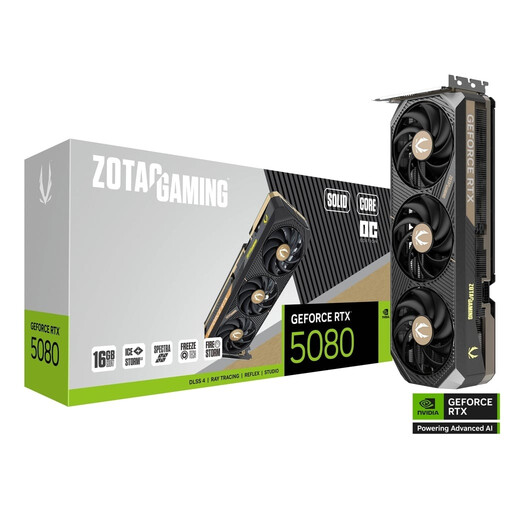
Why this choice makes sense: Its 16 GB of GDDR7 memory, IceStorm 3.0 cooling and dual BIOS are built for high-definition gaming and content creation.
The included support bracket helps limit sag on a large card. However, you should still check the case dimensions before buying.
12V-2x6 connector, SPECTRA 2.0 lighting, reinforced structure and extended warranty after registration, subject to the stated terms.
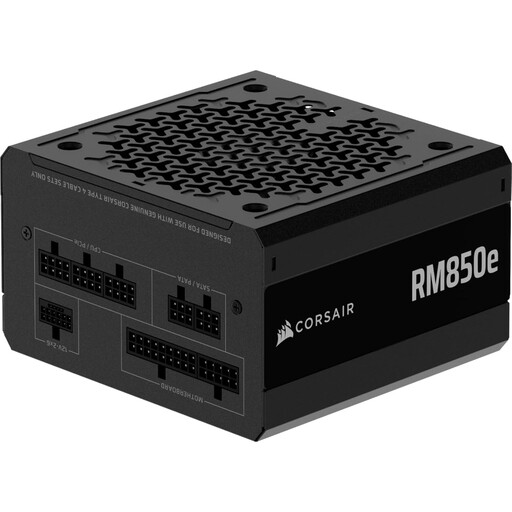
Why this choice makes sense: This 850 W PC power supply is suitable for builds with a power-hungry graphics card, a powerful processor or lots of peripherals.
The ATX 3.1 standard and 12V-2x6 connector mean you don't have to resort to unsuitable adapters for the graphics card.
850 W continuous output, 80 PLUS Gold certification, fully modular design and fan with Zero RPM mode at low load.
We've put together a comprehensive, real-time updated selection of products that meet these demanding criteria, while complying with European safety regulations.
It all depends on the overall build. Check the manufacturer's recommendation, the processor's power consumption and the available connectors. An 850 W ATX 3.1 power supply can suit a machine equipped with a high-end graphics card, provided you respect the specifications of each component.
No. A motherboard designed for DDR4 cannot accept DDR5 memory, even if the sticks look similar. Check the supported memory type, the number of slots, the maximum capacity and the compatibility list published by the manufacturer.
The lifespan of a build depends on how heavily it's used, its operating temperature, the quality of the power supply and how well it's maintained. Regular dusting, proper airflow and firmware updates all help preserve its stability.
If you plan to upgrade the machine in future, make sure from the start that you have available M.2 slots, a sufficiently powerful power supply and a spacious enough case.