
Livraison le jour même ou le lendemain

Qualité garantie

Débloquez vos offres de bienvenue: Livraison GRATUITE | Jusqu'à -80 % | 30 jours d'essai gratuits à JoyPlus
Téléchargez l'application
A PC gaming case does more than just show off your components behind a tempered glass panel with a few RGB effects. It needs to house your hardware, keep it cool, and give you enough room to upgrade later. Choosing the wrong size or compatibility can quickly turn an enjoyable build into a real headache.
A mid-tower PC case might look spacious, but the length of your graphics card, the height of your CPU cooler and the presence of a radiator can all significantly reduce the available space. A compact PC case can work perfectly for a Mini-ITX or Micro-ATX build, but it may prove too tight for a large graphics card paired with a 360 mm radiator.
Always check the maximum dimensions stated by the manufacturer, rather than relying solely on the external volume of the chassis.
A PC case fitted with ARGB fans offers customisable lighting, but that says nothing about the quality of its airflow. An airflow-focused PC case should primarily have a mesh front panel, easy-to-remove filters, and intake and exhaust positions that are well distributed.
A largely solid front panel can restrict airflow, even when the case houses several fans.
Some compact models only accept an SFX or SFX-L power supply. Others support a standard ATX unit, but only up to a specific maximum length. A dual-chamber PC case generally makes cable routing easier, but it doesn't eliminate all compatibility constraints.
Before you order, check the power supply form factor, the space available behind the motherboard, and the position of its connectors.
An ATX PC case usually accepts ATX, Micro-ATX and Mini-ITX motherboards. Compatibility with E-ATX or boards featuring rear connectors must be checked on a case-by-case basis. BTF, ASUS BTF or MSI Project Zero boards require specific cut-outs and layout.
If you're planning a large graphics card, compare its maximum length both with and without a front fan or radiator installed. The difference can be significant.
For a gaming build with a powerful CPU and graphics card, look for:
A water-cooling PC case must also provide enough room for the combined thickness of the radiator and fans. If you're installing a custom pump and reservoir, check the space allocated for them too.
A PC case with tempered glass really shows off your components, but the panels need careful handling, ideally on a soft surface. Avoid placing their corners on tiles, metal or a hard table. Removable filters make cleaning easier and help maintain good airflow.
Also remember to measure the space available under or on your desk. As a guide, the larger models in the MasterFrame range measure 549 × 291 × 581 mm, while some compact formats are significantly less bulky.
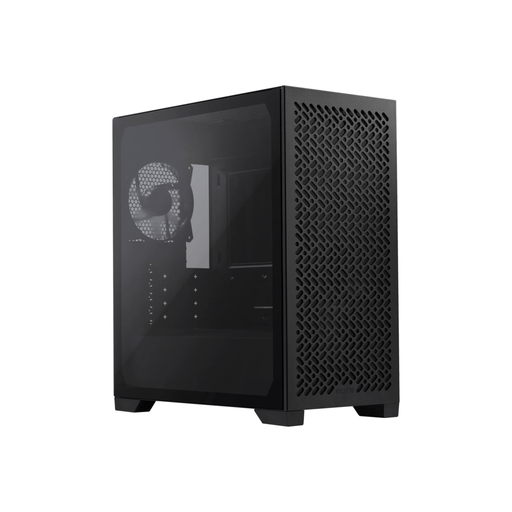
Why this choice suits this profile: its compact form factor accepts Mini-ITX and Micro-ATX boards, an ATX power supply and a graphics card up to 365 mm depending on the cooling configuration.
Its magnetic mesh front panel makes filter access easy and stops you mistaking decorative lighting for genuine air intake. However, it's still essential to check motherboard compatibility before buying.
Supports radiators up to 360 mm at the front, front USB-C port and a 120 mm rear fan included.
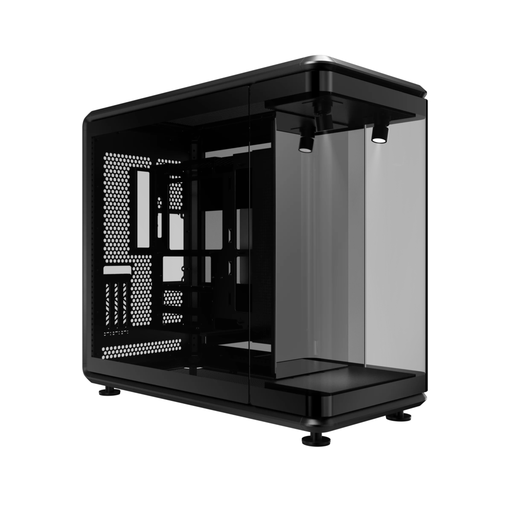
Why this choice suits this profile: this 93-litre chassis is designed for E-ATX builds, large graphics cards and custom water-cooling setups.
Its vast internal space reduces the compromises imposed by large components. However, its glass panels require careful handling and a perfectly stable location.
Supports E-ATX, graphics cards up to 430 mm, radiators up to 360 mm and 110 mm of cable management space.
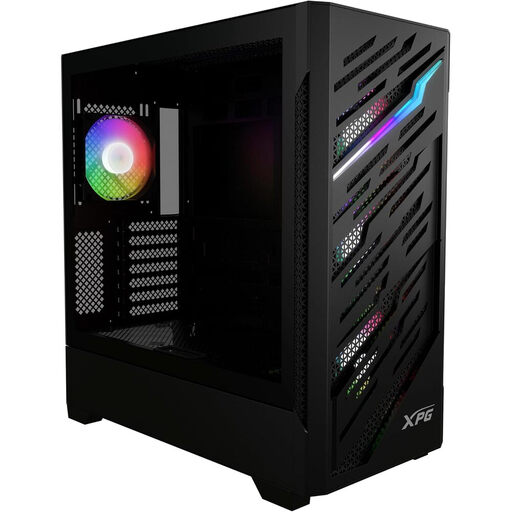
Why this choice suits this profile: it's aimed at builders who want to use an ATX BTF motherboard and reduce cable visibility on the front side.
BTF compatibility is clearly stated, but you should still confirm it with your exact motherboard model. The perforated front panel meets the needs of good airflow.
Mid-tower format, four pre-installed ARGB fans and an interior designed for large gaming components.
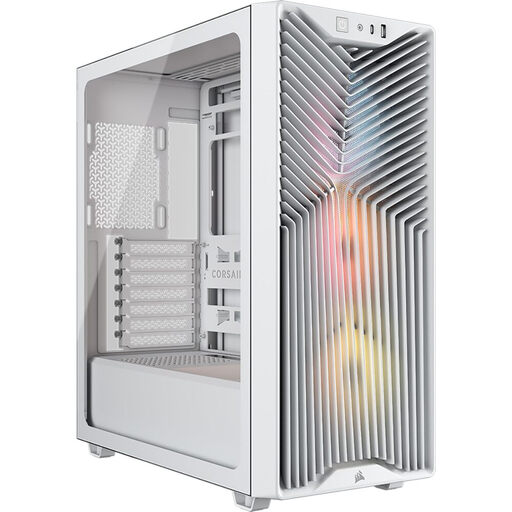
Why this choice suits this profile: it combines a mesh front panel, a tempered glass side panel and pre-installed RS ARGB fans, in a chassis compatible with ATX, Micro-ATX and Mini-ITX.
The top, front and bottom filters make maintenance simple. The lighting can be controlled via PWM and a compatible 5 V ARGB connector.
Dimensions of 445 × 455 × 220 mm, tool-free removal of the glass panel and announced integration with CORSAIR iCUE.
We've put together a comprehensive, real-time updated selection of products that meet these demanding criteria, while complying with European safety regulations.
A typical setup includes one or more intakes at the front or under the case, and an exhaust at the rear or on top. The ideal number depends on the chassis, your components and the fan speed. Also check that your motherboard has enough PWM and ARGB headers.
Glass doesn't necessarily compromise cooling. However, a glass front panel with little ventilation can reduce air intake. For a high-performance build, choose a mesh front panel or side intakes that are sufficiently open. Fan layout matters at least as much as the panel material.
A chassis can last through several system upgrades, as long as its dimensions, power supply format and cooling mounts remain compatible. Fans and filters need regular maintenance. Clean the grilles with a soft brush or a vacuum cleaner set to low power, after switching off and unplugging the system.