
Livraison le jour même ou le lendemain

Qualité garantie

Débloquez vos offres de bienvenue: Livraison GRATUITE | Jusqu'à -80 % | 30 jours d'essai gratuits à JoyPlus
Téléchargez l'application
The right PC CPU cooler helps keep temperatures under control, noise levels reasonable and your system stable. However, it is not uncommon to end up with a model that is difficult to install, too large for the case or simply underpowered for the processor you have chosen.
Before opting for a CPU air cooler or an AIO liquid cooler, it is therefore worth setting marketing claims aside and checking a few very practical points: socket, available height, radiator size, connectivity and intended use.
The statement ‘compatible with Intel’ or ‘compatible with AMD’ is not enough. You need to identify the motherboard’s exact socket: Intel LGA 1851 or LGA 1700, AMD AM5 or AM4, for example. Even when a mounting kit is included, there is no guarantee that the cooler will fit easily between the memory modules, graphics card and motherboard heatsinks.
A 240 mm or 360 mm liquid cooler requires a compatible mounting position at the top, front or side of the case. You also need to add together the thickness of the radiator and the fans. With an air cooler, it is the tower height that matters: a 158 or 161 mm model may simply not fit inside a compact case.
An ARGB CPU fan can add plenty of style to a system, but its LEDs will not cool the processor. Airflow, static pressure, contact surface and PWM control are far more important. Also remember to check for a 3-pin 5 V ARGB connector, which should not be confused with a 4-pin 12 V RGB connector.
For a recent platform, look specifically for an Intel LGA 1851-compatible cooler or an AMD AM5-compatible cooler. Several Cooler Master and MSI models featured here support the LGA 1851, LGA 1700, AM5 and AM4 sockets. This wide compatibility can make a future upgrade easier, but you should still check the manual and box contents before starting the installation.
An air cooler measuring 152 mm in height will fit in many mid-tower cases. From 159 mm upwards, however, careful checking is essential. Also look at the width of the heatsink above the memory slots: some models may obstruct memory modules fitted with large heatsinks.
For an AIO, check the radiator’s exact dimensions and the intended mounting position in the case. A 240 mm model is generally easier to install than a 360 mm model. The latter accommodates three 120 mm fans and requires a case designed for this format.
The advertised noise level in dBA is measured under conditions defined by the manufacturer, so it does not predict exactly how loud the cooler will sound in your room. PWM control can nevertheless automatically adjust fan speed according to the processor’s workload.
An air cooler contains neither a pump nor liquid and mainly requires regular dusting. An AIO is factory-sealed and must not be opened or modified. If you notice a leak, switch off the PC immediately and unplug it from the mains.
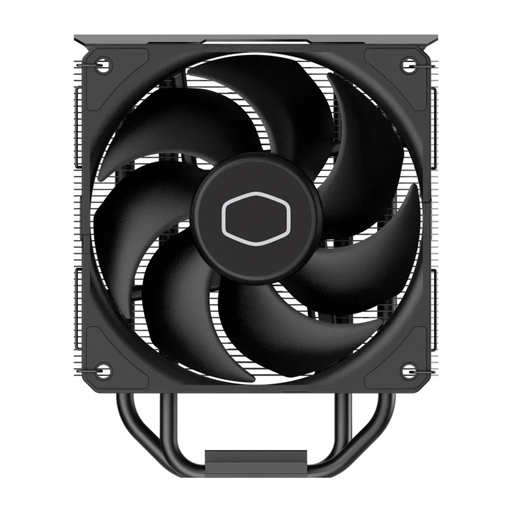
Why this choice suits this profile : This CPU air cooler is ideal for a first installation or a typical gaming system. Measuring 125 × 74 × 152 mm, it is easier to accommodate than a large liquid-cooling radiator.
Compatibility covers Intel LGA 1851/1700 and AMD AM5/AM4 sockets. Four direct-contact heat pipes and CryoFuze thermal paste are included.
A 120 mm PWM fan, a compact 152 mm height and a stated two-year warranty.
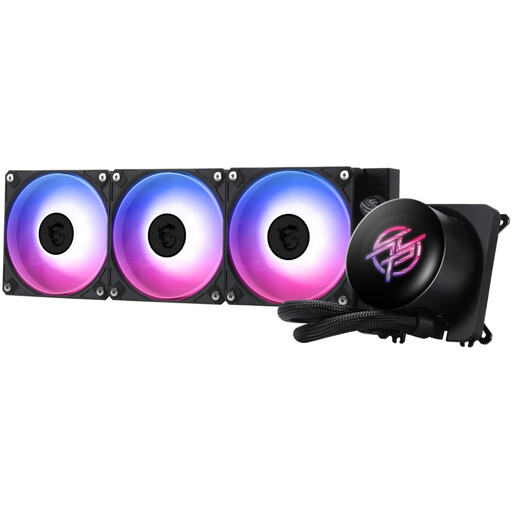
Why this choice suits this profile : This 360 mm AIO is designed for high-end systems that value performance just as much as appearance. It features a 2.1-inch LCD screen and pre-assembled fans to simplify installation.
LGA 1851/1700 and AM4/AM5 compatibility is stated. However, you will need a case capable of accommodating a 360 mm radiator.
A pump rated at up to 3 400 rpm, a 480 × 480 display and connectivity integrated into the tubing, according to the product specification.
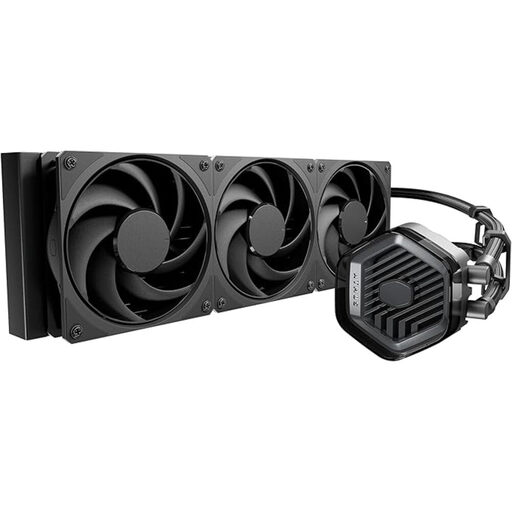
Why this choice suits this profile : With its 360 mm radiator and three Mobius 120 fans, this AIO is built for PCs handling long gaming sessions, content creation or sustained heavy workloads.
The specification lists the radiator dimensions, PWM connectors and compatibility with LGA 1851/1700 and AM5/AM4 sockets. Measure your case before placing an order.
A pump rated at 3 400 ± 300 rpm, pre-installed fans and a stated five-year warranty.
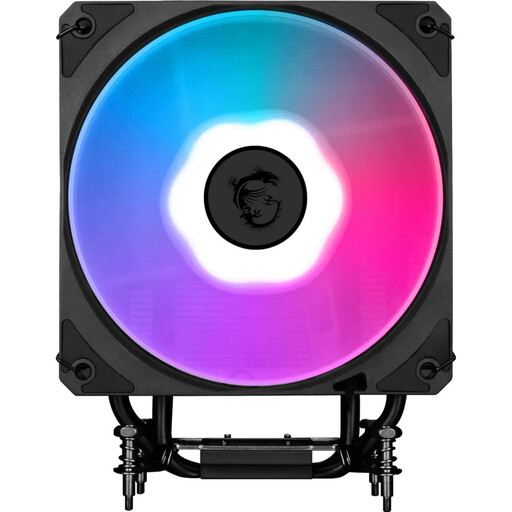
Why this choice suits this profile : This single-tower CPU cooler is just 152 mm tall and adds ARGB lighting. It is an appealing compromise for a gaming PC with an RTX 5060 in a mid-tower case.
Its dimensions, four 6 mm heat pipes and compatibility with LGA 1851/1700 and AM4/AM5 are clearly stated.
Support for up to 240 W TDP, a 120 mm PWM fan and ARGB lighting that can be controlled from a compatible motherboard.
We have brought together a complete, real-time updated selection of products that meet these demanding criteria as well as European safety standards.
For most gaming systems, an air cooler suited to the socket and processor will do the job perfectly well. The RTX 5060 has its own cooling system, so the main points to monitor are the processor, its thermal envelope, airflow through the case and the maximum supported cooler height.
A 240 mm AIO is sealed and does not need refilling. You should still regularly remove dust from the radiator and fans, watch out for unusual pump noises and check for leaks. Installation requires more care than an air cooler, particularly when fitting the radiator and routing the tubes correctly.
It all depends on usage, the amount of dust, bearing quality and maintenance. An air cooler contains few moving parts and can often be kept when changing platforms, provided the manufacturer supplies a suitable mounting kit. An AIO contains a pump and a closed loop, so its lifespan also depends on the warranty, operating conditions and regular monitoring.