
Livraison le jour même ou le lendemain

Qualité garantie

Débloquez vos offres de bienvenue: Livraison GRATUITE | Jusqu'à -80 % | 30 jours d'essai gratuits à JoyPlus
Téléchargez l'application
A hot processor, a noisy case or performance drops during a gaming session can often be traced to an incorrectly sized PC cooling system. Choosing a fan or CPU cooler is not simply a matter of comparing maximum speed or the number of LEDs.
Some features highlighted in product specifications can be misleading when considered in isolation. Here are the main pitfalls to avoid before buying a CPU cooler, case fan or complete kit.
A fan capable of reaching a high speed is not necessarily the best choice for your build. The faster it spins, the more likely it is to become noisy. To make the right choice, consider airflow, static pressure, the bearing type and whether PWM control is available.
A fan fitted to a heatsink or behind a thick dust filter should offer sufficient static pressure in particular. For simple exhaust use, airflow and the case layout will carry more weight.
A cooler compatible with AM5, AM4 or LGA 1700 sockets may still be impossible to install in your case. Before placing your order, check the maximum CPU cooler height, the space available around the RAM modules and the maximum graphics card length supported.
For example, a 152 mm-high model will not fit in a case limited to 150 mm. Two millimetres can be enough to make installation impossible.
An ARGB fan generally uses a 5 V 3-pin connector. Do not confuse it with a 12 V 4-pin RGB connector: these two standards are not interchangeable. An unsuitable connection could damage the lighting system.
The 4-pin PWM connector, on the other hand, is used to control rotation speed. In most cases, the lighting and fan therefore require two separate connections.
For a recent Intel build, check support for LGA 1700 or LGA 1851, depending on your motherboard. For AMD, AM5 and AM4 remain the most common sockets, although mounting systems can vary.
Simply stating “Intel AMD cooler” is therefore not enough. Check the precise list of compatible sockets provided by the manufacturer and make sure the mounting kit is included.
Start by measuring the maximum height supported by the case, then check the width of the heatsink. A dual-tower model may also overlap the RAM slots.
As a guide, the Cooler Master Hyper 212 Black is 152 mm high, while the Cooler Master V4 Alpha 3DHP Black reaches 161 mm. These dimensions must be compared with your case specifications.
The TDP stated by the manufacturer provides a general indication, but does not guarantee a specific temperature in every build. Results also depend on case ventilation, thermal paste, ambient temperature and processor settings.
For fans, compare the values expressed in CFM, mmH₂O and dBA. Ideally, consider them together rather than relying on a single figure. A 120 mm PC fan with a PWM connector will generally allow the motherboard to adjust its speed automatically, helping to reduce noise when the system is idle.
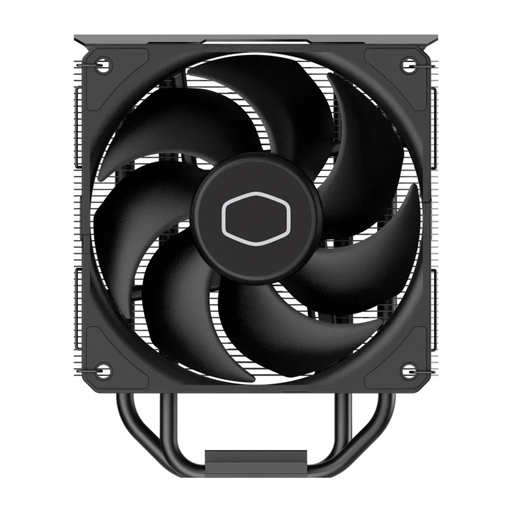
Why this choice suits this profile : This CPU cooler combines a straightforward installation, a height of 152 mm and compatibility with Intel LGA 1851/1700 and AMD AM5/AM4 sockets. It is a worthwhile first upgrade over the standard cooler supplied with your processor.
Its four direct-contact heat pipes and included CryoFuze thermal paste mean you do not have to choose several essential accessories separately.
120 mm PWM fan, four heat pipes and a stated speed of 690 to 2 500 rpm.
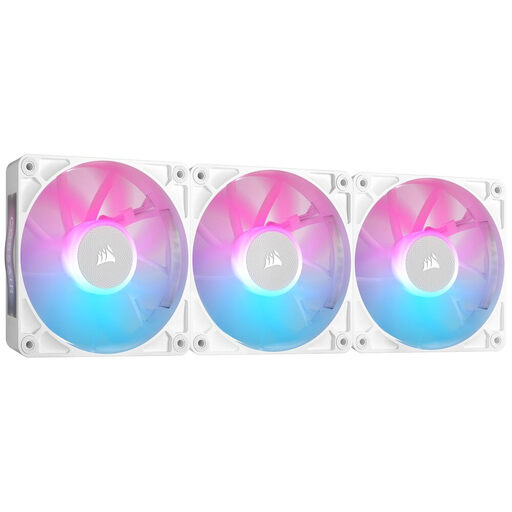
Why this choice suits this profile : This three-fan kit is designed for builds that require a tidy installation, centralised management and a white aesthetic enhanced by RGB lighting.
The kit includes the iCUE LINK hub and modular connections, helping to prevent a tangle of cables during installation.
Three 120 mm fans, PWM control and lighting managed via the iCUE LINK system.
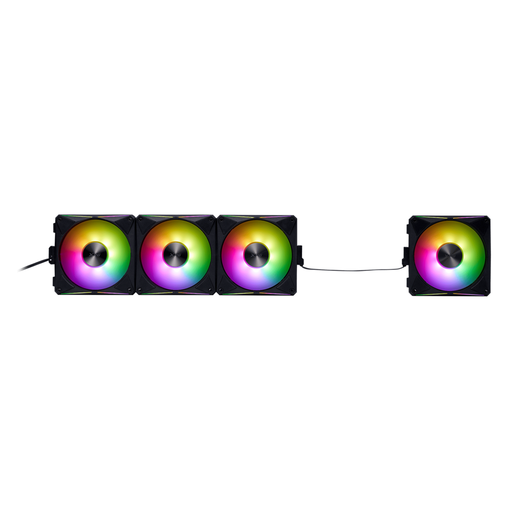
Why this choice suits this profile : This 120 mm ARGB PWM fan is ideal for gamers and content creators adding multiple fans to their case while wanting to keep cabling simple.
Its magnetic daisy-chain design reduces the number of visible cables while retaining PWM control and a separate ARGB connection.
Magnetic daisy-chain connection, PWM control and customisable ARGB lighting.
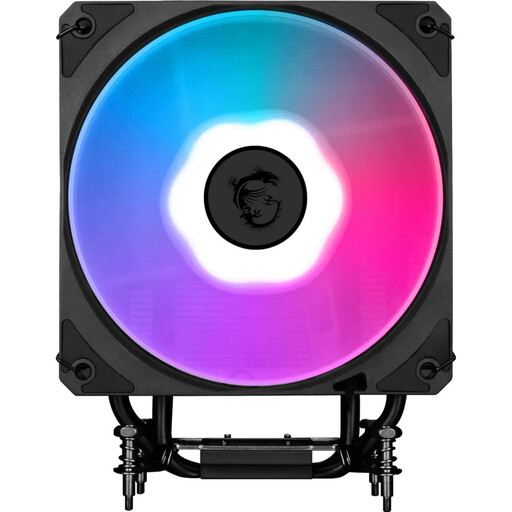
Why this choice suits this profile : This compact air cooler is designed for Intel LGA 1700/1851 and AMD AM4/AM5 builds with no more than 152 mm of clearance.
Detailed compatibility information, pre-applied thermal paste and a PWM connector reduce the checks and accessories needed for installation.
Four 6 mm copper heat pipes, 120 mm CYCLOBLADE 7 fan and a stated TDP of up to 240 W.
We have put together a complete, real-time-updated selection of products that meet these demanding criteria as well as European safety standards.
Before carrying out any work, switch off the computer, unplug the mains cable and wait until all fans have stopped completely. To install a CPU cooler, clean the processor surface with a suitable product and check that the thermal paste has been applied correctly.
For case fans:
Regular cleaning helps maintain airflow and limit heat build-up. However, fan lifespan depends on the type of bearing, the amount of dust, the ambient temperature and how intensively the fan is used.
It allows more precise speed control through its 4-pin connector. The motherboard can then automatically adjust cooling according to the temperature of the processor or case. However, check that the connector and motherboard settings are compatible.
Air cooling is generally easier to install and has neither a pump nor a liquid circuit. A suitable CPU cooler is ideal for many gaming, content creation and office builds. The choice mainly depends on the processor, the space available and the noise level you want to achieve.
There is no universal rule. A properly ventilated case can start with one intake fan and one exhaust fan, then be expanded according to the graphics card, processor and internal layout. Before buying a PC fan kit, check the available mounting positions and the number of headers on the motherboard.