
Livraison le jour même ou le lendemain

Qualité garantie

Débloquez vos offres de bienvenue: Livraison GRATUITE | Jusqu'à -80 % | 30 jours d'essai gratuits à JoyPlus
Téléchargez l'application
An Intel or AMD processor can become unstable when heat builds up inside the case. However, choosing a PC cooling system is not simply a matter of picking the model with the highest RPM. Compatibility, airflow and noise levels are just as important.
To help you avoid buying an unsuitable product, here are the main pitfalls to watch out for, the specifications to check and a selection of recommended solutions for different configurations.
A fan that spins quickly is not necessarily the most effective. Airflow, static pressure, blade design and bearing quality all play a part. On an AIO liquid cooler’s radiator or behind a poorly ventilated front panel, static pressure is particularly important.
A 120 mm PC fan with PWM control can adjust its speed according to the processor’s temperature. This regulation prevents it from running at full power all the time and helps limit noise during lighter tasks.
An ARGB fan generally uses a 5 V 3-pin connector, which differs from a 12 V 4-pin RGB connector. Connecting it to the wrong header can damage the lighting. Also check how many connectors are available on your motherboard, or plan to use a compatible controller.
Systems with daisy-chaining, such as some CORSAIR fans, can simplify cable management. However, a proprietary solution such as iCUE LINK requires the supplied hub and a suitable power supply.
A 240 mm liquid cooler or 360 mm liquid cooling system will not fit in every case. Check the following carefully:
A 360 mm model provides a large heat-dissipation surface, but it requires a sufficiently spacious chassis.
Start by identifying your motherboard’s socket. Several products in this selection support Intel LGA 1851 and LGA 1700 sockets, as well as AMD AM5 and AM4 platforms. This information should be checked on the product page and in the installation manual.
For an Intel or AMD CPU cooler, having a suitable mounting kit does not necessarily guarantee support for every generation. Check the exact socket reference before placing your order.
A CPU air cooler uses heat pipes and metal fins to transfer heat into the air. The MSI MAG CoreFrozr AA13, for example, features four 6 mm copper heat pipes according to its specifications, has a height of 152 mm and supports Intel LGA 1700/1851 and AMD AM4/AM5 sockets.
Dual-tower models, such as the XPG MAESTRO PLUS Dual and the Cooler Master Hyper 612 APEX, feature two fans and a larger heat-transfer surface. They can be suitable for processors under heavy load from gaming, content creation or computation, provided there is enough space around the heatsink and memory modules.
The noise level shown in dB(A) generally corresponds to a specific test condition, often measured at maximum speed. It therefore does not necessarily reflect the noise you will hear inside your case. A correctly configured PWM curve in the BIOS can keep a quiet PC fan during office work, then gradually increase airflow when the processor is under heavy load.
For case fans, make sure you create a consistent airflow pattern: intake at the front or bottom, and exhaust at the rear or top. Regularly remove dust from the blades and filters, with the PC switched off and unplugged. With a sealed liquid cooling system, never dismantle the pump or tubes.
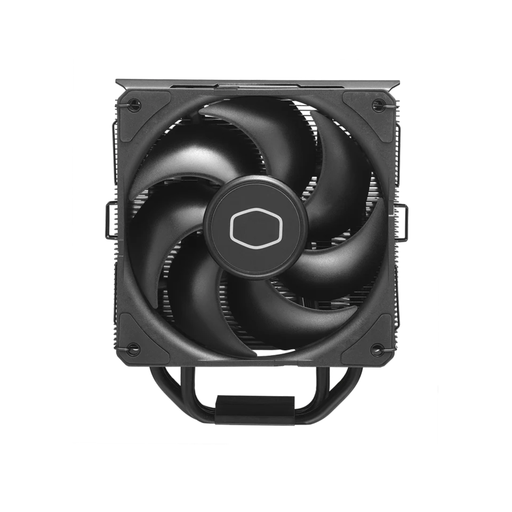
Why it suits this profile : this CPU air cooler is easy to install and uses a dual-fan design, with no external radiator or pump.
Its 152 mm height and Intel/AMD compatibility, as stated on the product page, make pre-installation checks easier.
Two SickleFlow 120 Edge fans, four direct-contact heat pipes and 4-pin PWM connectivity.
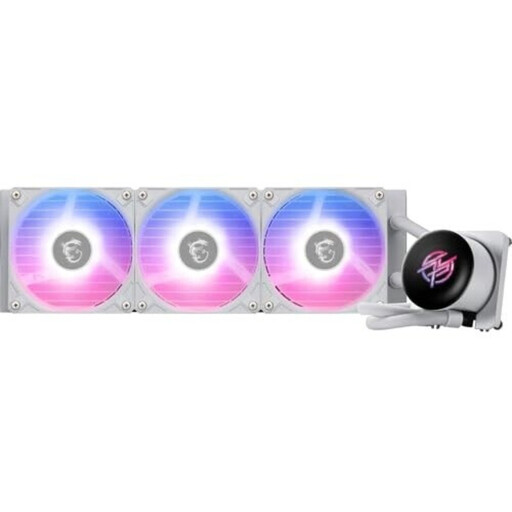
Why it suits this profile : this 360 mm liquid cooling system combines a white finish, a 2.1-inch LCD screen and pre-installed fans.
The radiator dimensions and compatibility with LGA 1700/1851 and AM4/AM5 are clearly specified, helping to reduce the risk of installation errors.
394 × 120 × 52 mm radiator, pump rated at up to 3,400 RPM and a 480 × 480-pixel display.
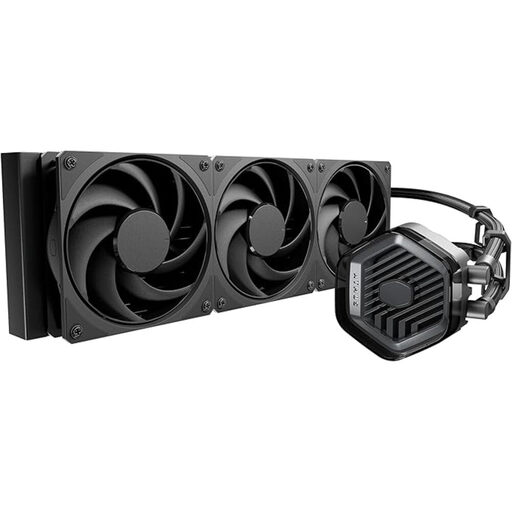
Why it suits this profile : its 360 mm format and three fans are well suited to heavily used gaming or content creation systems, provided the case can accommodate them.
The product page lists the dimensions, supported sockets and PWM connectors : all useful details for validating your configuration before buying.
Three pre-installed Mobius 120 fans, six Intel/AMD compatibility profiles and a pump rated at 3,400 RPM.
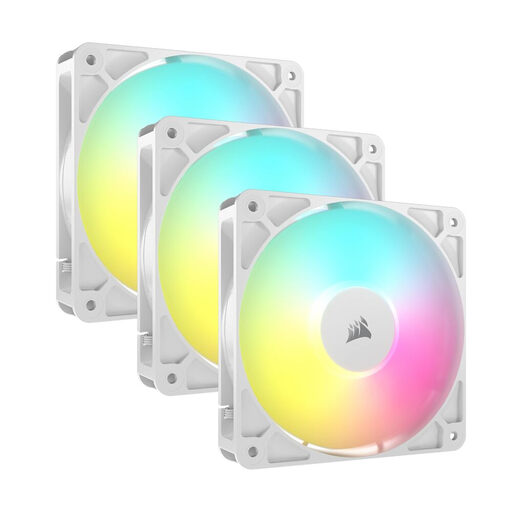
Why it suits this profile : this set of three white PC fans looks great in a glass-sided case and is suitable for builds seeking consistent airflow.
The 4-pin PWM and 5 V 3-pin ARGB connectors are clearly specified, while the daisy-chaining function helps reduce cable clutter.
Three 120 mm fans, a magnetic-dome bearing, anti-vibration pads and PWM control.
We have put together a complete, real-time updated list of products that fully meet these strict selection criteria and European safety regulations.
A CPU air cooler is generally easier to install and contains no liquid circuit. It is suitable for many gaming and office configurations. An AIO liquid cooler can free up space around the socket and offer a 240 or 360 mm radiator, but it requires more checks regarding the case, cabling and pump position.
It depends on the chassis and the components installed. A typical configuration includes at least one front intake and one rear exhaust. A three-fan kit can supplement this setup, but it will not resolve issues caused by a poorly filtered case or airflow blocked by cables.
No. ARGB is an aesthetic feature that does not directly lower temperatures. Before thinking about lighting effects, check the airflow, static pressure, PWM control, dimensions and compatibility with the motherboard. Lighting can then enhance the appearance of your build, but it can never replace thermal performance criteria.