
Livraison le jour même ou le lendemain

Qualité garantie

Débloquez vos offres de bienvenue: Livraison GRATUITE | Jusqu'à -80 % | 30 jours d'essai gratuits à JoyPlus
Téléchargez l'application
A computer that runs too hot can become noisier, less comfortable to use and may automatically reduce the processor’s clock speed. Choosing a PC cooling solution, however, is not simply a matter of selecting the model with the highest airflow or the most LEDs.
Among PC gamers, system builders and hardware enthusiasts in France, three mistakes come up regularly:
The selection below is based on specifications announced by the manufacturers. It makes it easier to compare the different solutions according to your processor, case, noise expectations and preferred aesthetic.
A CPU cooler or liquid cooling system must be compatible with the motherboard socket. The models featured here support several widely used platforms, including Intel LGA 1700 and LGA 1851, as well as AMD AM4 and AM5.
Before placing your order, check:
A CPU cooler measuring 152 mm in height will fit in many mid-tower cases. This measurement must nevertheless be compared with the chassis specifications.
A 240 mm AIO liquid cooler requires space for two 120 mm fans and a radiator approximately 277 mm long, depending on the model. A 360 mm AIO uses three 120 mm fans and requires more length, thickness and clearance for routing the tubes.
When choosing a PC case compatible with a 360 mm radiator, check several points:
The Cooler Master Elite 600, for example, advertises support for two 360 mm radiators and a CPU cooler up to 160 mm tall. The Cooler Master Elite 502 supports a front radiator up to 420 mm and a top-mounted model up to 360 mm. This information does not replace checking your complete configuration.
A case fan installed for intake does not serve exactly the same purpose as one mounted on a radiator. Static pressure becomes important when air has to pass through closely spaced fins or a dust filter. Airflow is more useful for refreshing air in an unobstructed space.
To achieve a balanced airflow setup:
Anti-vibration pads, magnetic bearings and hydrodynamic bearings can help reduce vibration. Noise levels also depend on the PWM curve, the case and the load placed on the processor.
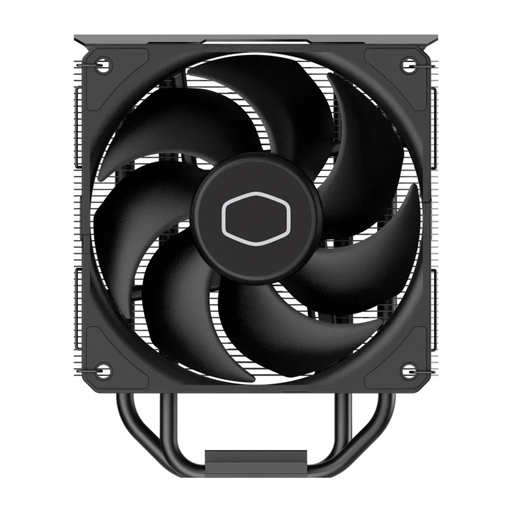
Why it suits this profile: A discreet CPU air cooler for a first Intel or AMD build, with no pump or radiator to maintain.
At 152 mm tall, with support for Intel LGA 1851/1700 and AMD AM5/AM4, its compatibility is easy to verify before installation.
Four direct-contact heat pipes, a 120 mm PWM fan and a rated speed range of 690 to 2,500 rpm.
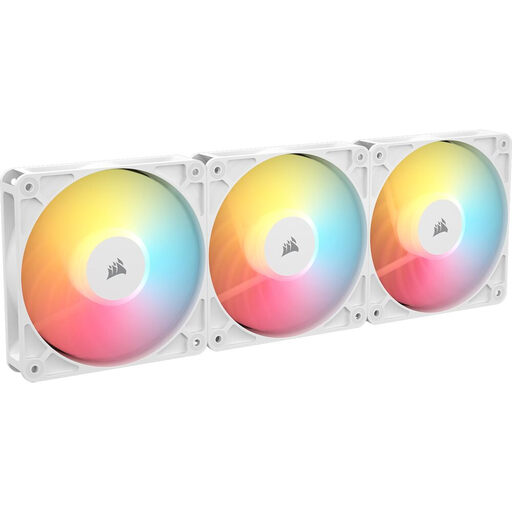
Why it suits this profile: A three-pack of white 120 mm fans for a cohesive, well-ventilated PC case, with side or bottom intake.
The 5 V 3-pin ARGB connection and daisy-chaining are supported. You should still check that the motherboard has the corresponding header.
Reverse-airflow blades, PWM control and anti-vibration pads at all four corners.
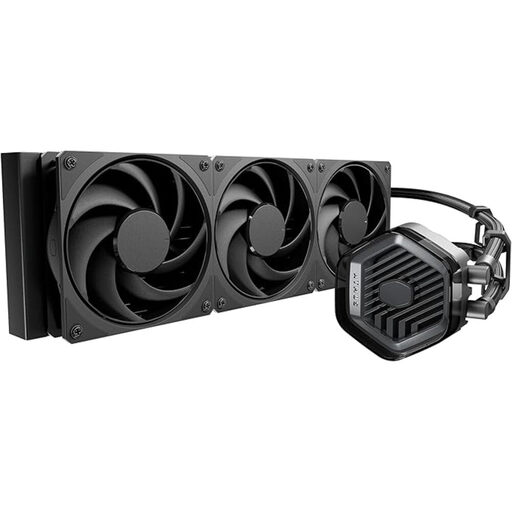
Why it suits this profile: A cooling kit designed for demanding systems, provided the case can accommodate a 360 mm radiator.
The radiator, three Mobius 120 fans and Intel/AMD compatibility are clearly specified. Nevertheless, check the available mounting position and total thickness.
A 394 × 119.2 × 27.2 mm radiator, a pump rated at 3,400 rpm and a 5-year manufacturer warranty.
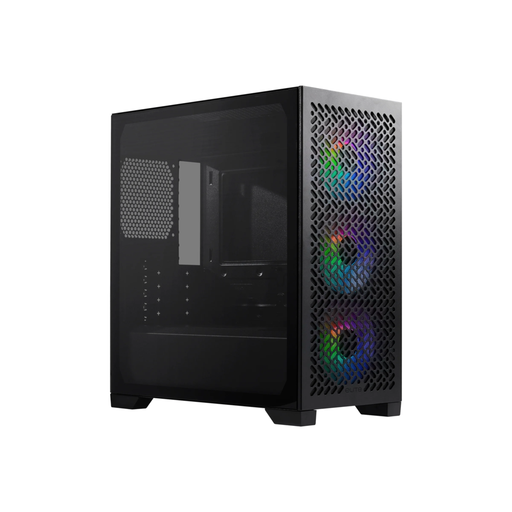
Why it suits this profile: A Mini-ITX or Micro-ATX case for building a space-efficient gaming machine while retaining several cooling options.
The maximum dimensions for the graphics card, CPU cooler and radiator are specified, reducing the risk of purchasing incompatible components.
Three pre-installed ARGB fans at the front and support for a front-mounted radiator up to 360 mm.
Before carrying out any work, shut down the computer, unplug the power cable and wait until all fans have stopped completely. With a liquid cooling system, never puncture the tubes or disassemble the closed loop. In the event of a leak, immediately disconnect the power and stop using the hardware.
To maintain stable temperatures while gaming:
We have put together an up-to-date selection of solutions that meet these compatibility, airflow and installation requirements for systems in France.
No. A correctly sized CPU air cooler is sufficient for many gaming systems. A 240 mm or 360 mm AIO can make sense with a more power-hungry processor, a case with the appropriate mounting position or when a particular aesthetic is important.
It depends on the case and the installed components. Two intake fans and one exhaust fan are a very common starting point. Airflow balance, dust filters and the PWM curve matter just as much as the number of fans.
120 mm fans generally consume very little compared with the processor and graphics card. A liquid cooling system adds the power draw of the pump. To estimate the real cost, check the rated power, your daily usage time and your electricity provider’s tariff.