
Livraison le jour même ou le lendemain

Qualité garantie

Débloquez vos offres de bienvenue: Livraison GRATUITE | Jusqu'à -80 % | 30 jours d'essai gratuits à JoyPlus
Téléchargez l'application
Building your own PC is an adventure. Meticulously choosing each component, assembling them, and seeing the machine power on for the first time... it's a satisfaction every enthusiast knows. But that euphoria can quickly turn to disappointment, especially over one crucial detail: cooling. One wrong choice, and your brand-new gaming PC turns into a jet engine with throttled performance. To help you avoid this pitfall, we've broken down the subject and identified the mistakes you absolutely must not make.
CPU Cooling: The 3 Mistakes to Avoid
Before you pull out your credit card, let's review the few technical specifications that will make all the difference. This is your guarantee of a balanced and long-lasting build.
The essential starting point: compatibility. Your CPU cooler must be compatible with your motherboard's socket. For a new build today, that means Intel LGA1851 / 1700 and AMD AM5 sockets. This simple check will save you from massive frustration during assembly.
Next, ensure the system you choose can dissipate the heat generated by your processor (its TDP, or Thermal Design Power). A high-end CPU designed for overclocking will require a much beefier AIO (All-in-One) water cooling system than a simple office processor.
When it comes to AIO water cooling, radiator size is crucial. There are three main formats:
Also, remember to check the fans' static pressure (in mmH2O). A high value is essential to force air through the dense fins of a radiator.
Good cable management is more than just for looks. A clean and tidy case interior ensures unobstructed airflow, which benefits all of your PC components. Tricks like daisy-chainable fans are life-changers, simplifying assembly and drastically reducing the number of cables. For a picture-perfect finish, cable ties and adhesive guides are your best friends.
Rather than a random list, we've selected three solutions tailored to specific user profiles. It's up to you to find the one that fits.
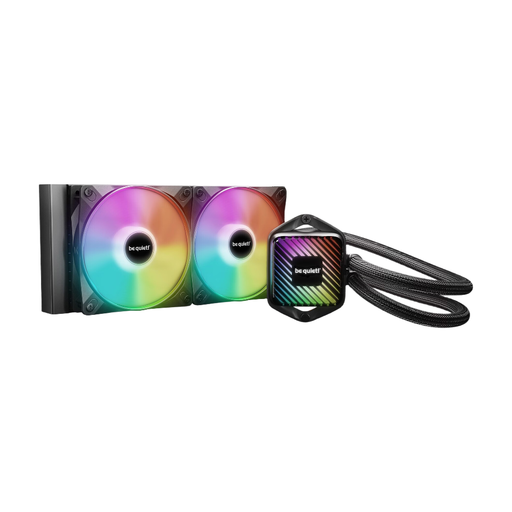
Why we chose it: Perfect for those who demand a flawless look without sacrificing performance. Its customisable ARGB lighting (fans and water block), with 10 interchangeable films, offers nearly endless stylistic freedom.
It balances tasteful ARGB lighting with the high-performance cooling be quiet! is known for. You're guaranteed not to have to choose between style and efficiency.
High-performance and quiet PWM pump; extensive aesthetic customisation; easy installation thanks to flexible tubing.
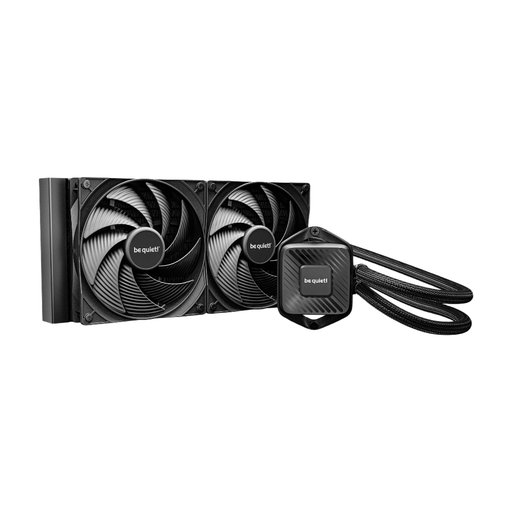
Why we chose it: For those who can't stand the slightest unwanted noise. Its 280mm radiator and two 140mm fans excel at low speeds, ensuring near-monastic silence for total concentration.
It gets straight to the point: acoustic performance. By relying on larger fans and a 6-pole pump, it remains nearly inaudible, even when the processor is under heavy load.
Virtually inaudible operation; clean installation thanks to daisy-chain connection; easy maintenance via the refill port.
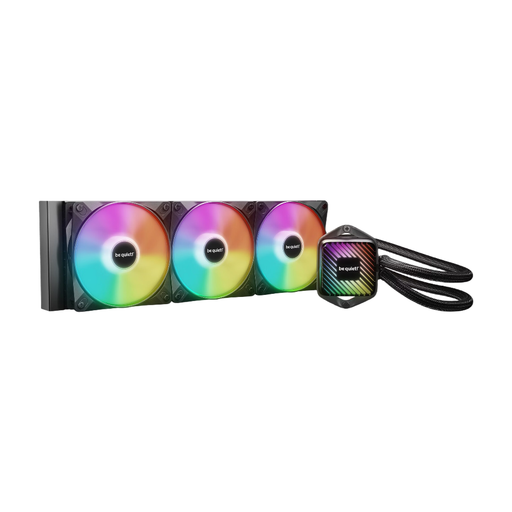
Why we chose it: The ultimate solution for those who refuse to compromise. Its 360mm radiator delivers maximum cooling power, ideal for taming the most power-hungry processors, overclocking, and video rendering or gaming marathons.
It brings together the best of both worlds: extreme cooling capacity to eliminate any risk of thermal throttling, and a sleek ARGB aesthetic.
Maximum cooling potential with its 360mm radiator; three Light Wings LX PWM high-speed fans; simplified cable management via daisy-chaining.
Impeccable cable management is the finishing touch on any great build. Discover our selection of accessories to organise, sleeve, and secure every cable in your PC.
A good AIO water cooler has an average lifespan of 5 to 7 years. The most common points of failure are the pump and the natural evaporation of the liquid over time. Models equipped with a refill port, like those in the Pure Loop 3 series, allow you to extend this lifespan with regular maintenance.
No, modern AIO kits are designed for simple installation. The manuals are clear, and unlike a custom water cooling loop, no plumbing knowledge is required. The only real thing to watch out for is the compatibility of the radiator's dimensions with your case.
The choice mainly depends on three things: your processor, your case, and your budget.