
Livraison le jour même ou le lendemain

Qualité garantie

Débloquez vos offres de bienvenue: Livraison GRATUITE | Jusqu'à -80 % | 30 jours d'essai gratuits à JoyPlus
Téléchargez l'application
A cluttered desk, a poorly protected laptop or a PC case that’s too small can quickly turn a practical purchase into a waste of money. Storage solutions and computer accessories meet a wide range of needs: organising cables, filing documents, protecting a mobile device or building a gaming PC.
To make an informed choice, look beyond the photos and marketing promises. The factors that matter in everyday use include usable capacity, internal dimensions, component compatibility and material quality.
A plastic storage box may look spacious, but hinges, handles and dividers can take up a surprising amount of room. Before placing your order, check the internal dimensions if they’re available and compare them with the items you want to store.
For clothes, accessories or stationery, a foldable storage organiser can save space when it’s not in use. However, be sure to check the recommended maximum load: a foldable storage unit isn’t designed to hold heavy or sharp items indefinitely.
A gaming PC case with tempered glass may show off your components beautifully, but that doesn’t necessarily mean it’s compatible with your motherboard, graphics card or power supply. An ATX PC case will generally need more space than a compact model, too.
Be sure to check:
Phrases such as “optimised airflow”, “large capacity” or “enhanced protection” should be backed up by specific details. If a PC case is promoted as optimised for airflow, check the panel types, number of fan positions and supported radiator sizes.
For a laptop sleeve, focus instead on the internal dimensions, padding, fastening system and whether it has a pocket for a charger or mouse. A surface described as splash-resistant doesn’t make the sleeve waterproof.
A storage solution should suit the way you use it. For cables and small peripherals, separate compartments stop everything becoming tangled together. For paperwork, a vertical desk organiser for documents with several compartments keeps files close at hand without taking over your entire workspace.
SPACEXPERT boxes are available in 12 L, 20 L and 50 L sizes, with a lid, handle and clips on selected models. The 12 L model is suitable for small accessories and stationery, while the 50 L option is better suited to storing bulkier items. The transparent design lets you see what’s inside at a glance, without having to open every box.
Small items need the right kind of organisation. A jewellery box with a removable tray, hooks and dividers helps keep rings, earrings and chains separate. A weekly pill organiser should have easy-to-read markings and compartments that suit your routine. Of course, it’s no substitute for advice from a healthcare professional.
Transparent plastic is easy to clean and lets you see what’s inside straight away, but take care not to exceed the recommended load. Foldable fabric is lightweight and easy to store, but should be kept away from damp, heat and anything that could snag it.
For a metal desk organiser, check its stability and the quality of the finish. The Senhoglb document holder shown below has four vertical compartments for A4 documents and non-slip EVA feet. For everyday cleaning, a dry cloth is all you need.
When handling a PC case with tempered glass, place the panels on a soft surface and avoid knocks around the corners. Never use the glass as a handle when moving the case.
Cooling depends on the entire setup: components, fans, radiators and cable management. A case with a mesh panel can improve airflow, provided you don’t block the openings. Remember to check the space available for your graphics card, especially if a side-mounted radiator is installed.
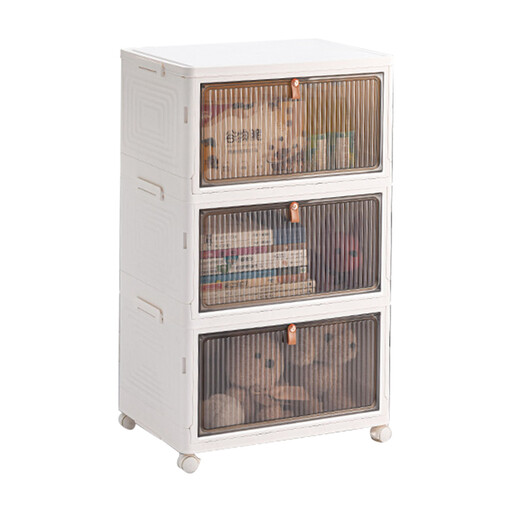
Why it suits this shopper: Its foldable design and three tiers make it easy to organise a bedroom, home office or student space without installing a permanent unit.
The separate tiers stop books, snacks or shoes from being piled into one box where everything becomes hard to find.
Three tiers, an extra-large size and a foldable frame to suit a wide range of uses.
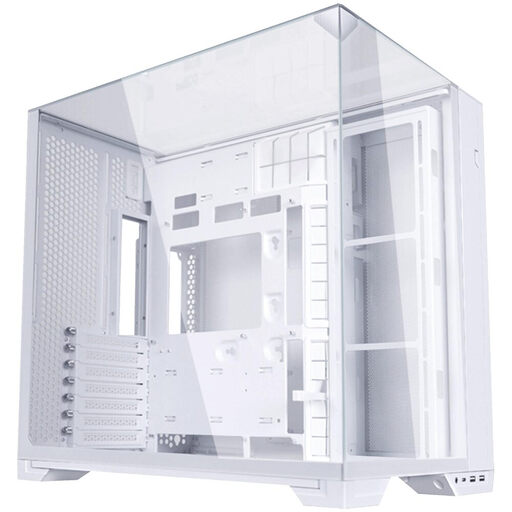
Why it suits this shopper: Its dual-chamber design and tempered glass panels are ideal if you want your PC to look as good as it performs.
The listed dimensions make it easier to check compatibility before you buy: graphics cards up to 408 mm and ATX power supplies up to 220 mm.
Three tempered glass panels, seven PCIe slots and support for ATX, Micro-ATX and Mini-ITX motherboards.
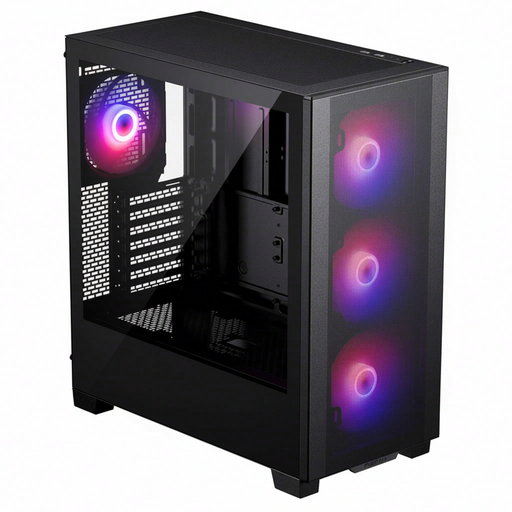
Why it suits this shopper: If you’re building a gaming PC or a powerful workstation, you’ll benefit from the spacious chassis and wide range of cooling options.
Compatibility limits are clearly listed: graphics cards up to 415 mm, CPU coolers up to 184 mm and power supplies up to 270 mm.
Four included 140 mm D-RGB fans, E-ATX compatibility and support for radiators up to 360 mm.
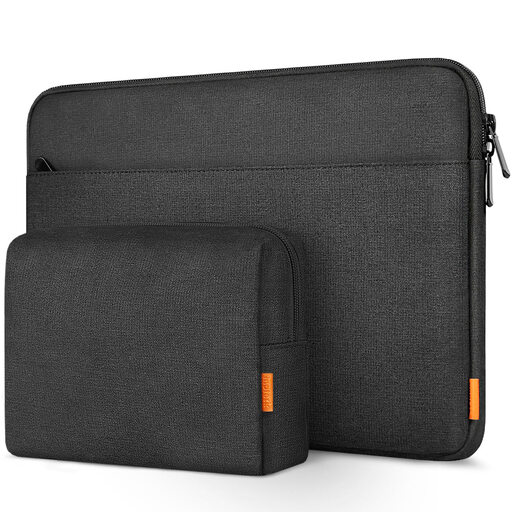
Why it suits this shopper: Its accessory compartment and internal dimensions, designed for 15 to 15.6-inch laptops, make it a good fit for journeys between home, campus and the office.
The product details list external and internal dimensions separately, making it easier to check whether the sleeve will fit your laptop.
Multi-layer padding, a soft lining, a dual zip and a pocket for cables, cards or a mouse.
We’ve put together a comprehensive selection, updated in real time, of products that meet these exacting criteria while complying with European safety regulations.
Measure your laptop’s length, width and thickness, then compare these measurements with the sleeve’s internal dimensions. The stated screen size, such as 15 or 15.6 inches, isn’t always enough: bezels and chassis designs vary from one model to another.
Not necessarily. Temperatures depend on the internal volume, air intake and exhaust, number of fans and component power. However, with a compact PC case, you’ll need to check clearances and cable routing more carefully.
Stick to the maximum load, distribute the weight evenly and avoid high temperatures. Clean the box with a gentle cleaner and dry it before closing. Check the clips, handles and lid regularly for signs of wear.