
Livraison le jour même ou le lendemain

Qualité garantie

Débloquez vos offres de bienvenue: Livraison GRATUITE | Jusqu'à -80 % | 30 jours d'essai gratuits à JoyPlus
Téléchargez l'application
A cartridge might seem suitable just because it carries the HP logo or looks like the one already fitted in your printer. However, a similar reference number doesn’t guarantee compatibility or the same page yield. To avoid receiving a cartridge you can’t use, it’s best to check a few key details before ordering original HP ink cartridges.
This guide is for individuals, students, remote workers, families and small businesses who use an HP DeskJet, ENVY, OfficeJet, OfficeJet Pro, Photosmart or Tango printer.
The references HP 301, HP 302, HP 303, HP 305, HP 364, HP 62, HP 912, HP 903, HP 924, HP 933 and HP 937 are not interchangeable. An HP 301 cartridge won’t automatically work in a printer designed for an HP 302, even if their outer shape looks similar.
The product range name alone isn’t always enough. An HP ENVY can use different references depending on the exact model. So check the number printed on your old cartridge, in the printer menu or in its manual.
An HP XL cartridge contains more ink, but whether it’s worthwhile depends on how often you print and how long it will be before you use it. For occasional use, a standard cartridge can prevent an opened cartridge sitting around for too long. On the other hand, for regular printing, the high-yield option reduces how often you need to replace it.
The stated yields are generally measured according to the ISO/IEC 24711 standard. They are only a guide: the actual number of pages depends on ink coverage, whether images are included and the cleaning cycles of the print head.
An HP cartridge pack might contain a black and a tri-colour cartridge, or all four colours in separate cartridges. Compare the exact contents of the bundle, the yield of each cartridge and the compatible reference. A pack that’s cheaper to buy isn’t necessarily more economical if you rarely use the colour cartridge or if its yield doesn’t match your needs.
This is the number one criterion. Note down the full model, for example HP ENVY Photo 6230, HP OfficeJet Pro 8025 or HP DeskJet 3630, then compare it with the product’s compatibility list. A cartridge compatible with an HP printer must match both the range and the exact model.
Never force a cartridge into its slot. Its shape, electronic contacts and identification chip are designed for a specific printer family.
A black HP cartridge may contain pigment ink, which is particularly well suited to text and business documents. For some home printers, a colour HP cartridge combines cyan, magenta and yellow in a single tank. Professional models often use four separate cartridges.
Before ordering, decide whether you need to replace only the black, only the colour, or the full set of cyan, magenta, yellow. Buying a complete pack when only one cartridge is empty can unnecessarily push up your running costs.
The yield, expressed in pages, lets you compare products on a common basis – as long as you take the standard used into account. As a guide, the HP 303 black T6N02AE is rated for around 200 pages, while the HP 303XL tri-colour T6N03AE is rated for around 415 pages according to the ISO/IEC 24711 standard.
The type of ink also matters. A pigment black cartridge is generally preferred for sharp, long-lasting text. Dye-based colour inks are often used for illustrated documents and photos. Some ranges, such as the HP 912 and HP 937 shown below, use pigment ink for all four colours.
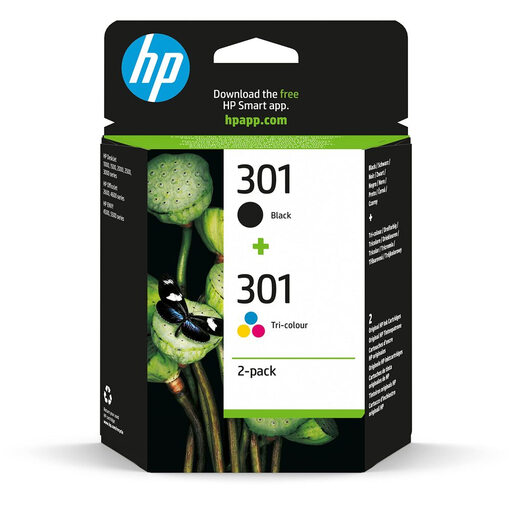
Why this choice suits this profile: This pack brings together a black and a tri-colour cartridge for the everyday needs of a student, a household or an occasional user. It works with several specific models in the HP DeskJet, ENVY and OfficeJet ranges.
The pack contents are clearly defined and the stated yield reaches around 190 pages in black and 165 pages in colour, according to the ISO/IEC 24711 standard.
Two original HP cartridges, with pigment black ink and dye-based colour ink.
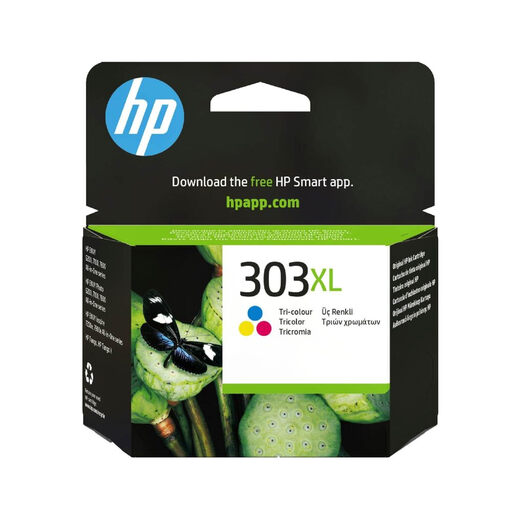
Why this choice suits this profile: This XL version is aimed at users of an HP ENVY Photo or an HP Tango who regularly print illustrated documents and colour images.
The high-yield format reduces how often you need to replace it, with around 415 pages stated according to the ISO/IEC 24711 standard.
Tri-colour cartridge with cyan, magenta and yellow, using dye-based ink and offering a higher capacity than the standard format.
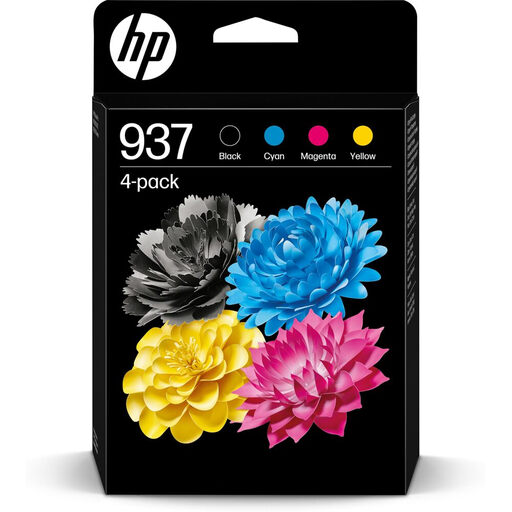
Why this choice suits this profile: This four-cartridge pack is aimed at small businesses and remote workers who use an HP OfficeJet Pro 9110b, 9120e, 9130e, 9720 or 9730.
The four colours are separate and their yields are clearly stated: around 1,450 pages for black and 800 pages for each colour.
Pigment black and colour ink, integrated RFID chip and a format designed for sustained print volumes.
We’ve put together a complete, real-time updated list of products that fully meet these strict selection criteria and European safety regulations.
Keep cartridges in their sealed packaging until you’re ready to replace them. Install them straight after removing the protective tape, without touching the copper contacts or the metal nozzle. Once the cartridge is inserted, check it clicks into place, then run a test page.
Store cartridges vertically, in a dry place away from direct sunlight and extreme temperatures. Don’t attempt to refill, pierce or dismantle an original HP cartridge. Used cartridges can be taken to a collection point or appropriate recycling scheme.
Start by noting the reference printed on your current cartridge or shown in the HP software. For example, HP 301 cartridges work with certain DeskJet 1050, 1510, 2540 and ENVY 4500 models, while HP 62 cartridges are designed for several ENVY 5540 and OfficeJet 5740 models. Checking the full model number is still essential.
Not necessarily. A high-yield cartridge can be worthwhile if you print regularly and will use the ink before a long storage period. For just a few pages a month, compare the price, the ISO/IEC 24711 yield and how long you expect to use it.
Keep it sealed, upright, in a temperate, dry environment. Check the date or any information on the packaging. Once opened, install it promptly to reduce the risk of the nozzle drying out and causing print defects.