
Livraison le jour même ou le lendemain

Qualité garantie

Débloquez vos offres de bienvenue: Livraison GRATUITE | Jusqu'à -80 % | 30 jours d'essai gratuits à JoyPlus
Téléchargez l'application
With features presented as essential, incompatible accessories and products that are impractical for everyday use, buying office accessories and electronic devices calls for a few checks. Parents, students, home workers and readers do not have the same needs: an electronic diary for a child is not chosen in the same way as an e-reader with a stylus or a keyboard and mouse set.
Here are the criteria to review before placing your order, along with a selection of products suited to different uses in France.
Facial recognition, backlighting, wireless connectivity and handwritten note-taking can all be useful, provided they meet a real need. A child aged 6 to 12 will prioritise a fun, easy-to-use interface, while a student will mainly want to annotate PDFs, store course materials and carry their device around easily.
So take the time to check which features are actually available, how they are activated and which accessories are included. A stylus sold separately, a missing USB-C cable or a wireless receiver that is difficult to replace can quickly push up the total cost.
For office equipment, keyboard layout is an essential consideration. A QWERTY keyboard is less practical for typing French accents and commonly used characters. Look specifically for French AZERTY, then check compatibility with Windows, macOS or your laptop.
For an e-reader, check the supported formats, synchronisation with your library and the different transfer methods. A large storage capacity is of little use if the device struggles to handle your documents.
A silent mouse can be ideal in a shared office, library or child’s bedroom, but its shape, resolution and feel in the hand remain important. Similarly, an ultra-thin keyboard is easy to carry, but may not offer the best comfort after several hours of typing.
For battery-powered products, check the type of battery used and the stated battery life. For rechargeable devices, check the cable supplied, the recommended charger and the signs that mean you should stop using the device immediately, such as overheating or swelling.
For a wireless AZERTY keyboard and mouse set, check the following points in particular:
A set that uses a single receiver can free up a USB port, which is especially useful on a laptop. However, take care not to lose this small accessory: it may be essential for both peripherals to work.
An e-reader designed for reading and annotation should be assessed based on its screen size, resolution, display technology and stylus precision. A 10.3-inch display provides more space for viewing PDFs than a compact model, but it also takes up more room in a bag.
Also check support for formats such as EPUB and PDF, transfer by cable or online service, Wi-Fi and Bluetooth connectivity, and storage capacity. Converting handwritten notes into text can be convenient, but it does not always eliminate the need to proofread.
An electronic diary for a child should clearly state the recommended age and include warnings about small parts, batteries and magnets. Camera features, voice messages and information relating to friends should ideally be used under adult supervision. Consult the instructions to understand the settings related to facial recognition and the access code.
For school supplies and office equipment, the specifications are simpler, but they are still important: paper weight, format, number of pages, nib type and storage options. An A5 spiral notebook with 70 g/m² paper will suit everyday note-taking, while thicker paper may be preferable when using certain felt-tip pens or markers.
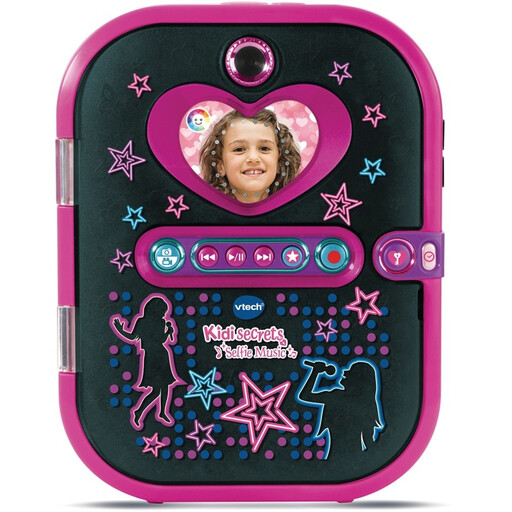
Why this choice suits this profile : This electronic diary combines writing, a camera, music, games and a virtual pet in a device designed for children aged 6 to 12.
The listing mentions facial recognition or a four-digit code, as well as a minimum age of 6. Adult supervision is still recommended for photos, batteries and small parts.
Physical keyboard, colour screen, stated capacity of more than 750 pages, dual camera and 4 LR6 batteries included.
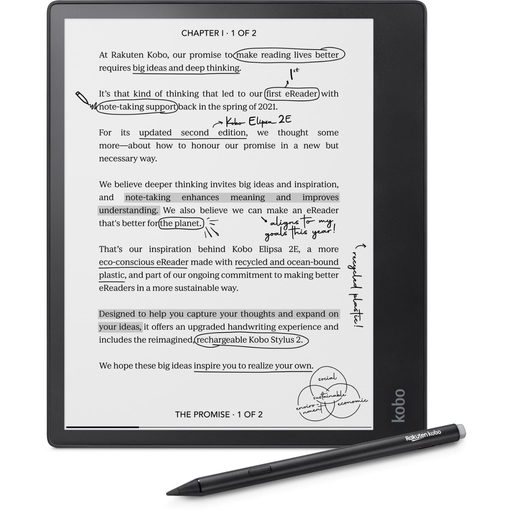
Why this choice suits this profile : Its large 10.3-inch screen is aimed at readers, students and professionals who want to annotate digital books and PDF documents.
The Kobo Stylus 2 is included, so there is no need to buy a stylus separately. Before ordering, however, check the USB-C cable required and compatibility with your file formats.
E Ink Carta 1200 technology, 32 GB storage, Wi-Fi, Bluetooth, USB-C and annotation features with handwritten note conversion.
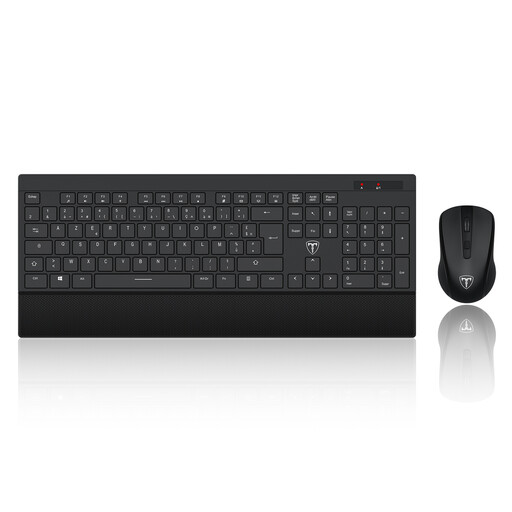
Why this choice suits this profile : This set is suitable for home-working stations, family offices and students who regularly type French text.
The French layout is clearly stated and both peripherals use a single receiver. Nevertheless, remember to check that a USB port is available.
105-key keyboard, stated wireless range of up to 10 metres, wrist rest and power-saving system rated for up to 12 months.

Why this choice suits this profile : It can be suitable for a laptop, a shared workstation or any space where clicking noise becomes disruptive.
The listing mentions a 2.4 GHz connection with a USB receiver and silent clicks. Check port compatibility and the space available around the receiver.
Stated optical resolution of 1,600 DPI, 2.4 GHz wireless connection and quiet-click design.
To complete a workstation or a student’s bag, the WRITECH 0.5 mm black gel pens feature a fine tip, retractable mechanism and a pack of eight. Their quiet operation can be particularly useful in class or at the library. The 0.5 mm tip is suitable for precise writing, although ink flow will always depend on the paper used.
The Deli A5 spiral notebook is sold in packs of four, with 60 sheets, or 120 pages per notebook, and a stated paper weight of 70 g/m². Easy to slip into a bag, it is suitable for lists, lessons and note-taking. Before choosing it, check that the paper works well with your pens to help minimise show-through on the reverse side.
These items can also serve as affordable technology gift ideas, provided you choose them according to their intended use: creative writing for a child, document annotation for a reader or everyday organisation for a student.
Plug in the USB receiver, insert the batteries if necessary, then switch on the keyboard and mouse. If the computer does not recognise the peripherals, try another USB port and consult the instructions. On a recent laptop equipped only with USB-C ports, an adaptor may be required.
Battery life depends on how often the device is used, the type of batteries and the power-saving mode. Some listings state up to 12 months for a keyboard and mouse set, but this figure is indicative and varies according to usage conditions. A rechargeable e-reader must be powered using a compatible cable and charger. If a device is left unused for a long period, it may be best to remove the batteries.
It depends entirely on the level of comfort you are looking for. A notebook, pens and a mouse can supplement existing equipment without adding too much to the cost. A large-format e-reader with a stylus represents a more substantial investment, but combines reading, annotation and note-taking. In every case, compare the accessories included, connections and compatibility before making your choice.