
Livraison le jour même ou le lendemain

Qualité garantie

Débloquez vos offres de bienvenue: Livraison GRATUITE | Jusqu'à -80 % | 30 jours d'essai gratuits à JoyPlus
Téléchargez l'application
A home-working space, study corner or dedicated gaming setup can quickly become cluttered or even uncomfortable. Choosing your office equipment is therefore about more than simply comparing appearance or price. Dimensions, compatibility, power supply and ease of maintenance all have a direct impact on your everyday comfort.
Before placing your order, three mistakes come up time and again:
Here are the main criteria to consider when choosing products suited to your everyday life in France.
Start by measuring the available space before choosing a desk or chair. A 120 × 60 cm desktop is generally enough for a laptop, monitor and a few documents. For two monitors or a more comprehensive setup, a 160 × 70 cm desktop will be considerably more comfortable, provided you have enough distance from the wall in the room.
If you choose an electric sit-stand desk, check the adjustment range, maximum static load and the space required for the desktop to rise. The models featured here offer adjustment ranges of 72 to 118 cm or 72 to 120 cm. Leave a little clearance from the wall and make sure no cable, drawer or object obstructs the movement.
Your chair should also be suited to your build and the height of your desk. Compare the seat height and depth, width, presence of lumbar support and stated maximum load. In a small room, folding armrests can make all the difference: they make it easier to tuck the chair under the desktop.
For office work, a wireless AZERTY keyboard and mouse remove two cables from your desk. However, check the type of receiver, compatibility with your computer and whether there is a numeric keypad if you need one. The ET model featured here works with a single receiver and has a stated range of up to 10 metres.
Gamers and people short on space can opt for a compact gaming keyboard. A 60% layout frees up room, but generally does without a numeric keypad and several dedicated keys. The MageGee TS91 is a wired 61-key keyboard with RGB backlighting. It is therefore better suited to those happy to use a USB cable and a more minimalist layout.
A 23.8-inch 1080p PC monitor can be a good compromise for working, studying and occasional gaming. The ochama model listed has a stated refresh rate of 100 Hz. Before buying, check the available ports, the stand supplied and the viewing distance available to you.
When using electrical equipment, use the cables and adapters supplied, keep devices away from moisture and unplug them before cleaning. The CE mark, or reference to a European standard, indicates declared compliance for the product concerned; it is not a general promise of comfort or performance.
Composite wood surfaces can be cleaned with a slightly damp cloth. For a monitor, use a soft, dry cloth. For a portable desk fan, look at the battery’s actual capacity, the charging method and the instructions relating to the lithium battery. The Luxaid Mini Desk Fan states an actual capacity of 1,800 mAh, despite different information appearing on the packaging: a detail worth checking before ordering.
For school supplies and desk accessories, look at durability and storage options. Retractable multicoloured pens, a pencil sharpener with a container or a transparent 30 cm ruler can help keep your desk tidy, provided they meet your needs. An A4 document organiser lets you separate post, files and exercise books without taking over the entire work surface.
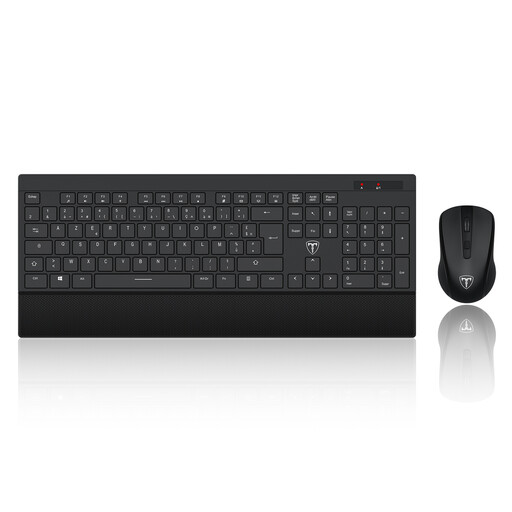
Why this choice suits this profile : This set lets you quickly upgrade a workstation without replacing all your furniture. The French layout makes it easier to type the characters you use every day.
The listing specifies the AZERTY layout, single receiver and wireless power supply. This helps you avoid receiving a QWERTY keyboard or having to manage several receivers.
105 keys, optical mouse with adjustable resolution, stated range of up to 10 metres and low-noise design.
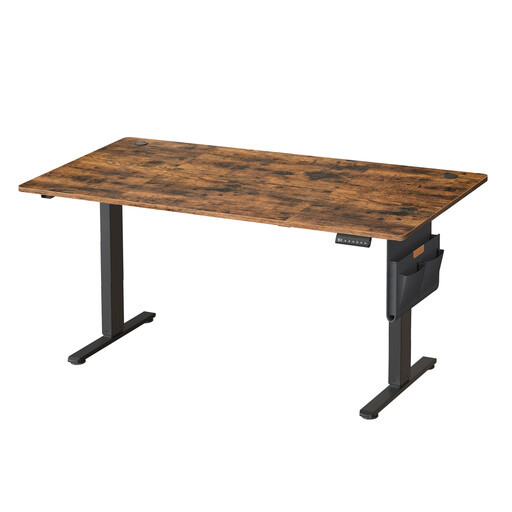
Why this choice suits this profile : Its large desktop can accommodate several devices, documents and accessories, while allowing you to save several working heights.
The listing specifies the dimensions, adjustment range of 72 to 120 cm and maximum static load of 70 kg. You can therefore check the space required and the weight of your equipment before buying.
Four programmable height settings, storage pocket, hook and integrated cable management.

Why this choice suits this profile : For home working or long gaming sessions, the adjustable seat, tilt and lumbar support let you adapt the chair to your preferred setup.
The listing details the dimensions, seat height of 46 to 54 cm and stated capacity of 120 kg, rather than relying on a simple promise of comfort.
S-shaped backrest, adjustable lumbar support and headrest, padded seat and folding armrests.
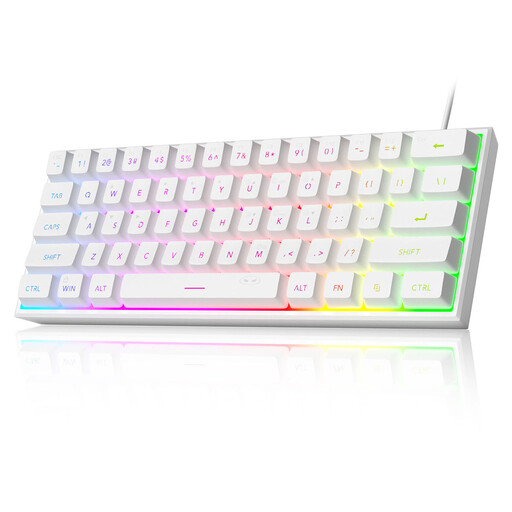
Why this choice suits this profile : Measuring 29.2 × 10.1 cm, it frees up space for notebooks, a mouse or a gaming mat, even on a small desk.
The description specifies that this is a compact, wired US QWERTY model. This information is essential for users looking for a French AZERTY keyboard.
61 keys, RGB backlighting, stated IPX4-rated circuitry and compatibility with Windows and macOS according to the listing.
Once you have chosen your furniture and computer equipment, a few simple accessories can help keep your desk organised:
Start with an adjustable chair, a desk of the right size and a keyboard suited to your language. You can then add a monitor, suitable lighting and storage accessories. School supplies and smaller accessories should be chosen according to your tasks and habits.
It depends on how often it is used, the weight it supports, maintenance and the quality of its components. Observe the stated limits, regularly tighten assembled parts and protect electrical devices from moisture. A chair or desk that develops unusual play should be checked before being used again.
It depends on the motor’s power and how often you adjust it. In practice, the motor only runs while the desktop is moving up or down. To limit consumption, save one or two useful heights and avoid making repeated adjustments without good reason.