
Livraison le jour même ou le lendemain

Qualité garantie

Débloquez vos offres de bienvenue: Livraison GRATUITE | Jusqu'à -80 % | 30 jours d'essai gratuits à JoyPlus
Téléchargez l'application
A functional workspace isn't just about the computer. An ill-fitting mouse, an incompatible keyboard, or a shortage of ports can quickly make daily work a chore. Whether you're a professional, a remote worker, a student, or simply a PC or Mac user, choosing your office computer accessories deserves a bit of careful thought.
A wireless mouse can communicate via a 2.4 GHz USB receiver, Bluetooth, or both. However, modern laptops often have several USB-C ports but very few USB-A ports. So before ordering, check the connection type, whether an adapter is included, and compatibility with Windows, macOS, ChromeOS, iOS or Android.
A Bluetooth keyboard is perfect for a cable-free desk, while a wired model saves you from recharging and pairing issues. On a Mac, also check for the presence of Command and Option keys, as well as macOS shortcuts.
A sensor rated at 4,800 or 3,600 DPI doesn't automatically make a mouse more pleasant to use. This figure indicates cursor sensitivity, but says nothing about the shape, weight, or button placement. For hours of work, the mouse's orientation, how it feels in your hand, and the surface you use it on often matter far more.
An ergonomic mouse – whether vertical or designed for left-handed users – serves a different purpose than a compact model intended for travel.
A full-size keyboard with a numeric keypad takes up considerably more space than a compact or foldable model. Similarly, a USB-C hub can get warm when powering multiple devices. Be sure to check its dimensions, charging method, stated battery life, and the power limits listed in the specifications.
For devices with a lithium battery, use a certified 5V charger, avoid high temperatures, and stop using it immediately if you notice swelling or abnormal heat.
On a desktop PC, a USB keyboard and a wired mouse offer simple setup with no batteries or pairing required. A wireless keyboard and mouse combo reduces cable clutter, but means you'll need to keep an eye on charging or battery levels.
If you use a Mac, go for a Mac keyboard with a French AZERTY layout and clearly marked macOS functions. For travel, a foldable Bluetooth keyboard slips easily into a bag. However, do check the key size and the hinge's durability.
A mouse should keep your hand in a natural position, without forcing your wrist into a constant twist. Ambidextrous models work well for both right-handed and left-handed users, while a vertical mouse for left-handers meets a more specific need.
An ergonomic mouse pad with a wrist rest can help stabilise your hand, but it won't correct an unsuitable desk height. Choose a firm support with a non-slip base and a surface compatible with your optical or laser sensor.
A 10-in-1 USB-C hub really comes into its own when your computer lacks ports for connecting a monitor, an Ethernet cable, USB peripherals, and a charger. Check the video outputs offered and your computer's USB-C port compatibility: not all USB-C ports support display output or charging.
For video calls, a USB headset with a microphone fitted with a USB-A plug can be recognised immediately by a PC. If your computer only has USB-C ports, you may need an adapter. Keep the volume at a reasonable level and take regular breaks during long sessions.
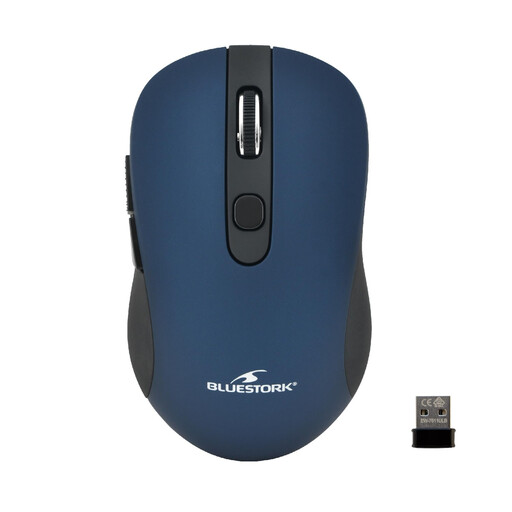
Why this choice suits this profile: This wireless mouse uses a nano USB 2.4 GHz receiver and offers three sensitivity levels. It's ideal for a simple office setup on both PC and Mac.
The product page clearly states the 2.4 GHz connection, the 800, 1,200 and 1,600 DPI settings, and Windows and Mac compatibility – all the essential information is available before you buy.
Six buttons, laser tracking, driver-free operation, and powered by a single AA battery.
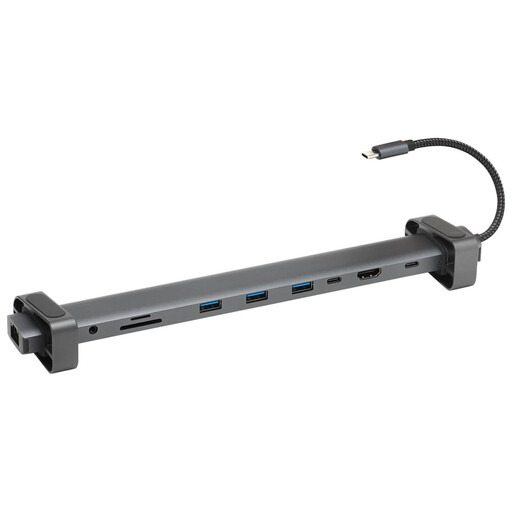
Why this choice suits this profile: This model combines video, data, Ethernet and charging connections in an aluminium casing. It's ideal for workstations with multiple peripherals.
The product page details the ten ports and specifies USB-C, Thunderbolt 3 and 4 compatibility. It's still essential to check your host computer's video capabilities.
Ten independent ports, Power Delivery pass-through charging, and an aluminium alloy casing.
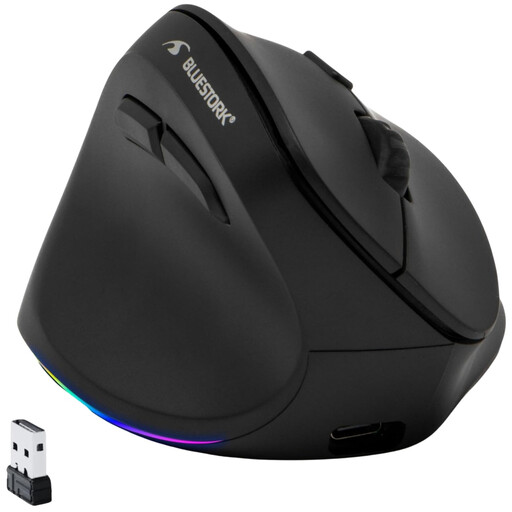
Why this choice suits this profile: Its vertical left-handed design meets a need rarely covered by standard mice. USB-C charging means you won't need to keep spare batteries on hand.
The left-handed orientation, connection type and built-in battery are all clearly stated on the product page – you can match them against your working setup.
Adjustable sensor up to 4,800 DPI, nano USB 2.4 GHz receiver, USB-C charging and RGB lighting.
Why this choice suits this profile: This ventilated stand is designed for those who move between home, office and travel with a laptop up to 15.6 inches.
The maximum size, USB power supply and fixed angle are all specified. Place the stand on a flat surface and make sure not to block the fan grille.
A quiet fan, perforated metal surface, two USB ports and a lightweight design.
Choose a Mac keyboard with a French AZERTY layout and clearly marked Command and Option keys. A USB keyboard works well for a desktop setup, while a rechargeable Bluetooth keyboard makes it easier to connect to multiple devices. If space is tight, a compact 75% format or a foldable keyboard can be more practical, though you'll lose the numeric keypad.
It can offer a grip that's better suited to certain hand shapes, but its design alone won't solve all comfort issues. Desk height, forearm position, cursor sensitivity and regular breaks all play a vital role too. Compare right-handed, left-handed or ambidextrous orientation against your actual usage.
It depends on the power source. A battery-powered mouse needs regular replacements, while a rechargeable model just needs a USB-C top-up. Wireless keyboards and combos reduce clutter, but do check whether the cable is included, how many devices are compatible, and whether you can use the product while it's charging.