
Livraison le jour même ou le lendemain

Qualité garantie

Débloquez vos offres de bienvenue: Livraison GRATUITE | Jusqu'à -80 % | 30 jours d'essai gratuits à JoyPlus
Téléchargez l'application
Whether you work from home, are an avid gamer, or a student, choosing the right office chair is crucial. Sitting for hours without proper support is a recipe for discomfort and plummeting focus. But with an overwhelming number of options, how do you find your way?
This guide is here to shed some light. As content experts, our mission is to provide you with practical advice and a curated selection of products to help you make an informed decision, free from marketing jargon.
Before diving into our selection, let's review the essential criteria that will guide your choice.
A good ergonomic office chair isn't a luxury; it's a real investment in your health. Prioritise models that offer the maximum number of adjustment points:
These adjustments are all the more critical for a work-from-home chair, where the hours in front of the screen add up quickly.
You wouldn't choose the same seat for back-to-back online gaming sessions as you would for working on spreadsheets.
The upholstery of your chair directly impacts its comfort and longevity.
We have selected three models that cater to distinct profiles and budgets.
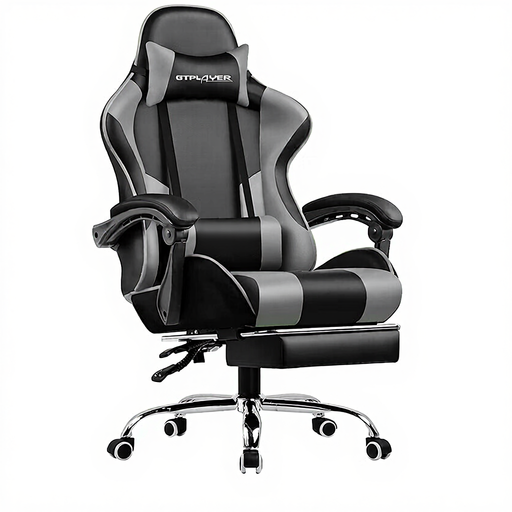
What sets it apart: This gaming chair is built for immersion and long gaming sessions. Its standout feature is its relaxation-focused options: a massaging lumbar cushion (via USB) and a retractable footrest. It's a very comprehensive model for anyone who spends hours in front of their screen, for both gaming and work.
Key features:
Who is it for? For gamers, streamers, and also remote workers looking for a comfortable office chair with real relaxation perks.

What sets it apart: This chair gets straight to the point: ergonomics designed to protect your back during long workdays. Its breathable mesh back is a real bonus against overheating, while its numerous adjustments (lumbar support, headrest, armrests) allow for a perfectly tailored fit.
Key features:
Who is it for? The sensible choice for professionals working from home and anyone who spends long hours at their desk. It's aimed at those who prioritise back health and the understated design of an effective ergonomic office chair.
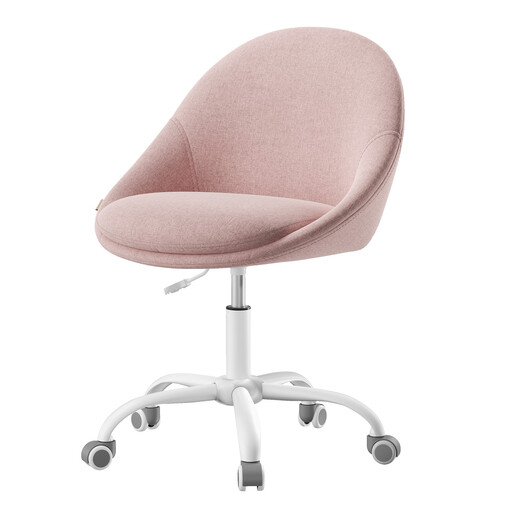
What sets it apart: This designer office chair plays the style card without sacrificing basic comfort. Compact and armless, it's perfect for small spaces like a student's room or an office nook in the living room. It slides effortlessly under any desk for maximum space-saving.
Key features:
Who is it for? Perfect for students, teens, or for occasional office use. It's the clever option for those who want to combine a stylish look, sufficient comfort, and space optimisation.
Our selection covers three typical profiles, but your needs might be different. Specific features, original colours, different mechanisms... the possibilities are vast.
Explore our full catalogue of height-adjustable office chairs to find that hidden gem.
It's all a matter of philosophy. A gaming chair prioritises a bold style and a body-hugging fit, with relaxation-oriented bonuses (deep recline, footrest). An ergonomic office chair, on the other hand, is more discreet and focuses entirely on the fine-tuning of its adjustments (lumbar support, armrests, headrest) to ensure a healthy posture over the long term.
The basics of adjustment in 4 steps:
For intensive use, lumbar support is not an option: it's a must-have. It helps maintain the natural curve of the lower back (the lumbar lordosis), thus reducing pressure on the intervertebral discs and preventing pain. A model that is adjustable in height and depth is ideal for customised support.