
Livraison le jour même ou le lendemain

Qualité garantie

Débloquez vos offres de bienvenue: Livraison GRATUITE | Jusqu'à -80 % | 30 jours d'essai gratuits à JoyPlus
Téléchargez l'application
Whether you're working from home or in the office, the reality is often the same?: spending hours sitting down can quickly turn into a nightmare. Poor posture creates a vicious cycle?: tension, dwindling concentration, and inevitably, the dreaded back pain. Choosing a good ergonomic office chair isn't a luxury—it's a crucial investment in your health and productivity.
The problem is, the market is a jungle of marketing promises and technical jargon. To avoid regretting your purchase six months down the line, it's crucial to know how to spot the scams and the seemingly good ideas that aren't.
The 2 Common Pitfalls (to Avoid at All Costs)?:
To find that perfect gem—a comfortable office chair that will go the distance—focus on the technical details that make a real difference day-to-day.
It's simple?: lumbar support is non-negotiable. A good office chair with lumbar support does more than just offer a vague curve in the backrest. The support must be adjustable, at least in height and ideally in depth, to perfectly conform to YOUR body shape. Poorly positioned support is worse than no support at all. Make sure the adjustment is easy to access and locks firmly in place.
A good office chair for remote work should adapt to your needs, not the other way around.
Initial comfort means nothing if it doesn't last. It all comes down to the materials. For the seat, insist on high-density foam. It's the only kind that will stand the test of time without sagging. For the backrest, mesh is excellent for its breathability—a real bonus during heatwaves. Just make sure it's taut and high-quality to ensure firm support.
To put theory into practice, here are some models that check all the boxes, each tailored to a specific user profile.
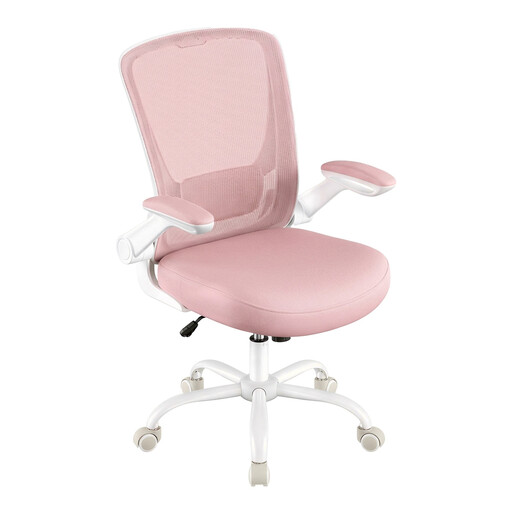
Why we love it : Perfect for a remote work setup where space is at a premium. Its minimalist design and compact dimensions blend into any decor, but its standout feature is what truly makes the difference.
No frills or unnecessary adjustments. This model gets straight to the point with one perfectly executed feature: the flip-up armrests. Its dense foam seat and breathable fabric prove that you can combine a compact design with durability.
Optimal space-saving thanks to retractable armrests, without sacrificing essential comfort with its built-in lumbar support.
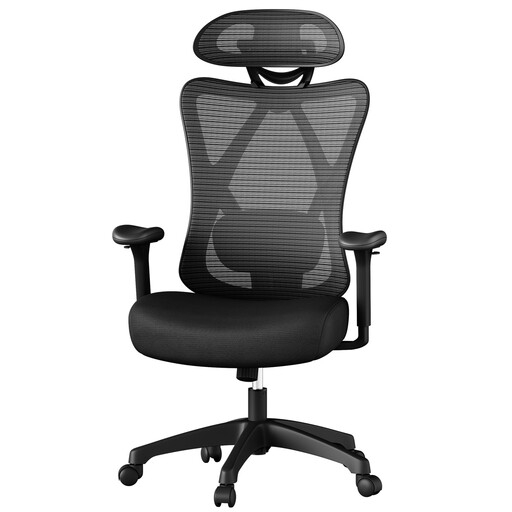
Why we love it : Designed for those who spend long hours in front of the screen. It provides total, tailored support for the back and neck, which is essential for going the distance without accumulating fatigue.
It doesn't fall into the trap of useless "fully adjustable" features. Here, the adjustments are relevant: an adjustable lumbar support and an adaptable headrest. Its maximum load capacity of 150 kg is a reassuring sign of its sturdiness.
Comprehensive postural support with targeted adjustments for the lower back and neck, perfect for staying focused during long workdays.
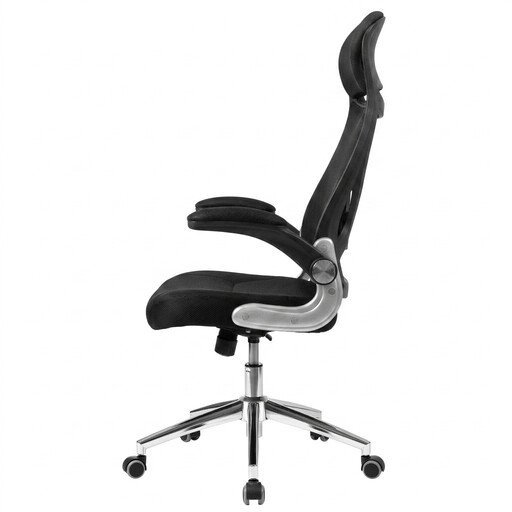
Why we love it : The Swiss Army knife of office chairs. It's perfect for juggling focused work sessions and relaxing breaks. It combines essential ergonomics with well-thought-out comfort features.
To counter the pitfall of low-grade materials, it features a durable, long-lasting padding made of dense foam. The combination of a tilt function and flip-up armrests offers true versatility without superfluous gadgets.
Its excellent flexibility, with a tilt function for relaxing and retractable armrests to adapt to any situation.
Our selection doesn't end here. Discover other chairs that meet our high standards for quality, ergonomics, and durability.
It all depends on the quality and usage. An entry-level model will hardly last more than 2 years before the foam sags or the mechanisms become loose. In contrast, a high-quality chair (steel frame, high-density foam, sturdy casters) can easily last you 5 to 10 years.
The foolproof 3-step method?:
It's a matter of personal preference and environment. Mesh is the champion of breathability, ideal if you tend to run hot. It offers firm, dynamic support. Foam, on the other hand, provides a softer, more "cocooning" comfort. High-quality foam distributes pressure wonderfully but retains a bit more heat. It's up to you to pick a side?: cool support (mesh) or cushioned softness (foam).