
Livraison le jour même ou le lendemain

Qualité garantie

Débloquez vos offres de bienvenue: Livraison GRATUITE | Jusqu'à -80 % | 30 jours d'essai gratuits à JoyPlus
Téléchargez l'application
OLED Model, standard version, Switch Lite… It's not easy to navigate the jungle of Nintendo Switch consoles. Each version has its own strengths and is aimed at a very specific type of player. This guide is here to break down each model and help you choose the one that truly matches your playstyle and budget.
Our mission: to give you all the keys to an informed purchase, without the marketing fluff.
Before diving into the details of our Switch comparison, take a moment to define your priorities. These few key points will help you see things more clearly.
This is the fundamental question: where and how will you play most often?
The screen quality in handheld mode and the storage space aren't just gimmicks: they directly impact your daily comfort. OLED technology, for example, offers much more intense colours and perfect blacks that transform the visual experience compared to a standard LCD screen. Similarly, 64?GB of storage (versus 32?GB) will save you from having to buy a microSD card after downloading your second game.
The bottom line is also the price of the Nintendo Switch. The Lite version, being purely handheld, is logically the most affordable. The Standard and OLED models, being more versatile, require a higher investment. Also, consider the features that give the console its flavour, like the famous detachable Joy-Con controllers that let you start a two-player game on the fly.
Now that you've defined your needs, here is our detailed analysis of the three consoles in the Nintendo Switch family to help you make the right choice.
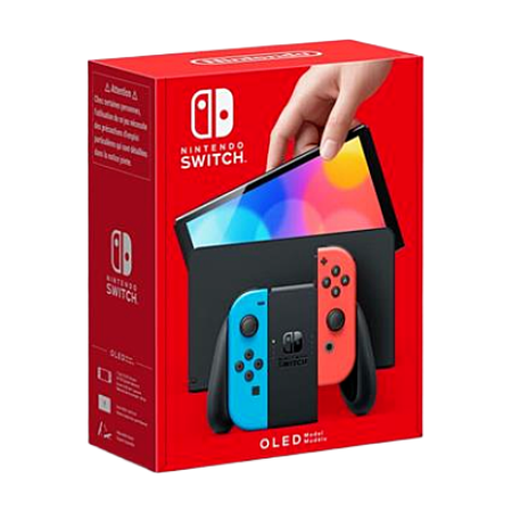
Its Ace in the Hole: The Screen
The Nintendo Switch OLED is, above all, a visual knockout. Its superb 7-inch OLED screen delivers vibrant colours and infinite contrast that literally transform games in handheld mode. Comfort hasn't been overlooked either: its wide, adjustable stand is much more stable, its internal storage is doubled to 64?GB, and its dock includes an Ethernet (LAN) port for a rock-solid wired online connection.
Key Features:
Who is it for? For players who spend a lot of time in handheld mode and simply want the best possible visual experience. It's also the choice for online competitors who will appreciate the stability of the Ethernet port.
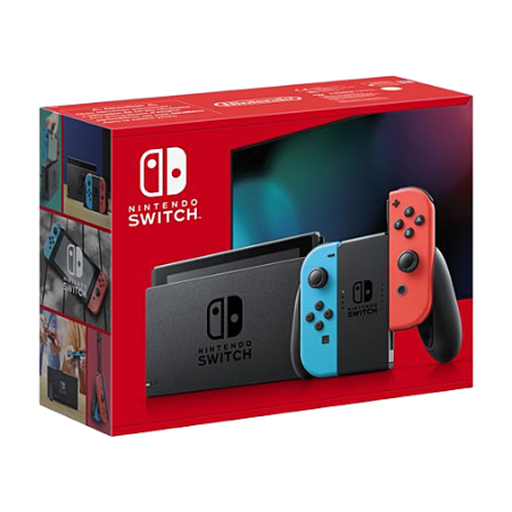
Its Ace in the Hole: Versatility
This is the iconic model, the original that changed everything. Its key strength remains its absolute versatility: it effortlessly juggles between the big screen in the living room and handheld gaming. With its detachable Joy-Con controllers, a multiplayer session can be started anywhere, anytime. It's conviviality incarnate.
Key Features:
Who is it for? It's the Swiss Army knife of the lineup, ideal for families and anyone who wants the full Switch experience, both on the TV and on the go. A safe bet for discovering the world of Nintendo.
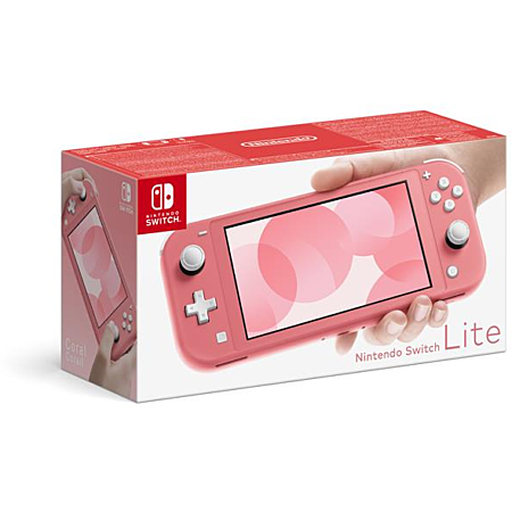
Its Ace in the Hole: 100% Handheld
The Nintendo Switch Lite is built for one thing, and it does it perfectly: handheld gaming. More compact, lighter, and sturdier with its unibody design, it's the king of the backpack. Its integrated controls, including a proper D-pad, make it a formidably effective portable console.
Key Features:
Who is it for? For pure handheld gamers, young players, or as a second personal console in a household. It's the smart choice for those who are certain they will never connect it to a TV.
None of these models catch your eye? Are you looking at other brands or types of consoles? Take a look at our complete catalogue!
? Discover all our game consoles on Joybuy.fr
The most noticeable difference is the screen: a superb 7-inch OLED screen for the OLED model, versus a 6.2-inch LCD screen for the standard model. The OLED offers more vibrant colours and deeper blacks. It also comes with more storage (64?GB vs. 32?GB), a much more practical kickstand, and an Ethernet port on its dock.
Yes, the Switch Lite is compatible with the vast majority of Switch games, as long as they support handheld mode. However, be aware that a few rare titles that require detached Joy-Con controllers (like 1-2-Switch or certain modes in Nintendo Switch Sports) will not work unless you purchase a pair of Joy-Con separately.
It all depends on your habits. If you're a collector of physical game cases and buy your games in their physical versions, the internal storage (32?GB, or 64?GB for the OLED model) might be enough at first. However, if you're a fan of buying from the Nintendo eShop, investing in a microSD card will quickly become essential to avoid having to juggle your game installations.