
Livraison le jour même ou le lendemain

Qualité garantie

Débloquez vos offres de bienvenue: Livraison GRATUITE | Jusqu'à -80 % | 30 jours d'essai gratuits à JoyPlus
Téléchargez l'application
Does a desk overrun by a jungle of cables sound familiar? Between your laptop, smartphone, tablet, and headphones, every device demands its own charger, turning your workspace into a real headache. The hunt for a free socket becomes a daily ritual, and standard chargers often struggle to quickly revive our most power-hungry devices.
This guide is here to help you make sense of it all. As a product recommendation expert at Joybuy, my mission is to find the solutions that truly simplify your daily life. Together, we'll break down the essential criteria for choosing the perfect multi-port charging station for your needs, and I'll present a selection of models that will bring order back to your desk and efficiently charge all your devices.
Before you buy, a few technical details are necessary to avoid making the wrong choice. Here are the three key points to check to make the right decision.
Total power, expressed in watts (W), is the most critical factor: it determines the charger's ability to power multiple devices at the same time. A 65W fast charger will be sufficient for an ultraportable laptop and a smartphone. However, if you plan to connect several power-hungry devices, like two computers or a tablet in addition to a PC, a 250W charging station will be necessary.
Be aware that total power isn't everything! You also need to look at how it's distributed. A 100W station with four ports won't deliver 100W to each output. The power is intelligently distributed among the connected devices. Therefore, remember to check the maximum power per port (especially for USB-C) to ensure it's compatible with your laptop's requirements.
The number and type of ports are obviously crucial. Today, the USB-C charging hub has established itself as the standard for fast charging, thanks in large part to Power Delivery (PD) technology. Make sure the station you're considering offers at least one or two USB-C ports capable of delivering high power (45W, 65W, or even 100W and more) for your computers and tablets.
USB-A ports are still relevant: they remain very practical for less demanding or older accessories, such as smartwatches, mice, or keyboards. A good multi-device desktop charger must therefore offer a fair balance between these two types of connectors for rock-solid versatility.
You'll often come across the term GaN charger. Behind this acronym lies gallium nitride, a semiconductor that is replacing the silicon in our old chargers. The advantages are very real:
Choosing a GaN model means opting for the most modern and efficient technology for your setup.
Let's move on to our selection. Here are three models that cater to very distinct profiles, from the digital nomad to the power user.
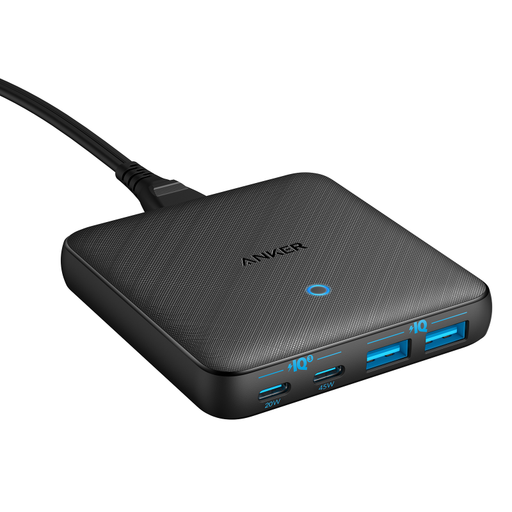
Why it stands out: Its ultra-slim design. This is its main asset. Thanks to GaN technology, this charger blends in seamlessly on or under a desk, while delivering a comfortable 65W of power.
Advantages:
Who is it for? Ideal for remote workers and professionals looking for a discreet and efficient solution to power an ultraportable (like a MacBook Air or Dell XPS 13), a smartphone, and a few accessories.
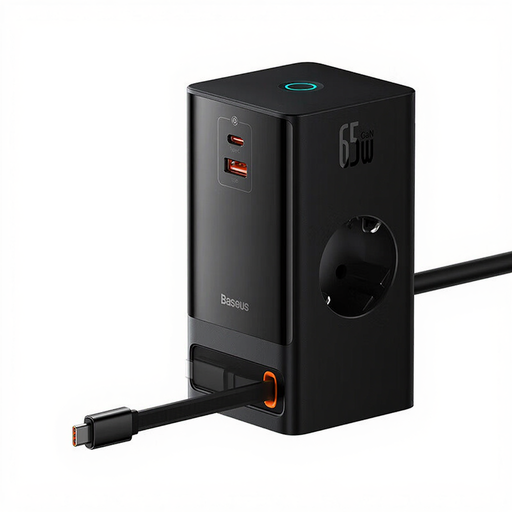
Why it stands out: Much more than a simple charger, this is a true power strip 2.0. It combines USB ports, AC outlets, and even a wireless charger, all in a surprisingly compact housing.
Advantages:
Who is it for? Perfect for those who want to do a major clean-up on their desk by replacing their power strip and chargers with a single, versatile device. A very practical option for co-working spaces or remote work.
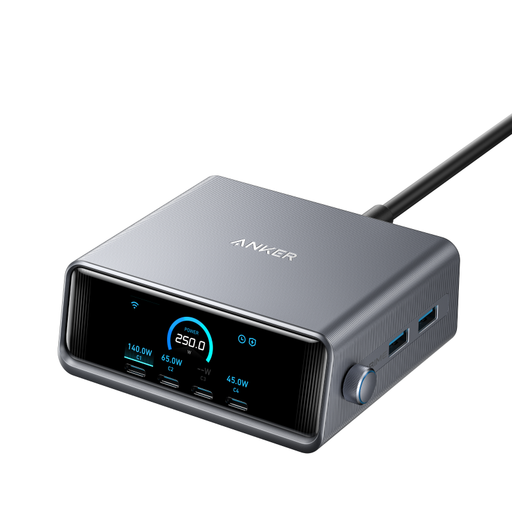
Why it stands out: Raw power combined with intelligence. With its total output of 250W and its LCD screen, this station is designed for the most demanding users—those who want to make absolutely no compromises.
Advantages:
Who is it for? For tech enthusiasts, creatives, developers, or well-equipped families juggling multiple power-hungry devices (multiple MacBook Pros, graphics tablets, etc.). It's the ultimate solution for a desk that isn't afraid to flex its muscles.
This selection covers the main scenarios, but the charger market is vast. If you have more specific needs (an ultra-compact travel adapter, a particular set of connectors, etc.), be aware that other models exist.
To discover a wider range of solutions, with more compact models or those meeting other criteria, feel free to explore our complete category of USB-C Port Adapters.
A GaN charger uses gallium nitride, a semiconductor that is much more efficient than traditional silicon. The result: smaller, lighter chargers that run cooler but are capable of delivering very high power. Choosing a GaN model is simply opting for the most modern and high-performance technology available today.
It all depends on your computer. A 65W fast charger is perfect for most ultraportables (like a MacBook Air, Dell XPS 13, or HP Spectre). However, for more powerful machines (workstations, gaming PCs) that often require 90W, 100W, or more, you will absolutely need to turn to a 100W, 140W, or 250W station to ensure full-speed charging. The easiest way to know? Check the power rating indicated on your device's original charger.
Yes, without any problem. Modern charging stations are packed with protections against overcharging, overheating, and short circuits. They automatically cut off power to a device once its battery is full. So there is no danger in leaving your devices plugged in. However, as a general rule and to avoid passive power consumption (even if minimal), it is still advisable to unplug devices that will not be used for a long period.