
Livraison le jour même ou le lendemain

Qualité garantie

Débloquez vos offres de bienvenue: Livraison GRATUITE | Jusqu'à -80 % | 30 jours d'essai gratuits à JoyPlus
Téléchargez l'application
A multi-colour 3D printer lets you create figurines, prototypes, functional parts or decorative objects without the need for painting. But behind the promises of speed and a wealth of colours, there are sometimes very real constraints for users in the UK: filament consumption, noise levels, footprint, material compatibility and maintenance of the multi-colour system.
So before you reach for your wallet, it's worth sorting the genuinely useful features from the marketing claims that are harder to verify.
A printer advertised at 600 or 800 mm/s won't necessarily print every model at that speed. The geometry of the part, layer height, material used and the desired finish all directly affect the result. A high-speed 3D printer also needs a rigid frame, good vibration control and sufficient extrusion throughput.
When comparing spec sheets, look at the recommended speed, maximum acceleration and the motion technology used, such as a CoreXY architecture.
A 3D printer capable of handling 16 colours typically requires multiple filament-changing modules or several connected units. The result: the footprint increases, as does the purge time and the amount of material consumed between colour changes.
Also check whether the stated number of colours corresponds to the supplied configuration or to an extension sold separately. The Creality K2 Combo, for example, includes one CFS unit and can reach up to 16 colours with four compatible units. Real-world operation therefore depends on the equipment you choose.
PLA filament and PETG filament can both absorb moisture from the air. This can lead to inconsistent extrusion, less crisp surfaces or poor layer adhesion. A 3D printer with filament drying reduces this risk, but doesn't replace storing filament in a dry, airtight place.
An integrated drying box is particularly useful for long prints, frequent material changes and workshops that are unheated or damp.
Build volume is measured as width × depth × height. A size of 220 × 220 × 220 mm is sufficient for many everyday objects and medium-sized models. For making large parts in one go, a large-volume 3D printer like the Anycubic Kobra 3 Max Combo offers a space of 420 × 420 × 500 mm.
Bear in mind, though: a large volume means a heavier machine, more space around the device and potentially higher power consumption. Measure the available space on your workbench before ordering.
A nozzle reaching 300 °C is suitable for several common materials, including PLA, PETG and certain reinforced filaments, according to the profiles validated by the manufacturer. Models equipped with a 350 °C nozzle and a heated chamber can support more technical materials, such as some nylon or polycarbonate blends.
Still, pay close attention to exact compatibility: a machine that can print TPU with direct drive may not necessarily support this material via its multi-colour module. The stated temperatures are technical limits, not a guarantee of the same result with every filament.
Automatic levelling simplifies first-layer preparation. Features like Z-offset compensation, power-loss recovery, filament run-out detection or camera monitoring can also reduce the need for intervention.
These features don't replace the need to install the printer on a stable, heat-resistant surface. The nozzle, build plate and moving parts remain hazardous during operation. Set up the machine in a ventilated area, away from children and flammable materials, following the manufacturer's instructions.
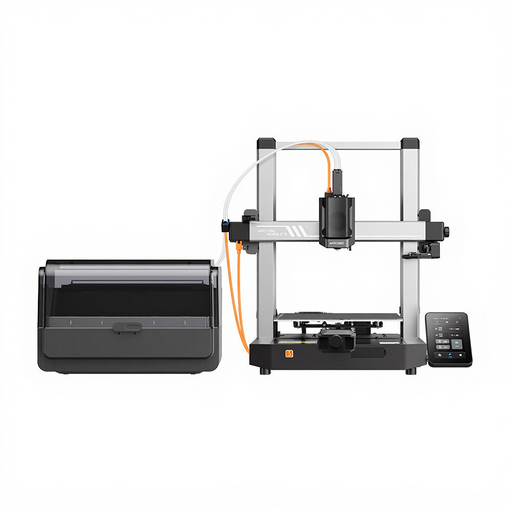
Why this choice suits this profile: Its 255 × 255 × 260 mm build volume and 4 or 8 colour system are ideal for first multi-colour projects, decorative objects and everyday prototyping.
LeviQ 3.0 levelling, active filament drying and tangle detection reduce the need for manual adjustments.
Recommended speed of 300 mm/s, maximum stated speed of 600 mm/s, nozzle up to 300 °C and compatibility with PLA, PETG and TPU depending on configuration.
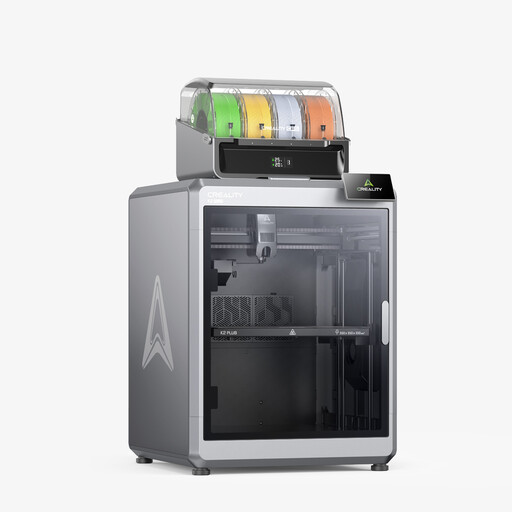
Why this choice suits this profile: Its 350 × 350 × 350 mm build volume, enclosed chamber and compatibility with several technical filaments make it ideal for advanced workshops.
The enclosed chamber, automatic levelling and power-loss recovery address the demands of long prints and demanding materials.
Nozzle up to 350 °C, build plate up to 120 °C, chamber stated up to 60 °C and CFS system expandable to 16 colours.
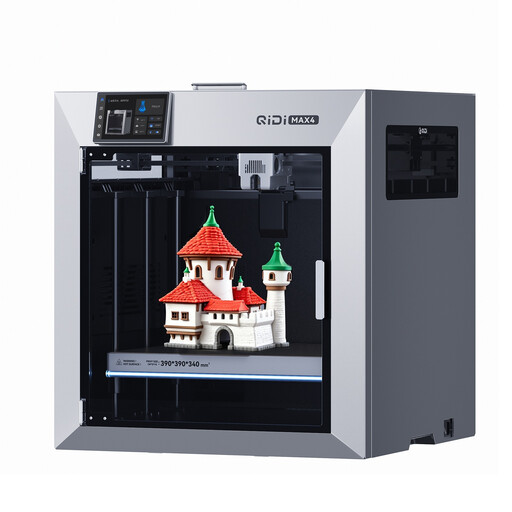
Why this choice suits this profile: Manufacturers, designers and small businesses can put its large 390 × 390 × 340 mm build volume to use for prototypes, moulds and small production runs of parts.
The heated chamber at 65 °C, automatic levelling and multi-material management reduce the limitations associated with large parts.
Maximum stated speed of 800 mm/s, active chamber, support for up to 16 colours with QIDI Box and compatibility with reinforced materials according to profiles.
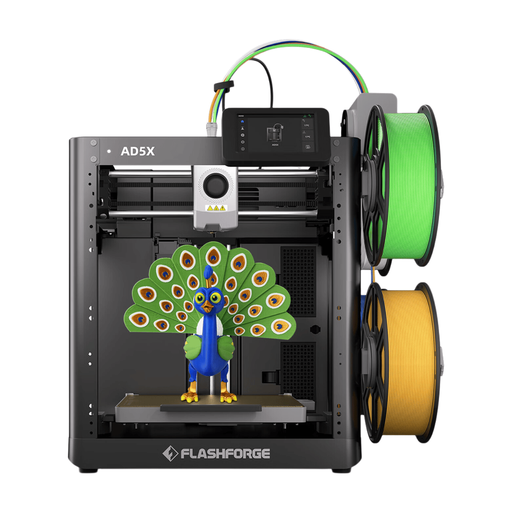
Why this choice suits this profile: Its 220 × 220 × 220 mm format is ideal for makers, schools and workshops where every centimetre counts.
One-click levelling and the CoreXY design let you get started quickly, without moving up to a larger machine.
Support for four colours, stated speed up to 600 mm/s, 300 °C extruder and interchangeable nozzles from 0.25 to 0.8 mm.
We've put together a comprehensive, real-time updated list of products that fully meet these strict selection criteria and European safety regulations.
Filament is a recurring expense. PLA is generally preferred for figurines, models and decorative objects. PETG is better suited to parts that need to combine strength and moisture resistance, though settings can sometimes be a little trickier.
For visual effects, a rainbow PLA filament like CAILAB PLA Rainbow lets you achieve colour transitions with a single spool. If you're after a matte finish, eSUN Matte PETG is available in a 1 kg spool with a 1.75 mm diameter. In every case, check the accepted diameter, recommended temperature and storage conditions.
Also factor in purges from colour changes, replacement nozzles, electricity and any drying units. A multi-colour solution can reduce the time spent on finishing, but it doesn't necessarily lower the total amount of material consumed.
Models equipped with automatic levelling, material profiles and automated feeding keep initial setup to a minimum. You'll still need to clean the build plate, select the right profile and monitor the first layer, especially when changing filament.
It depends on how often you use it, how well you maintain it and the condition of wear parts. Cleaning the build plate and nozzle, checking the belts and storing filament in a dry place all help maintain consistent print quality. However, high-temperature prints or abrasive filaments can accelerate nozzle wear.
It all depends on the weight of your models, the number of colour changes, print duration and filament price. For an estimate, add up the weight shown by your slicer, the price per kilogram of filament and a margin for purges or calibration prints.