
Livraison le jour même ou le lendemain

Qualité garantie

Débloquez vos offres de bienvenue: Livraison GRATUITE | Jusqu'à -80 % | 30 jours d'essai gratuits à JoyPlus
Téléchargez l'application
Choosing a mobile phone for an elderly loved one can quickly become a headache, as the market is flooded with options. For our seniors, the goal is simple: find a device that allows them to stay in touch with family and friends, without being cluttered by unnecessary features, while also including reassuring safety options. This guide breaks down the essentials for you and introduces a standout model to help you stay connected with complete peace of mind.
Before you start shopping, focus on the features that will truly make a difference in daily life.
The first, and often most important, criterion is a large-key mobile phone with well-spaced, high-contrast buttons. This makes it easy to dial a number without mistakes and navigate menus more easily. The interface should be streamlined, with large icons and crystal-clear menus. The flip phone for seniors format remains a reliable choice: flip open to answer, flip closed to hang up. It's a simple, intuitive action that prevents many accidental presses.
The inclusion of a phone with an SOS button provides peace of mind for both the user and their loved ones. Typically located on the back of the phone, this button is activated with a single long press. It then sends an alert SMS—including the GPS location—to several pre-saved contacts and initiates a call loop until someone answers.
Nothing is more frustrating than an inaudible phone conversation. Therefore, check that the ringtone and call volumes are sufficiently loud. For hearing aid users, a hearing aid-compatible (HAC) phone is essential. It reduces interference and static to ensure perfectly clear conversations.
Keeping these criteria in mind, one model stands out for its design, which is perfectly tailored to seniors. It checks all the boxes: simplicity, safety, and comfort.
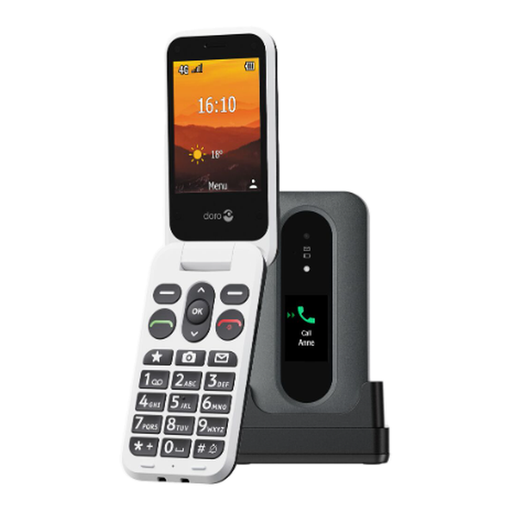
The Doro phone Leva L30 is a device that gets straight to the point, meeting the essential needs of seniors. Its flip design is as familiar as it is practical.
Why it stands out: This model brings together essential functions without ever becoming complicated. Its external screen lets you see who is calling before you even open it. Its assistance button with GPS is a real bonus for safety, while HD Voice technology ensures crystal-clear conversations.
Benefits:
Who is it for? This phone is ideal for seniors looking for a reliable and simple device to make calls and send a few texts. It's also the perfect gift for families who want to give a loved one a secure communication tool that is easy to use and recharge.
The Doro Leva L30 is an excellent benchmark, but tastes and needs vary. If you prefer to explore other options, such as classic candy bar phones or even smartphones with a simplified interface, many alternatives are available.
Discover our entire selection of mobile phones on Joybuy
The flip phone format has several key benefits. First, it protects the screen and keypad from bumps and scratches when closed. Second, it prevents accidental calls from the bottom of a bag or pocket. Most importantly, the action of flipping open to answer and closing to hang up is simple, intuitive, and very reassuring for many users.
The SOS button is a vital safety feature for emergencies. A long press on this dedicated button triggers an automatic sequence:
Yes, most dedicated models are. To be certain, look for the HAC (Hearing Aid Compatibility) rating. This standard evaluates compatibility on two points: "M" (for microphone, for standard listening at the ear) and "T" (for telecoil, for use with the induction loop mode). An M3/T3 rating or higher is recommended for optimal listening comfort without static. The Doro Leva L30, for example, goes a step further by integrating HD Voice technology for enhanced sound clarity.
By the Joybuy editorial team