
Livraison le jour même ou le lendemain

Qualité garantie

Débloquez vos offres de bienvenue: Livraison GRATUITE | Jusqu'à -80 % | 30 jours d'essai gratuits à JoyPlus
Téléchargez l'application
Ever seen the dreaded “Insufficient Storage Space” message pop up at the worst possible moment? Or is your new 4K camera recording choppy video? Rest assured, you're not alone. Choosing a memory card seems simple, but in reality, it's a jungle of complex technical standards and often misleading marketing promises. The wrong choice isn't just money down the drain; it's also the risk of losing precious memories or irreplaceable professional footage.
As product experts at Joybuy, our mission is to cut through the noise for you. Let's skip the jargon and get straight to the point. Here are the 3 most common mistakes and how to avoid them to find the perfect card for your needs.
Making the right choice is simply a matter of understanding a few key indicators. They will allow you to decipher any spec sheet and know if the card is right for you.
A memory card's speed is measured in megabytes per second (MB/s). As we've seen, it's important to distinguish between:
To make things clearer, manufacturers have created speed classes:
Choosing the format is the easiest part: it's dictated by your device.
An adapter does allow you to use a microSD card in an SD card port, but beware of the catch: if your camera uses the UHS-II interface (identifiable by its second row of pins) to achieve extreme data rates, the adapter will bottleneck performance. In this specific case, a native UHS-II SD card is mandatory to avoid losing speed.
Also, remember to check the maximum capacity supported by your device. Older devices are sometimes limited to SDHC cards (up to 32?GB), whereas recent models accept SDXC cards (from 64?GB to 2?TB).
Rather than an endless list, we've selected cards for specific user profiles, ensuring they avoid the pitfalls we've just discussed.
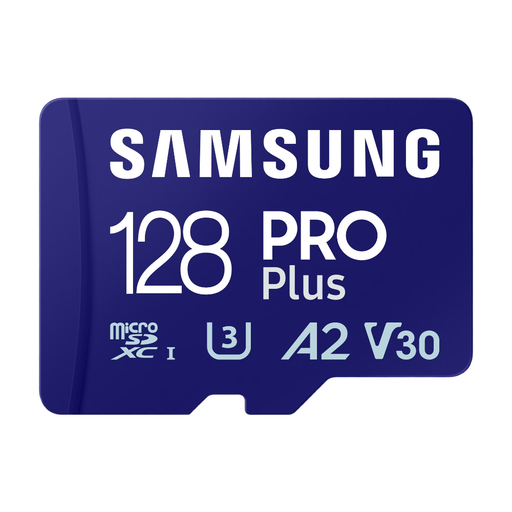
Why this card? Perfect for expanding the storage of an Android smartphone or tablet. Its A2 class ensures fast app loading, while its V30 class and high write speed (up to 130 MB/s) let you shoot 4K video with peace of mind. The **128 GB** capacity offers an excellent balance of storage and price.
It doesn't just boast a high read speed. Its fast write speed and V30 certification ensure real, reliable performance for video capture. This guarantees you won't fall for the trap of a card that's fast on paper but slow in practice.
A2 class for responsive apps. V30 certification for 4K UHD video. Included SD adapter for maximum versatility.
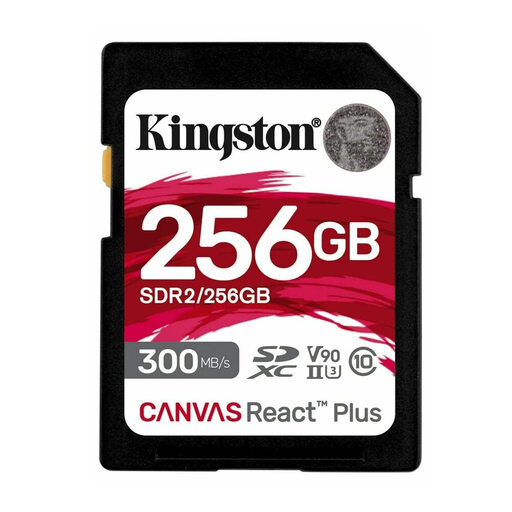
Why this card? For professional photographers, videographers, or advanced amateurs, this **SD card for cameras** is a true production tool. Its **UHS-II** interface and **V90** class are built for the most demanding workflows: 8K video, 4K at 120 fps, and RAW burst shooting without ever choking the camera's buffer.
It avoids the trap of high capacity without the necessary speed. Its V90 class guarantees a sustained write speed of at least 90 MB/s, eliminating any risk of dropouts or slowdowns, even with the most data-hungry video codecs.
UHS-II interface for extreme speeds (up to 300 MB/s read and 260 MB/s write). V90 class for 8K video. **256 GB** capacity to handle long shooting sessions.
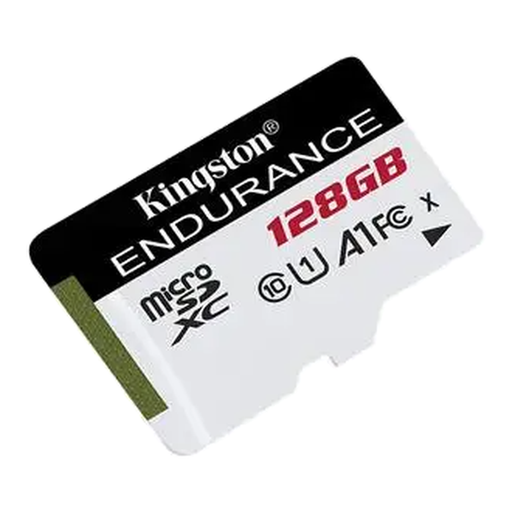
Why this card? This **microSD card for dashcams** is designed for one thing: to survive the extreme conditions inside a vehicle. Incessant write cycles, temperatures ranging from -25 °C to 85 °C... Its reliability is its main selling point, but it's a crucial one for an application where every second counts.
It directly addresses the endurance pitfall. Where a standard card would fail within a few months, this one is built to withstand thousands of hours of loop recording. It offers long-term peace of mind.
Designed for intensive loop recording. Resistant to shock, water, and extreme temperatures. The safe choice for dashcams and security cameras.
Discover our full selection of memory cards, all chosen according to strict performance and reliability criteria.
It all depends on how you use it. For an amateur photographer who shoots mostly in JPEG, a 128?GB card is often a good starting point. For a professional or a videographer shooting in 4K, a 256?GB or 512?GB model is a safer bet to avoid running out of space mid-session. To help you decide, keep in mind that a RAW photo takes up between 30 and 50?MB, and one minute of 4K video can easily exceed 500?MB.
For standard use (UHS-I interface), the performance will be identical. The difference becomes apparent on high-end devices that use the UHS-II interface. This technology uses a second row of pins to achieve very high data rates. However, a simple microSD to SD adapter does not have these additional pins, so it will always bottleneck the card to UHS-I speeds.
The most reliable method is to consult your device's user manual (camera, console, drone, etc.). There you will find three crucial pieces of information: