
Livraison le jour même ou le lendemain

Qualité garantie

Débloquez vos offres de bienvenue: Livraison GRATUITE | Jusqu'à -80 % | 30 jours d'essai gratuits à JoyPlus
Téléchargez l'application
A memory card failing at the worst possible moment, corrupting your holiday photos, or turning your video recording into a pixelated mess? It's a classic scenario and a frustration we've all experienced. The storage market is a jungle saturated with options, and it's easy to be fooled by marketing. Whether you're looking for a simple memory card for your camera, a 64?GB USB drive for your documents, or a 1?TB internal SSD to give your PC a speed boost, the golden rules for choosing well are the same.
As a product expert for the Joybuy editorial team, my mission is to clear the path for you. Let's forget the technical jargon and focus on the essentials so you never make the wrong choice again. Here are the most common pitfalls and our tips for avoiding them.
Marketing loves to highlight impressive features that are often useless for your actual needs. Focusing on the right criteria is the best way to save time and money.
To make an informed choice, there are three technical specifications to examine closely. These are what determine the performance and reliability of your external storage solution.
Speed is the name of the game. Expressed in megabytes per second (MB/s), it is broken down into two key values:
To put it simply, here are the standards to look for based on your use case:
The physical format is the first thing to confirm.
When it comes to capacity, the golden rule is simple: always check the maximum capacity supported by your device. Capacity standards also play a crucial role in compatibility:
If your card is intended for a dash cam, security camera, or any other device that records in a loop, a standard model won't hold up. You absolutely need a "High Endurance" model. These cards feature more robust flash memory, designed to withstand thousands of hours of writing and resist extreme conditions (heat, cold).
Here are a few options that meet specific needs, taking into account performance and reliability criteria.

Why we chose it: Ideal for quickly transferring documents, photos, and videos between multiple devices. Its 64 GB capacity is an excellent balance for everyday use.
It clearly displays its USB 3.0 interface, which guarantees much faster speeds than a basic USB 2.0 drive, without the hefty price tag for extreme speeds that are unnecessary for daily tasks.
An excellent balance of capacity, speed, and price, all backed by the reliability of a brand like SanDisk. The included SecureAccess software is a real bonus for protecting sensitive files.
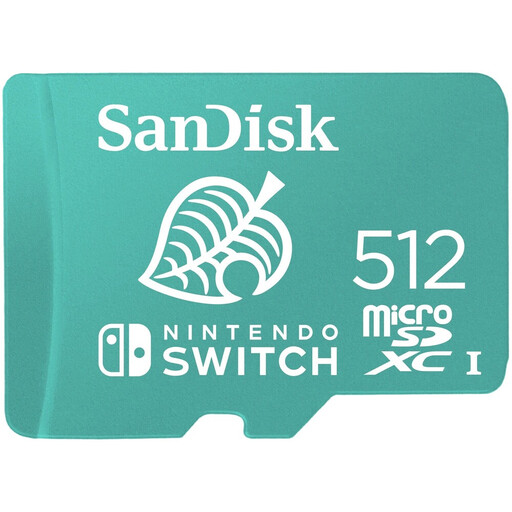
Why we chose it: Specifically designed for the Nintendo Switch, this card offers a comfortable 512 GB capacity to store dozens of games, with speeds optimised to reduce loading times.
It eliminates any risk of incompatibility. Its official Nintendo license is a guarantee of stable, flawless performance, where a generic card might not be recognised or could cause slowdowns.
Peace of mind. It's the ultimate "plug-and-play" solution for any Switch, Switch Lite, or Switch OLED owner who wants to expand their storage without a second thought.
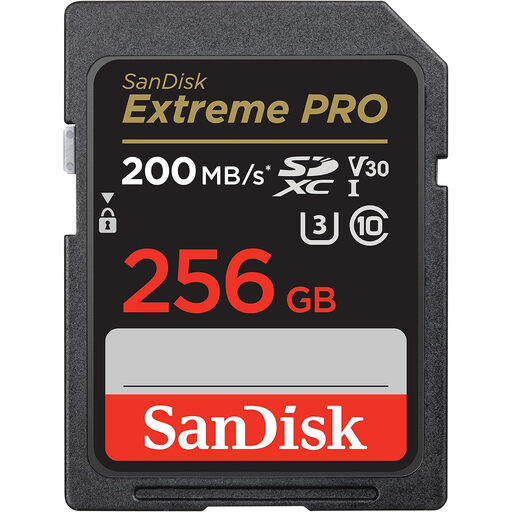
Why we chose it: Built for demanding content creators, it offers high write speeds (up to 140 MB/s) and V30 certification. This ensures you can record 4K UHD video without any interruptions and shoot in burst mode without any lag.
It doesn't just settle for a vague "Class 10" label and proudly displays its U3 and V30 certifications. This is the objective guarantee that it will handle the massive data streams of high-resolution video, where a standard card would fail.
Performance that serves professional workflows. Its high read speed (up to 200 MB/s) drastically accelerates file transfers to a computer, a precious time-saver in post-production.
Discover our complete, up-to-date selection of products that meet our demanding selection criteria and current safety standards.
A memory card's lifespan depends on its technology and usage, measured in write/erase cycles. For typical use (photos, file storage), a card from a reputable brand can last for years. However, for intensive use like in a dash cam, a "High Endurance" model is designed to last 2 to 5 years of continuous recording, compared to just a few months for a standard card.
It is highly recommended to format any new card directly in the device that will use it (camera, console, etc.). This process ensures the card is formatted with the optimal file system for the device, which prevents compatibility errors and performance drops. The option is usually found in the "Settings" or "Setup" menu.
This is perfectly normal. There's a difference in calculation: manufacturers use a decimal base (1?GB = 1 billion bytes), while operating systems (Windows, macOS, etc.) use a binary base (1?GB = 1,073,741,824 bytes). Additionally, a small portion of the space is always reserved for the card's file system. This is why a 128?GB card will actually show about 119?GB of usable space.