
Livraison le jour même ou le lendemain

Qualité garantie

Débloquez vos offres de bienvenue: Livraison GRATUITE | Jusqu'à -80 % | 30 jours d'essai gratuits à JoyPlus
Téléchargez l'application
More than just a peripheral, the keyboard has become an extension of our hands. For gamers, developers, or writing professionals, it's a crucial tool that dictates daily performance and comfort. But faced with a jungle of models, how do you make the right choice? This guide is here to demystify the options, give you the keys to choosing wisely, and present our selection of the best mechanical keyboards available today, tailored for every type of user.
Before you jump into our selection, let's review the essential criteria that make all the difference.
The switch is the small mechanism under each key that defines your entire typing experience. The feel, the sound, the responsiveness... it all starts here. They are classified into three main families:
The size of the keyboard, or "form factor," directly impacts your comfort and desk organisation.
The days of the simple USB cable are over! Modern keyboards are true chameleons. A wireless mechanical keyboard frees you from constraints with an ultra-fast 2.4 GHz connection for gaming, and Bluetooth to easily switch between multiple devices.
Customisation has also become a major focus. The hot-swappable keyboard is a small revolution: it allows you to change switches on the fly, without any soldering. It's absolute freedom to test and find your dream typing feel. Finally, you can't overlook the RGB keyboard, which transforms your setup into a light show that's infinitely customisable, key by key.
Enough theory, let's get practical! Here are the models that caught our eye, each with its own strengths to meet specific needs.
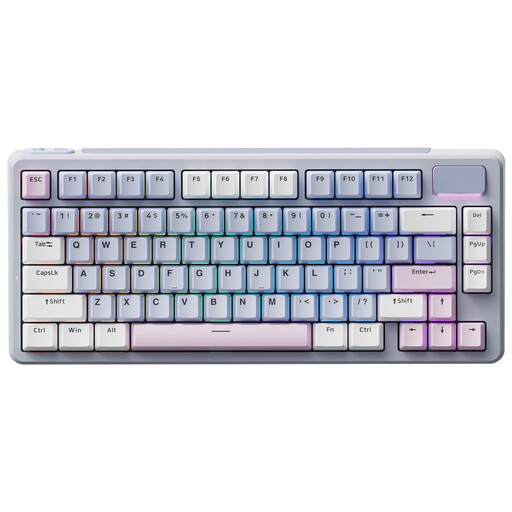
Why it stands out: The RAPOO V700DIY is the perfect solution for diving into the world of custom keyboards without breaking the bank or spending hours on it. Its 75% format is an excellent compromise: compact, yet it retains the essential function keys. Its Gasket Mount structure and polycarbonate plate give it a surprisingly soft typing feel and a highly sought-after, muted sound.
Key Strengths
Who is it for? For the curious, the tinkerers, and gamers who want an upgradable keyboard to experiment with different switches and find their perfect typing feel.
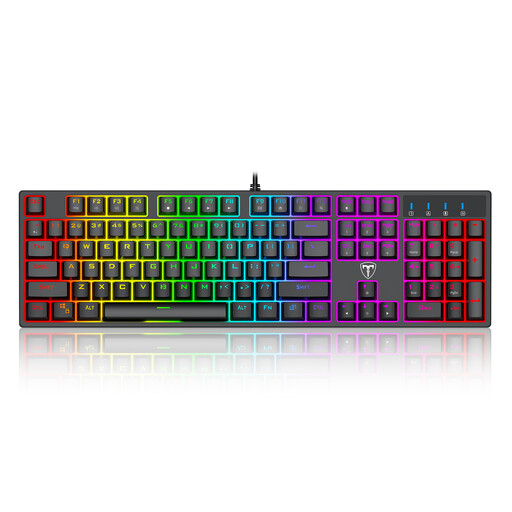
Why it stands out: This keyboard is no-nonsense: it gets straight to the point. It's a wired, 100% format gamer keyboard built for pure performance. Its Blue switches offer firm and substantial "clicky" feedback that leaves no room for doubt. Robust, equipped with anti-ghosting and N-key rollover, it's a tank you can rely on during the most intense gaming sessions.
Key Strengths
Who is it for? For gamers who swear by the reliability of a wired connection and love the distinct typing sensation of "clicky" switches. It's also a perfect fit for those who need a number pad for daily tasks.
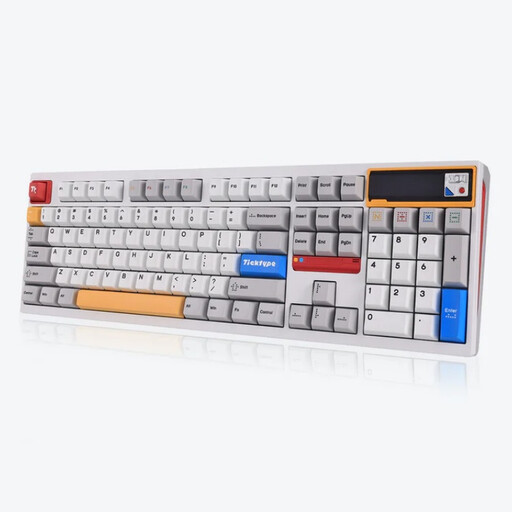
Why it stands out: With its fully machined aluminium chassis, the Ticktype DP104 plays in the big leagues. It combines a premium aesthetic, rock-solid durability, and cutting-edge features. Equipped with linear switches that produce a highly-prized "thocky" (deep and dull) sound, it delivers a typing experience of rare smoothness and musicality.
Key Strengths
Who is it for? For aesthetes, demanding professionals, and gamers who want the best: a keyboard that combines noble materials, advanced technology, and an exceptional typing experience.
This selection is just a taste of the immense universe of mechanical keyboards. Other form factors, switches, and designs await you. To dive deeper, feel free to explore our complete collection.
? Discover our full range of Keyboards and Mice
1. Why switch to a mechanical keyboard instead of sticking with a membrane one? For three reasons: precision, comfort, and durability. A mechanical keyboard offers a much more pleasant and responsive typing experience, an unparalleled lifespan (over 50 million keystrokes per key), and most importantly, the ability to choose a typing feel that suits you. It's an investment you won't regret.
2. What exactly does "hot-swappable" mean? It's the game-changing feature for customisation enthusiasts! A hot-swappable keyboard allows you to change the switches (the "engines" of the keys) as easily as Lego bricks, without any soldering. This lets you test linear, tactile, or clicky switches to evolve your keyboard and find the perfect typing feel.
3. Isn't a QWERTY keyboard difficult to use if you're used to another layout (like AZERTY or QWERTZ)? That's a fair question! In reality, the adjustment is often very quick. The QWERTY keyboard is the standard in gaming and coding. Furthermore, both Windows and macOS allow you to switch the software layout with a simple click or keyboard shortcut. This means you can type in your native layout (e.g., AZERTY) even if the letters on the keycaps are QWERTY. Many people adapt very quickly and even benefit from more convenient shortcuts in certain software.