
Livraison le jour même ou le lendemain

Qualité garantie

Débloquez vos offres de bienvenue: Livraison GRATUITE | Jusqu'à -80 % | 30 jours d'essai gratuits à JoyPlus
Téléchargez l'application
In the competitive gaming arena, every millisecond counts. A missed action or a command that doesn't register fast enough can spell certain defeat. Reliable, responsive gear isn't a luxury; it's a necessity. That's why so many gamers swear by the mechanical gaming keyboard with red switches, renowned for its speed and smoothness.
With an overwhelming number of options on the market, it can be hard to know where to start. This guide is here to break down the essentials and help you find the perfect keyboard for your playstyle, without drowning you in marketing jargon.
Before you buy, understanding a few key technical aspects is crucial to distinguish a good keyboard from a true ally that will give you the edge.
The heart of a mechanical keyboard is its switches. Red switches are the linear type. This means the key travels down perfectly smoothly, with no tactile bump or audible click halfway through the press.
Their secret? A very low actuation force and a particularly short actuation point. In simple terms: a light press is all it takes to register the command, allowing for lightning-fast repeated actions. This is a decisive advantage in first-person shooters (FPS) or multiplayer online battle arenas (MOBAs), where every tenth of a second can make a difference.
"Ghosting" is the frustrating phenomenon where some keys aren't registered when several are pressed at once. An anti-ghosting keyboard with N-Key Rollover (NKRO) technology ensures that every single keystroke is recorded, no matter how many keys are pressed simultaneously. This is essential for executing complex combos without ever dropping an input.
For most gamers, the standard QWERTY layout is essential for natural typing comfort. But beyond the key layout, the keyboard's form factor itself is important. A low-profile gaming keyboard has slimmer keycaps and switches, reducing travel distance and potentially lessening finger fatigue during long sessions.
Finally, a wired gaming keyboard remains the logical choice for its ultra-stable, latency-free connection. There's zero risk of interference or a dead battery in the middle of a tournament final.
Here are a few models that stand out from the crowd thanks to their technical specs and suitability for demanding gamers.
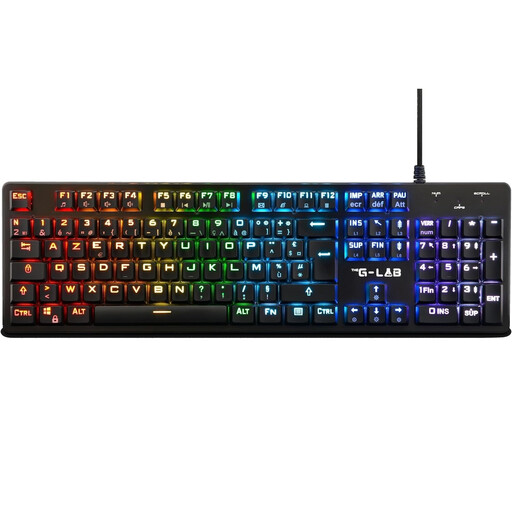
Why It Stands Out: The Keyz Platinum combines low-profile red switches with an ultra-slim design. This construction reduces the actuation distance by 40% compared to standard switches, delivering near-instantaneous responsiveness. Its aluminium alloy top plate provides welcome robustness and stability on your desk.
Advantages:
Who Is It For? For gamers who want the full performance of a full-size mechanical keyboard with red switches, but with the sleekness and speed of a low-profile design.
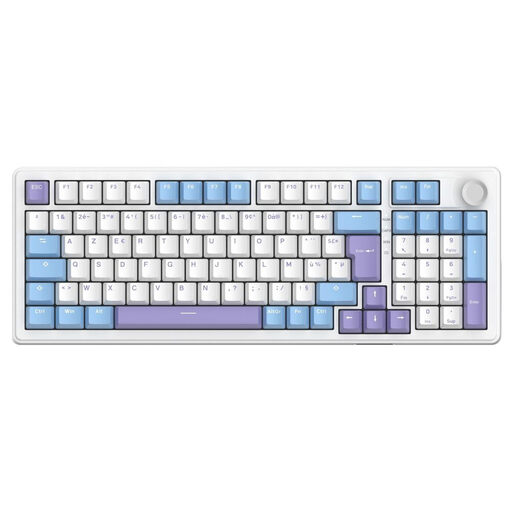
Why It Stands Out: The Keyz Elite 400 takes customisation to the next level with its pre-lubricated, hot-swappable linear switches. Its triple connectivity (wired, 2.4 GHz wireless, Bluetooth) and compact 96% form factor make it a true Swiss Army knife.
Advantages:
Who Is It For? The perfect keyboard for gamers and content creators who love versatility, want to tinker with their switches, and dream of a clean, minimalist desk setup thanks to its wireless capabilities.
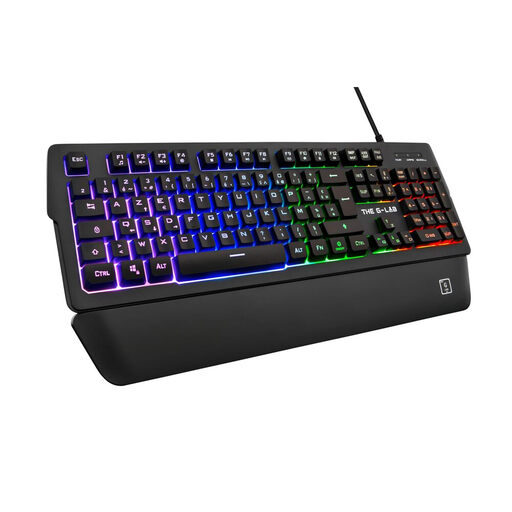
Why It Stands Out: Although it's not a mechanical keyboard, the Keyz Palladium is an excellent alternative for those who prefer the silence of a membrane keyboard. It doesn't skimp on essential gaming features, offering 26-key anti-ghosting, programmable macros, and a detachable magnetic wrist rest.
Advantages:
Who Is It For? For gamers who want a full-featured, responsive keyboard without the typical noise of mechanicals, or simply for those on a tighter budget.
If performance is non-negotiable but you refuse to sacrifice style, you should know there are keyboards that blend cutting-edge technology with retro design. To discover models with a truly unique look, check out our selection of typewriter-style mechanical gaming keyboards.
Absolutely. Most wired USB keyboards, like the wired gaming keyboard Keyz Platinum, are natively recognised by modern consoles (PS4, PS5, Xbox One, Xbox Series X/S). Simply plug them in (Plug & Play), and they will work immediately for gaming and navigating menus. Be aware, however, that advanced customisation software (for managing RGB or macros) is almost always a PC exclusive.
Regular maintenance is key to extending the life of your prized keyboard.