Joybuy Insights

Mechanical Keyboard Buying Guide: How to Choose the Right One

The world of mechanical keyboards is fascinating, but it can quickly become a minefield for the uninitiated. Between the technical jargon, marketing promises, and a jungle of layouts, it's easy to get lost and make the wrong choice. As the head of product selection at Joybuy, my mission is to demystify this topic for you. Together, we'll identify the criteria that truly matter for your specific needs, whether you're a die-hard gamer, a developer, or a content creator.

The 3 Pitfalls to Avoid Before Buying a Mechanical Keyboard

Before diving into the technical details, let's review the most common mistakes. Knowing them will save you from disappointment and ensure you make a worthwhile investment.

  1. The Myth of "Universal" Hot-Swappable: The hot-swappable feature is a game-changer: it lets you change the switches without any soldering. Be careful, though—not all printed circuit boards (PCBs) are created equal. Some only accept 3-pin switches, which drastically limits your options, while the most versatile models are compatible with 5-pin switches, which are known for being more stable.
  2. Compact Layouts: A Good Idea Gone Wrong? A TKL keyboard (tenkeyless) or a 75% keyboard frees up valuable desk space—that's a fact. But be careful not to sacrifice keys you use daily. An overly minimalist layout can quickly become a hindrance if the function keys (F1-F12) or the numpad are essential to your workflow.
  3. The False Promise of "All Wireless": A wireless mechanical keyboard promises a clean, clutter-free desk. But performance can vary wildly from one model to another. Poor battery life, noticeable Bluetooth latency, or frequent disconnects can turn the dream into a nightmare, especially for gaming. Multi-mode connectivity (wired, Bluetooth, 2.4 GHz) is the best way to guarantee a flawless experience.

The 3 Key Criteria for Making the Right Choice

To cut through the noise, focus on these three pillars. They will account for 80% of your daily satisfaction.

1. Layout: The Balance Between Space and Functionality

Your keyboard's layout should match your workspace and your habits.

  • Full-size (100% – 104/108 keys): The classic layout with a numpad. Ideal for data entry and for those who want every key available.
  • TKL (Tenkeyless – 80% – 87 keys): Same as a full-size board, but without the numpad. An excellent compromise for gamers and anyone who wants more room for their mouse.
  • 75% (approx. 84 keys): A very popular layout that condenses the keys. It keeps the function row and arrow keys in a more compact block. Perfect for a minimalist desk without sacrificing productivity.
  • 65% (approx. 68 keys): Even more compact, this layout removes the function key row. It's aimed at purists and those who prioritise portability above all else.

2. Switches: The Heart of the Keyboard

The switches are the soul of your keyboard. They define the feel under your fingers and the sound profile of each keystroke. Being able to change them on the fly on a hot-swappable model is a huge advantage for evolving your setup.

  • Linear (e.g., Red, Black): A smooth, direct keystroke with no bump. Highly prized by gamers for maximum responsiveness in the heat of the action.
  • Tactile (e.g., Brown, Clear): A slight tactile bump is felt mid-press to confirm actuation, all without an audible click. It's the perfect middle ground, equally suited for typing and gaming.
  • Clicky (e.g., Blue, Green): Here, the tactile bump is accompanied by a distinct, audible "click." A very satisfying feeling for typing, but a no-go if you have colleagues (or sensitive ears) nearby!

3. Connectivity: Wired or Wireless?

Your choice will depend on your need for mobility and performance.

  • Wired (USB-C): The guarantee of a flawless, zero-latency connection. The absolute standard for competitive gaming and reliability.
  • Wireless (Bluetooth / 2.4 GHz): Bluetooth shines with its versatility, allowing you to switch between multiple devices (PC, tablet, etc.). The 2.4 GHz dongle, on the other hand, provides a low-latency connection nearly identical to wired, making it perfect for gaming without restrictions.
  • Tri-mode: The best of all three worlds! These models combine wired, Bluetooth, and 2.4 GHz for ultimate versatility. The connoisseur's choice.

Recommended Mechanical Keyboards

Here are a few options that meet specific needs, based on the criteria we've just discussed.
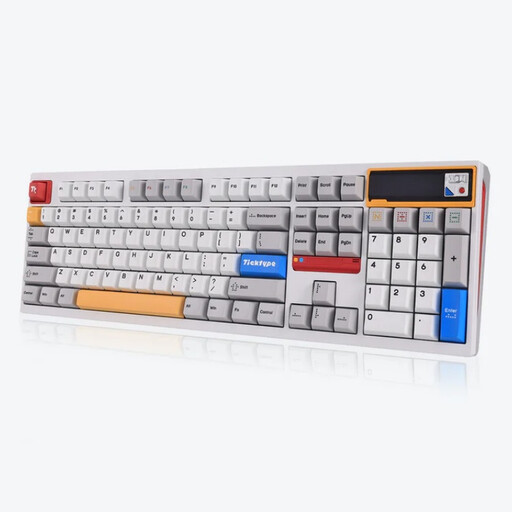
IDEAL FOR: THE DEMANDING USER
Ticktype DP104 Custom Tri-Mode Wireless Mechanical Keyboard

Ticktype DP104 Custom Tri-Mode Wireless Mechanical Keyboard

Why it's a great choice: For those who refuse to compromise. This keyboard combines a premium build with cutting-edge features. Its 100% aluminium chassis and leaf spring mount deliver a uniquely refined typing feel and acoustic profile, while its tri-mode connectivity and massive 8000 mAh battery ensure rock-solid versatility.

How it avoids the pitfalls:

It shatters the "disappointing wireless" pitfall with its ultra-reliable tri-mode connectivity and huge battery. Its full-size layout protects you from any frustration over missing keys.

Key strengths:

Full aluminium chassis for premium durability and acoustics; hot-swappable PCB for maximum upgradability.
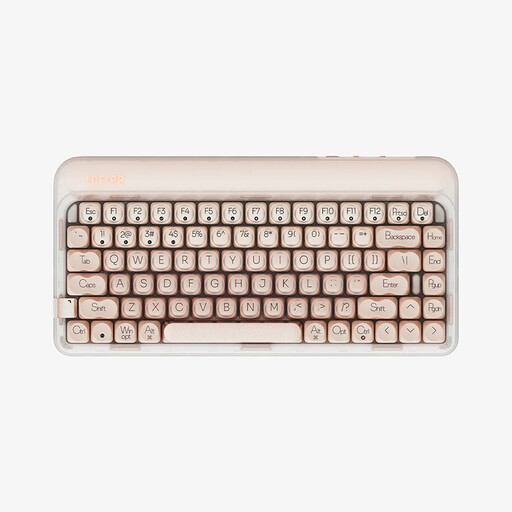
IDEAL FOR: THE MOBILE PROFESSIONAL
Lofree OE914 75% Mechanical Tri-Mode Keyboard

Lofree OE914 75% Mechanical Tri-Mode Keyboard

Why it's a great choice: Perfect for those who juggle multiple devices and appreciate a minimalist desk. Its 75% keyboard layout offers an ideal balance between a compact footprint and functionality, and its tri-mode connectivity lets you switch on the fly between a PC, a laptop, and a tablet.

How it avoids the pitfalls:

It avoids the "too compact" trap by keeping the essentials: the function keys and arrows. Its 4000 mAh battery and comprehensive connectivity make it a reliable and long-lasting wireless companion.

Key strengths:

Ultra-versatile tri-mode connectivity (USB-C, Bluetooth 5.3, 2.4G); compact yet perfectly functional 75% layout.
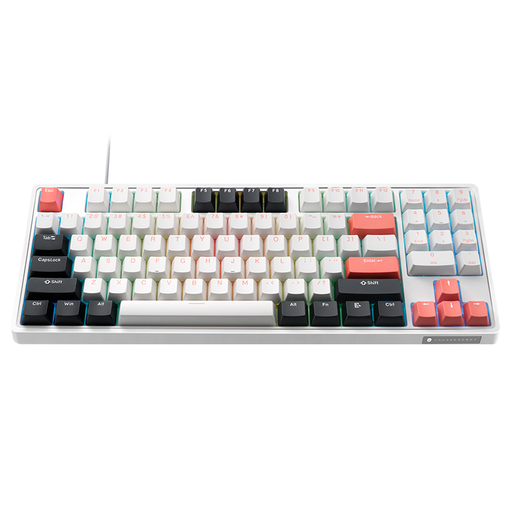
IDEAL FOR: THE CUSTOMISATION ENTHUSIAST
THUNDEROBOT KG3089 80% Wired Mechanical Keyboard

THUNDEROBOT KG3089 80% Wired Mechanical Keyboard

Why it's a great choice: This is an excellent gateway into the world of custom keyboards. It includes the key feature for any beginner: a hot-swappable PCB to experiment with different types of switches without having to buy a whole new keyboard.

How it avoids the pitfalls:

It bypasses the "limited hot-swappable" trap by being compatible with both 3-pin and 5-pin switches, ensuring total customisation freedom.

Key strengths:

Hot-swappable PCB (3/5-pin) for maximum flexibility; PBT double-shot keycaps for exceptional durability.

Looking for other options?

Discover our full selection of models, all rigorously chosen to meet our quality standards and European safety regulations.

Frequently Asked Questions (FAQ)

Q1: Most of these keyboards are QWERTY. Is that a problem?

The vast majority of niche mechanical keyboards, especially in the gaming and customisation scenes, use the QWERTY (US) layout. But this is not an obstacle at all. Your operating system (Windows, macOS, etc.) lets you switch the keyboard layout to your local one (like AZERTY or QWERTZ) in just a few clicks. You will therefore type in your native language, even if the letters printed on the keycaps don't match. It's a habit that thousands of users have already adopted!

Q2: Is a hot-swappable keyboard really useful for a beginner?

Absolutely. Even if you don't plan on becoming a custom keyboard expert, this feature offers two major advantages:

  1. Repairability: A faulty switch? You can replace it in seconds for a minimal cost, instead of throwing away the entire keyboard.
  2. Upgradability: Your preferences might change. You could start with linear switches for gaming and later want to try tactile switches for typing. A hot-swappable keyboard lets you make that upgrade affordably.

Q3: What is the lifespan of a mechanical keyboard?

A mechanical keyboard is an investment built to last. Its switches are rated for tens of millions of keystrokes (often 50 million or more), which translates to years of heavy use. Add to that a typically robust construction and the ability to replace keycaps and switches (on hot-swappable models), and you get a lifespan that is unmatched by traditional membrane keyboards.