
Livraison le jour même ou le lendemain

Qualité garantie

Débloquez vos offres de bienvenue: Livraison GRATUITE | Jusqu'à -80 % | 30 jours d'essai gratuits à JoyPlus
Téléchargez l'application
Whether you're a gamer seeking a competitive edge, a professional who spends their days typing, or a tech enthusiast, choosing a keyboard shouldn't be taken lightly. A good mechanical keyboard can transform your typing experience, making it more precise, comfortable, and enjoyable. But with the sheer number of options available, it's easy to get lost. This guide is here to demystify the key features and help you find the keyboard that's truly right for you.
To make the right choice, several criteria need to be considered. Let's break them down.
The size of your keyboard directly impacts your desk ergonomics and which keys are available to you.
The switch is the heart of the keyboard: it's the mechanism under each key that defines the entire typing feel. There are three main types:
For the more curious, a hot-swappable keyboard (whose switches can be replaced without soldering) allows you to change switches on the fly. It's the ultimate gateway into the world of the custom keyboard.
The choice here will depend on your mobility and desk setup.
Let's get down to business: here are a few models that have caught our eye and cater to very different needs.
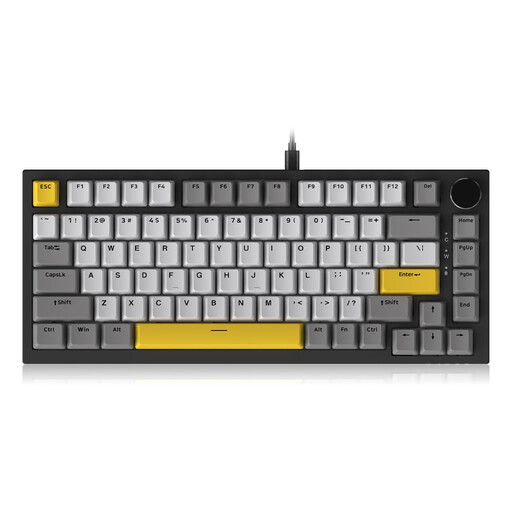
Why it stands out: The wired AJAZZ AK820 is an excellent entry point into the world of quality mechanical keyboards. It packs features usually reserved for much pricier models, such as a Gasket Mount structure. This type of mounting, where the plate supporting the switches rests on silicone gaskets, cushions each keystroke for a softer feel and a more muted sound. The CNC metal volume knob is an addition that's as elegant as it is practical for multimedia control.
Pros:
Who is it for? For gamers and professionals looking for a premium typing experience without breaking the bank. A very smart choice for anyone who wants a high-performing 75% keyboard that's ready to be customised.
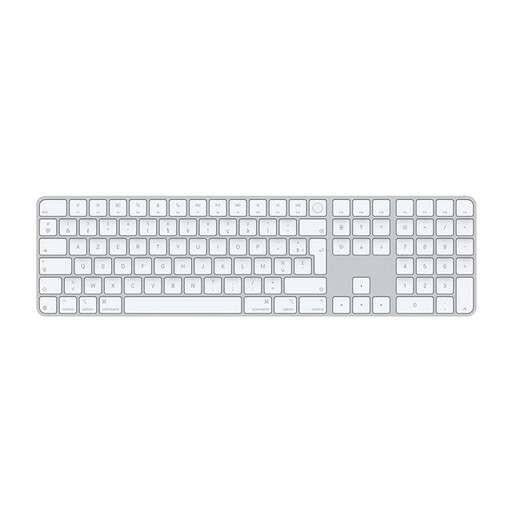
Why it stands out: Admittedly, this is a membrane keyboard, not a mechanical one. Yet, the Magic Keyboard remains an undeniable benchmark for users in the Apple ecosystem. Its key advantage: seamless integration, with a Touch ID sensor that makes authentication as simple as it is secure. Its ultra-slim aluminium design and nearly silent keystrokes make it a prime companion for minimalist desks.
Pros:
Who is it for? For die-hard fans of the Mac ecosystem (with Apple silicon) who prioritise design, silence, and seamless integration above all else.
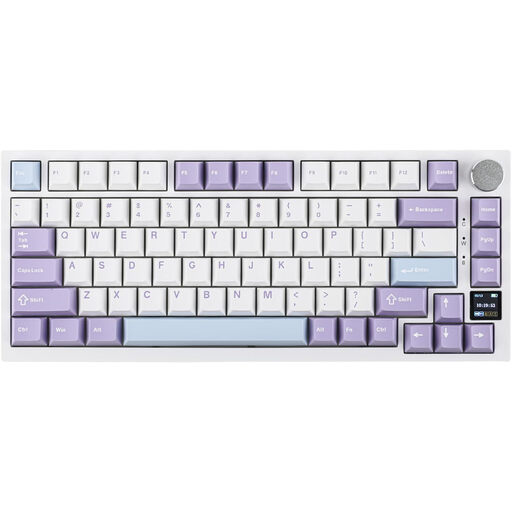
Why it stands out: This Pro version of the AK820 pushes the envelope on versatility even further. It combines tri-mode connectivity (wired, Bluetooth 5.1, 2.4 GHz) with an interactive TFT colour screen. Far from being a mere gimmick, this screen displays useful information (battery life, connection mode, time...) and can even be customised with animated GIFs. Of course, it retains the Gasket structure and meticulous sound dampening of its wired counterpart.
Pros:
Who is it for? For tech enthusiasts, gamers, and mobile professionals who want the best of both worlds: total flexibility, advanced features, and a customisable typing experience, all in a compact form factor.
Customising a custom keyboard often involves replacing the keycaps. It's the easiest way to give your keyboard a unique style, refine the typing feel, or even change the layout.
To create a keyboard that's uniquely yours, check out our selection of keycaps.
A mechanical keyboard uses an individual switch under each key. The result is precise tactile feedback, better responsiveness, and increased durability. In contrast, a membrane keyboard relies on a rubber dome under each key, which results in a softer, less distinct typing feel.
It all comes down to personal preference! To put it simply: Linear switches are smooth and fast, perfect for gaming; Tactile switches offer a noticeable bump without the noise, making them excellent all-rounders; finally, Clicky switches are the loudest and are reminiscent of a typewriter, a delight for many typists.
No, that's a common misconception! The noise depends primarily on the type of switch. Linear and tactile switches, for example, are quite discreet. Furthermore, modern keyboards like the AJAZZ AK820 integrate multiple layers of insulating foam that dampen unwanted noise for a much more muted typing sound.