
Livraison le jour même ou le lendemain

Qualité garantie

Débloquez vos offres de bienvenue: Livraison GRATUITE | Jusqu'à -80 % | 30 jours d'essai gratuits à JoyPlus
Téléchargez l'application
A mechanical keyboard can make typing more comfortable and deliver a more precise response in games. However, product listings do not always tell you everything. Between compact sizes, QWERTY layouts, promises of quiet operation and RGB effects, certain details can turn an appealing purchase into a frustrating peripheral for everyday use.
Here are the main pitfalls to avoid and the criteria to check before choosing a keyboard for gaming, work or travel.
A US QWERTY keyboard does not use the same layout as French AZERTY. Even though Windows and macOS allow you to change the system language, the characters printed on the keys will not necessarily match those you type. To write in French without having to hunt for symbols, make sure the listing clearly states French AZERTY before placing your order.
QWERTY models may nevertheless suit gamers, people who are used to this layout or those who mainly use software configured in English. The QWERTZ layout, found on some German keyboards in particular, also deserves careful checking.
A 60% keyboard generally removes the function row, navigation keys and number pad. Secondary commands remain accessible via the “ Fn ” key. This frees up space for your mouse, but does require a short adjustment period.
A 75% keyboard usually retains the arrow and function keys while reducing the width of the case. 96% and 98% sizes offer more keys, sometimes with an integrated number pad, in a case that is more compact than a full-size keyboard.
An RGB keyboard improves visibility and lets you customise the appearance of the peripheral, but the lighting has no effect on switch quality. Similarly, a foam-filled structure or “ gasket ” mount can reduce some resonance without automatically making the keyboard quiet.
The type of switch remains the deciding factor: linear models offer a smooth keypress, tactile switches provide noticeable feedback, while “ clicky ” switches produce a clearly audible click. In a shared office or bedroom, it is worth considering this before you buy.
Start by determining how you will mainly use the keyboard:
Also check compatibility with Windows, macOS, Android, iPadOS and consoles. A USB connection may require an adaptor for a PS4, PS5 or Xbox if one is not included.
A wired USB-C model avoids the need to recharge and provides a stable connection. It is particularly suitable for gaming on a desktop computer or for a permanent workstation.
A Bluetooth wireless keyboard makes it easy to switch between devices. The 2.4 GHz mode with a USB receiver is often preferred on PC for its ease of use and low latency. “ Tri-mode ” keyboards generally combine USB, Bluetooth and 2.4 GHz.
For a rechargeable model, check the battery capacity, how long it takes to recharge and whether you can continue using the keyboard while it is charging. Claimed battery life with the backlight switched off cannot be compared directly with a measurement taken with RGB enabled.
Hot-swap functionality lets you replace compatible switches without soldering. This is useful if you want to gradually change the typing feel or replace a faulty switch. However, check compatibility between 3-pin or 5-pin switches and the printed circuit board.
PBT keycaps generally resist developing a polished, shiny finish better than ABS keycaps. Their profile, height and legend shape also affect comfort. To minimise wear, unplug the keyboard before cleaning it, then use a soft brush or dry cloth. Limited splash resistance does not mean that the peripheral can be immersed in water.
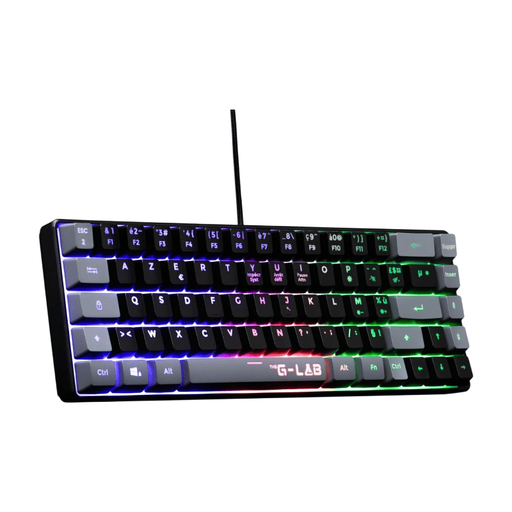
Why this choice suits this user: its 60% AZERTY layout and USB connection are ideal for gamers looking for a compact keyboard that can be used straight away with a PC, PS4 or PS5.
The AZERTY layout is clearly stated, while plug-and-play operation means there is no need to install dedicated software.
60% size, fixed multicolour backlighting, anti-ghosting for up to 19 keys and a reinforced USB cable.

Why this choice suits this user: its 80% size, multiple connection options and programmable controls are ideal for users who want to customise their workspace or gaming setup.
The listing specifies the 87-key layout, 5-pin hot-swap functionality and three connection modes, making it easier to check the specifications before ordering.
PBT keycaps, 4 000 mAh rechargeable battery, Bluetooth, 2.4 GHz and USB-C, plus a programmable knob.

Why this choice suits this user: its 97 keys, knob and tri-mode connections are ideal for creators, remote workers and gamers who regularly switch between devices.
The number of keys and 98% size are clearly stated. This lets you keep a number pad while limiting the amount of desk space required.
Rechargeable battery rated at 8 000 mAh depending on the version, TFT display, metal knob and hot-swap PCB.
We have put together a complete, real-time-updated selection of products that meet these demanding criteria and European safety standards.
Yes, provided you choose switches and a size suited to your environment. Linear or low-profile models can be quieter than clicky versions. In a shared space, check the actual noise level and do not rely solely on the “ quiet ” label.
The stated lifespan depends on the switches and conditions of use. Some listings mention tens of millions of keystrokes, but this theoretical figure does not necessarily account for wear to the keycaps, cable, battery or stabilisers. A hot-swap model makes maintenance easier by allowing certain components to be replaced.
A wired keyboard remains simple to use and does not need recharging. Wireless models offer greater freedom, particularly with a laptop or console. For versatile use, a rechargeable tri-mode model lets you switch between Bluetooth, 2.4 GHz and USB-C depending on the situation. Simply check that the USB receiver is included, review the stated battery life and confirm compatibility with your device.