
Livraison le jour même ou le lendemain

Qualité garantie

Débloquez vos offres de bienvenue: Livraison GRATUITE | Jusqu'à -80 % | 30 jours d'essai gratuits à JoyPlus
Téléchargez l'application
A mechanical keyboard can transform the feel of typing, improve precision and offer plenty of customisation options. The challenge is knowing what to look for in specifications that sometimes combine different technologies and make promises that are difficult to compare. Compact formats, noisy switches, RGB lighting or wireless connectivity: here are the key points to check before placing your order.
Some membrane models claim to offer a “mechanical feel”. Their keystrokes may indeed feel more responsive, but that does not mean there is a genuine mechanical switch beneath every key. The MageGee TS91, for example, is described as a membrane keyboard with a mechanical feel. It could be an appealing option on a tight budget, but it is not in the same category as a model equipped with genuine mechanical switches.
A 60% keyboard generally removes the function row, navigation keys and numeric keypad. This frees up space for your mouse and makes the keyboard easy to slip into a bag. The trade-off is that some commands require the Function key and key combinations.
A 75% keyboard usually retains the arrow keys and F-key row while reducing the keyboard’s width. It is often the best compromise for working from home, studying and gaming. For accounting or spreadsheets, however, a 96% model or a full-size keyboard will remain more practical.
A wireless keyboard can connect via Bluetooth, a 2.4 GHz receiver or a wired USB-C connection. These technologies are not quite suited to the same needs:
Advertised battery life varies depending on the lighting, its brightness level and how frequently the keyboard is used. A specification promising several days of use should therefore be read alongside the relevant condition, such as “backlighting disabled”.
In France, an AZERTY keyboard makes it easier to type accents and commonly used characters. A QWERTY keyboard may suit gaming, programming or users already familiar with this layout, but you should check that the key legends match the software configuration.
It is also worth checking the stated compatibility with Windows, macOS, iOS and Android. A keyboard compatible with PC and Mac may use different shortcuts depending on the operating system. Built-in memory or configuration software can also make it easier to switch between devices.
Linear switches provide a smooth keystroke without a pronounced tactile click. Blue switches, which are often clicky, produce much more noticeable audible feedback. This is an important consideration in a shared office, library or home where noise could be disruptive.
Terms such as pre-lubricated, gasket mount and foam dampening provide information about the keyboard’s construction and the feel beneath your fingers. They do not guarantee a specific noise level: your typing force, the keycaps and the desk surface also affect the result.
A hot-swap keyboard lets you replace compatible switches without soldering. Check whether it accepts 3-pin or 5-pin models and whether the keycaps use a standard profile. PBT keycaps generally resist developing a glossy finish better than ABS keycaps, but their finish and printing method are also worth checking.
A mechanical RGB keyboard adds lighting effects and, in some cases, per-key customisation. This feature increases power consumption in wireless mode. For work, white or disabled backlighting may be more discreet and comfortable.
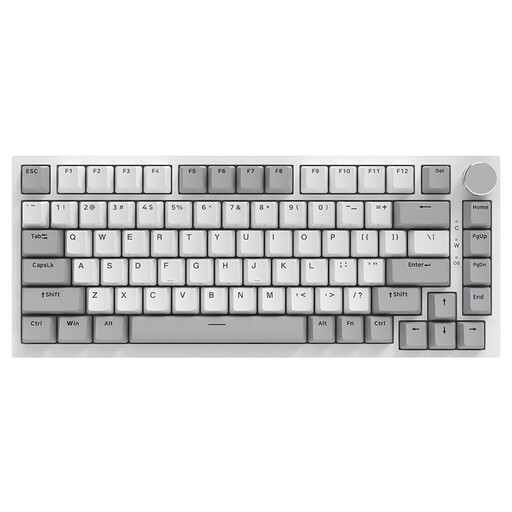
Why this suits this type of user: Its 75 % layout offers 82 keys, a USB-C connection and a volume control knob in a package that works just as well in the office as it does for gaming.
The listing clearly states that this is a wired mechanical model, not simply a keyboard with a mechanical feel. The cable also means there is no battery to manage.
Hot-swappable switches, PBT keycaps, gasket structure and RGB lighting with 20 advertised modes.

Why this suits this type of user: Its 98 % layout retains the numeric keypad while remaining more compact than a full-size keyboard, with three connection modes.
The listing clearly distinguishes between Bluetooth, 2.4 GHz and wired connections. Battery capacity varies by version, with or without a screen, so it should be checked before ordering.
Metal volume knob, TFT screen depending on the version, hot-swap support and RGB lighting.
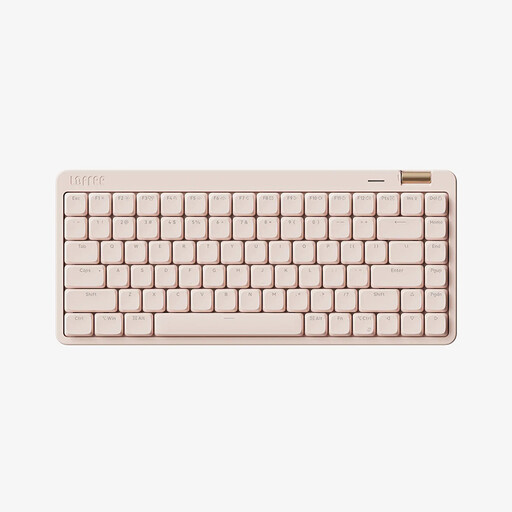
Why this suits this type of user: It is designed for people who switch between work, mobility and gaming, with a 75 % layout and stated compatibility with Windows, macOS, iOS and Android.
All three connections are detailed: Bluetooth 5.4, 2.4 GHz and USB-C. The listing also specifies a US QWERTY keyboard, so check the layout before buying in France.
Low-profile linear switches, double-shot PBT keycaps, volume knob and advertised 2,000 mAh battery.

Why this suits this type of user: With 61 keys and tri-mode connectivity, it is ideal for small spaces, travelling and gaming setups where every centimetre counts.
The listing specifies the 60 % format and US QWERTY layout, so the function and navigation keys are accessed via key combinations.
Bluetooth, 2.4 GHz and USB-C, advertised 1,600 mAh battery, 16 RGB modes and clicky blue switches.
We have put together a complete, real-time updated selection of products that meet these exacting criteria, while also taking European safety regulations into account.
Yes, provided you choose linear or silent switches and check the actual noise level. Clicky blue switches can quickly become disruptive in a shared space.
Manufacturers often state a number of keystrokes per key, but this figure alone is not enough to predict the keyboard’s overall lifespan. The quality of the stabilisers, cable and battery, as well as maintenance, also matter. With a hot-swap model, replacing a faulty switch is generally easier.
Bluetooth is convenient for mobility and use with multiple devices. A wired connection avoids recharging and makes life easier at a fixed workstation. If you want to switch between your desk, tablet and gaming, a tri-mode keyboard offers greater flexibility, provided you check compatibility and the key layout, whether AZERTY or QWERTY.