
Livraison le jour même ou le lendemain

Qualité garantie

Débloquez vos offres de bienvenue: Livraison GRATUITE | Jusqu'à -80 % | 30 jours d'essai gratuits à JoyPlus
Téléchargez l'application
The world of mechanical keyboards is fascinating. We're promised pinpoint accuracy, rock-solid durability, and that famously satisfying clack. But behind the dream, the reality is often a daunting task. Between the technical jargon, gimmicky features, and marketing hype, it's easy to get lost and regret your purchase. Our mission? To guide you through this jungle. Let's break down the mistakes to avoid and the criteria that truly matter to find THE keyboard that's right for you.
The market is flooded with options, but be warned, not all are created equal. Here are the three classic mistakes that can turn your purchase into a disappointment.
To make the right choice, forget the fluff and focus on the three pillars that define a good mechanical keyboard.
The size of your keyboard has a direct impact on your ergonomics and workspace.
Each key on a mechanical keyboard has its own switch. It's what determines the feel, sound, and responsiveness of each keystroke. There are three main families:
Some models offer hot-swappable switches, allowing you to change them without any soldering to endlessly customise your experience.
Let's get practical. Here is our selection for three distinct user profiles, based on the criteria we've just covered.
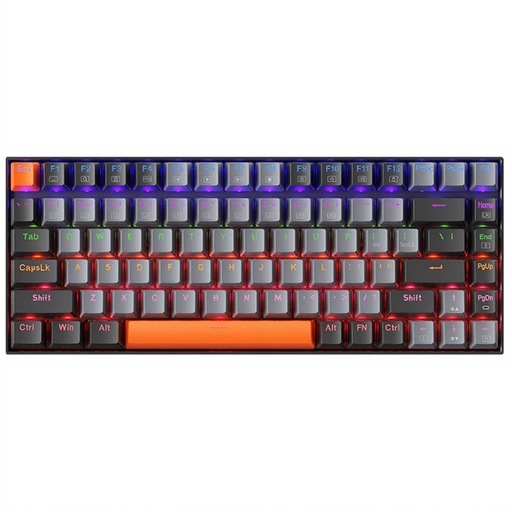
Why we chose it: This is the ideal entry point into the world of mechanical keyboards. It offers a versatile 75% layout, perfect for those who want a compact keyboard without sacrificing essential function keys.
There's no smoke and mirrors here: you get real mechanical switches (Red), not a vague imitation. The focus is on the essentials—the quality of the typing experience—not on superfluous lighting effects.
Linear Red switches: A smooth and discreet typing experience, equally at home in gaming and office work. 75% layout: The perfect balance between compactness and functionality.

Why we chose it: This keyboard checks all the boxes for those who demand performance, versatility, and customisation. It combines a refined build (gasket mount), comprehensive connectivity, and premium touches like a volume knob.
The RGB is certainly present, but it's just the icing on the cake. The real luxury is its internal gasket-mount structure and dampening foams, which provide acoustics and a typing feel worthy of high-end models.
Tri-mode connectivity: The choice is yours between USB-C, Bluetooth, and 2.4 GHz. Hot-swappable: Swap out switches on the fly for a 100% tailored experience. Metal volume knob: The premium detail that makes all the difference in daily use.
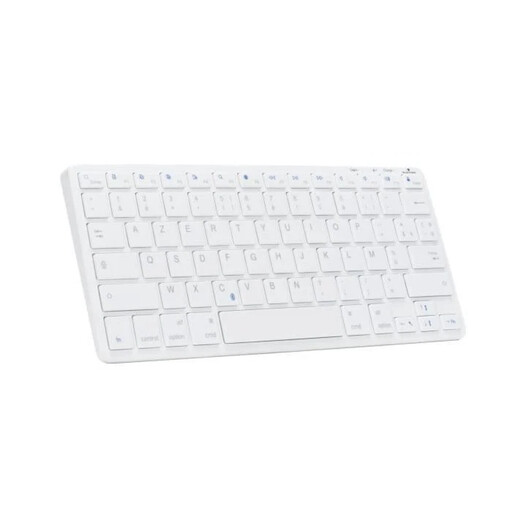
Why we chose it: Note, this is not a mechanical keyboard. It's a scissor-switch model, but it remains a highly relevant option for the Apple ecosystem if you prioritise portability, silence, and a minimalist design.
This keyboard plays it straight: it doesn't pretend to be mechanical. It embraces its scissor-switch technology, which is perfect for achieving an ultra-slim profile and quiet typing. Ideal for slipping into a bag or for a desk where every inch counts.
Optimised for Mac: Get right back into your workflow with the dedicated function keys (Command/Option) for macOS and iPadOS. Multi-device Bluetooth connectivity: Switch from a Mac to an iPad or iPhone in the blink of an eye.
Our complete keyboard collection has been rigorously selected to meet our quality standards. Discover other models that might be the right fit for you.
This is one of their greatest strengths. Most switches are rated to endure between 50 and 100 million keystrokes per key. In practical terms, a well-maintained mechanical keyboard can last for a decade or more, even with heavy use. This longevity is incomparable to that of a standard membrane keyboard.
This is the most persistent misconception! Only "clicky" type switches (like the famous Blues) are designed to produce that characteristic audible click. "Linear" (Red, Black) and "tactile" (Brown) switches are much more discreet. There are even "silent" variants of these switches, which incorporate dampeners to further reduce typing noise.
Yes, absolutely. It's your operating system (Windows, macOS, etc.) that manages the key layout, not the keyboard itself. So you can plug in a QWERTY keyboard and set your OS language input to "French (AZERTY)" in your settings. The key labelled "Q" on the keyboard will type an "A," the "A" key will type a "Q," and so on. However, if you're not a touch typist, this physical-to-digital mismatch can be confusing. In that case, a keyboard that physically matches your chosen layout remains more comfortable.