
Livraison le jour même ou le lendemain

Qualité garantie

Débloquez vos offres de bienvenue: Livraison GRATUITE | Jusqu'à -80 % | 30 jours d'essai gratuits à JoyPlus
Téléchargez l'application
With the overwhelming number of models on the market, choosing your first (or next) mechanical keyboard can feel like a daunting task. Between different layouts, switch types, and advanced features, it's easy to get lost. But don't worry! This guide is here to cut through the noise and help you find the perfect keyboard for your needs, whether you're a gamer, a professional, or simply someone who appreciates a quality typing experience.
As a Product Expert at Joybuy, my mission is to give you clear insights and practical advice to guide your decision, free of marketing jargon.
Before diving into our top picks, let's review three essential criteria to help you narrow down your search.
The size of the keyboard directly impacts your ergonomics and the amount of space it takes up on your desk.
The switches, nestled under each keycap, are the core of your experience: they define the feel and sound of every keystroke. There are three main families:
Beyond the typing feel, modern keyboards pack game-changing features for flexibility and longevity.
Here are a few models that stand out for their design and features, catering to a wide range of user profiles.
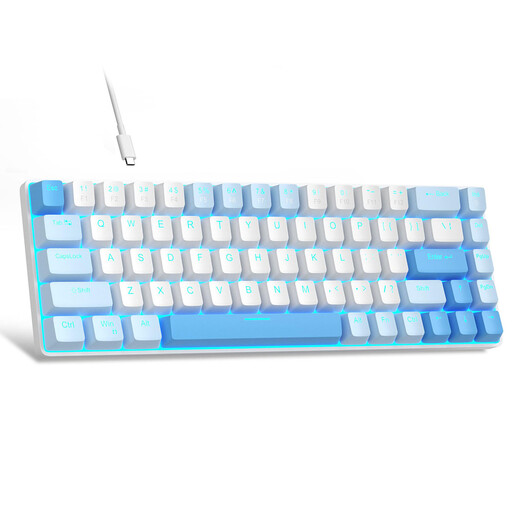
Why it stands out: This wired keyboard packs the essential mechanical experience into an ultra-compact form factor, all at an unbeatable price.
Pros:
Who is it for? Perfect for beginners, those on a tight budget, or as an efficient, compact secondary keyboard for a minimalist setup.
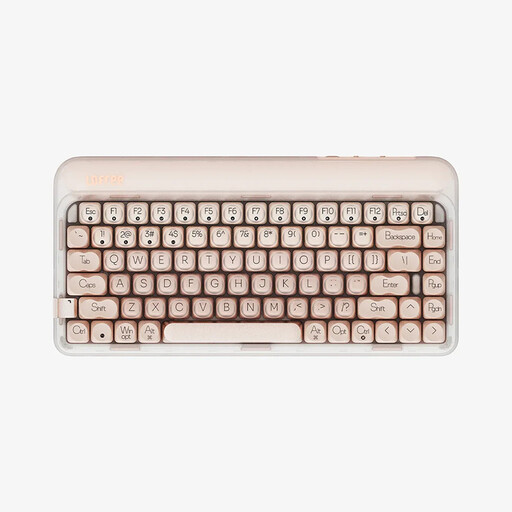
Why it stands out: The Swiss Army knife of keyboards, it combines comprehensive connectivity, deep customisation, and a design focused on acoustic comfort.
Pros:
Who is it for? For professionals and gamers who work across multiple devices and want a high-performance, customisable, and quieter-than-average wireless keyboard.

Why it stands out: A model aimed at enthusiasts seeking a premium experience, featuring highly refined acoustics, quality materials, and unique features.
Pros:
Who is it for? For custom keyboard enthusiasts, developers, and discerning gamers looking for refined acoustics, a premium typing feel, and a design that stands out from the crowd.
Our selection highlights versatile and high-performance models. If aesthetics are a key factor for you and you're drawn to more original or colourful designs, other keyboards might catch your eye.
? Discover our collection of cute mechanical keyboards for unique styles
1. What is a hot-swappable keyboard? A hot-swappable keyboard is one where the switches can be removed and replaced without any soldering. This makes it incredibly easy to customise the typing feel by trying out different types of switches (linear, tactile, etc.) or to replace a faulty switch in seconds.
2. What is the difference between a QWERTY and AZERTY keyboard? This refers to the layout of the keys. AZERTY is the standard in France, while QWERTY is the international standard (notably in the US). The models in this selection are QWERTY. Rest assured, while it requires a short adjustment period, many gamers and developers have adopted it. The easiest workaround is to configure your operating system (Windows, macOS) to interpret the keys as if it were an AZERTY keyboard.
3. Are mechanical keyboards always loud? No, that's a common misconception! The noise level depends primarily on the type of switch. "Clicky" switches are designed to be loud—it's their signature feature. In contrast, linear and tactile switches are much quieter. Furthermore, innovations like gasket-mount structures and the integration of acoustic foams help dampen the sound, resulting in a much more muted typing experience.