
Livraison le jour même ou le lendemain

Qualité garantie

Débloquez vos offres de bienvenue: Livraison GRATUITE | Jusqu'à -80 % | 30 jours d'essai gratuits à JoyPlus
Téléchargez l'application
Whether you're a hardcore gamer, a professional focused on comfort, or a digital nomad seeking efficiency, the right mechanical keyboard can literally transform your daily experience. But between the different layouts, switch types, and a jungle of features, it's easy to get lost.
This guide is here to cut through the noise. My role, as a product expert at Joybuy, is simple: to give you the keys to finding THE keyboard that's made for you, all without the marketing fluff.
Before we dive into our top picks, let's review the key points that will guide your choice.
The size of the keyboard is more than just a detail: it determines your comfort and your desk layout.
The switch is the mechanical component hidden under each key. It's what gives your keyboard its unique character, defining its feel and sound.
Now, let's move on to our selection. We have chosen three models with very distinct profiles, selected for their relevance and value for money.
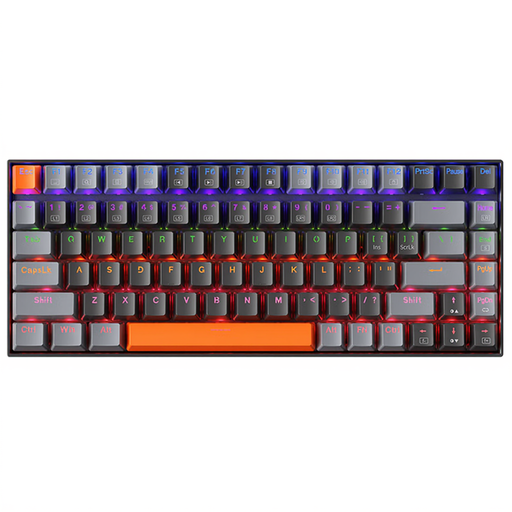
Why it stands out: The Machenike K500A-B84 features a 75% layout, that clever compromise that keeps the function and arrow keys while being much more compact than a TKL. With its understated dark grey design and white backlighting, it is as discreet as it is effective.
Advantages:
Who is it for? The perfect companion for developers, writers, and remote workers who want an optimised desk without sacrificing the essentials. It will also appeal to casual gamers looking for a versatile keyboard.
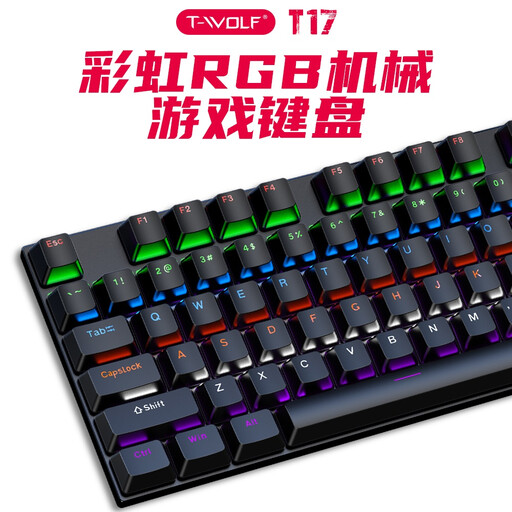
Why it stands out: The Rexsun T17 is a gaming keyboard that gets straight to the point. Its full 100% layout will be familiar to traditionalists, but it's the full anti-ghosting technology that really makes the difference, ensuring every keystroke is registered, even in the heat of the action.
Advantages:
Who is it for? Clearly designed for gamers who can't live without a number pad and who love vibrant setups. It will also suit those who are simply looking for a robust, full-size wired keyboard for everyday use.

Why it stands out: This keyboard excels in two areas: absolute compactness and rock-solid connectivity. Its 60% format frees up an incredible amount of desk space and allows it to slip into any bag. With its tri-mode connection (wired USB-C, Bluetooth, and 2.4G), it's a true all-rounder.
Advantages:
Who is it for? For digital adventurers, design purists, and fans of "clicky" typing. Its versatility makes it a gaming partner for almost any modern device.
The keyboard is the centrepiece of your desk, but it's often the details that make the difference in creating a space that truly reflects you. To fine-tune your setup and add a personal touch, don't underestimate the power of accessories, like a custom cable.
Take a look at our selection of accessories, including our range of vintage cables, to add the finishing touch to your setup.
It's all in the mechanism under the key. A membrane keyboard works with a rubber dome that collapses to make contact: it's a simple but imprecise solution. A mechanical keyboard, on the other hand, has a true, independent switch for each key. The result? Unmatched durability, precision, and typing comfort.
No, that's the most persistent misconception! The noise depends entirely on the type of switch you choose. Blue switches are intentionally loud (they're called "clicky"). In contrast, Brown switches (tactile) and especially Red switches (linear) are very quiet. So there's a mechanical keyboard for every environment, even the quietest of open-plan offices.
Absolutely. Even if the keycaps show a QWERTY layout, you just need to set your operating system (Windows, macOS, Linux) to your local layout (e.g., "French (AZERTY)"). Your computer will then interpret each keystroke as if it were a French keyboard. This is a very common practice among developers, gamers, and enthusiasts, as it opens the door to a huge catalogue of custom keyboards. The only prerequisite? You need to know your keyboard layout by heart, as what's printed on the key will no longer match what appears on the screen.