
Livraison le jour même ou le lendemain

Qualité garantie

Débloquez vos offres de bienvenue: Livraison GRATUITE | Jusqu'à -80 % | 30 jours d'essai gratuits à JoyPlus
Téléchargez l'application
A mechanical gaming keyboard can improve your typing comfort and in-game precision, but the spec sheets don't always tell the full story. Eye-catching RGB lighting, generous battery life on paper, or a compact form factor won't necessarily make up for a QWERTY layout that doesn't suit British typing habits.
Before buying a gaming keyboard, it's worth checking three points that are often overlooked: the key layout, the type of typing feel, and the connectivity. Here's a straightforward way to compare models and avoid purchases that prove impractical in daily use.
A true mechanical keyboard has an individual switch beneath every key. This can be linear, tactile or clicky. In contrast, a semi-mechanical or membrane keyboard can mimic that sensation without using the same internal design.
This difference affects the feedback under your fingers, the noise level, whether you can replace the switches, and how easy it is to maintain. Semi-mechanical models can work perfectly well for basic use, but they don't meet the same expectations as a wireless mechanical keyboard or a hot-swap model.
The word 'gaming' on the box doesn't guarantee a UK layout. Several compact models sold in Britain come in US QWERTY. They can be fine for gaming, programming, or users already used to that layout, but the keys and shortcuts won't match British typing conventions.
For office work, studying, or working from home, check for a UK layout, the number of keys, and whether the characters you need are present. A 60% or 75% keyboard may also require using the Fn key to access certain secondary functions.
An RGB mechanical keyboard adds a nice visual touch and can improve visibility in a dimly lit room. However, the lighting uses more power on a wireless model and doesn't, on its own, improve typing accuracy.
Similarly, a capacity stated in mAh isn't enough to tell you the real battery life. That depends on the brightness, the connection mode, and how often you use it. Look for a spec sheet that clearly details the available modes and the conditions under which the battery life was measured.
The size determines the trade-off between desk space and features.
A student or gamer with a small desk would do well to choose a compact size. For spreadsheets, accounting, or regular number entry, the number pad is still far more practical.
Linear switches offer a smooth press with no noticeable tactile bump. They're often favoured for fast-paced games and their fluid typing feel. Tactile switches add a perceptible bump at the activation point, while blue clicky switches produce a more pronounced sound.
In a bedroom, open-plan office, or shared space, check the noise level before choosing a clicky model. The sound also depends on the keycaps, the case construction, and the materials used to dampen vibrations.
A wired USB-C keyboard is generally simple to set up and doesn't need recharging. A Bluetooth model can connect to several devices, but latency and compatibility vary depending on the hardware used.
A tri-mode keyboard typically combines a wired USB connection, Bluetooth, and a 2.4 GHz wireless link. This setup is handy for switching between a computer, a tablet, or a console. Just remember to check the compatible systems, whether the USB receiver is included, and the key layout.
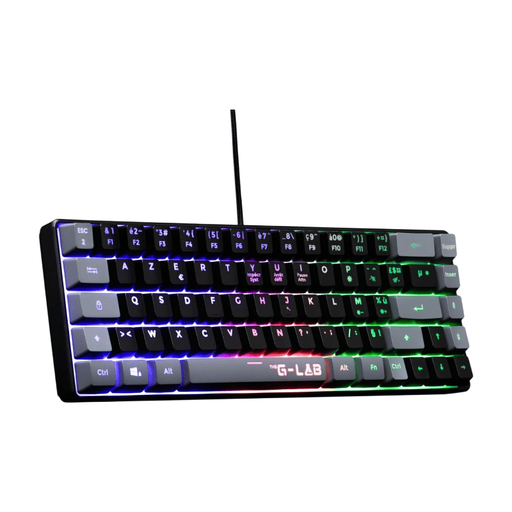
Why this choice suits this profile: Its 60% UK layout and wired USB connection let you start gaming on PC or console without any complicated setup.
The UK layout is clearly stated, and the keyboard works without a battery or any essential software.
60% size, fixed multi-colour backlighting, 19-key anti-ghosting, and a two-year warranty stated on the product page.

Why this choice suits this profile: Its dampened construction, programmable button, and three connection modes appeal to users who like to customise their workspace or gaming setup.
The spec sheet states the US QWERTY layout, compatibility with 5-pin switches, and the 4,000 mAh battery – the points to check before buying are clearly identifiable.
Bluetooth, 2.4 GHz and USB-C, PBT keycaps, hot-swappable all switches, and compatibility with Windows, macOS, iOS and Android.
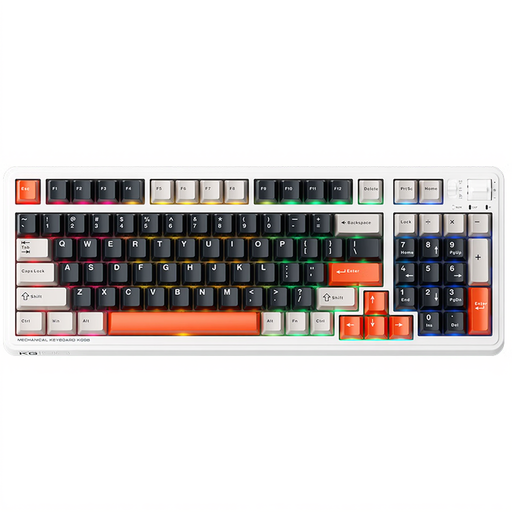
Why this choice suits this profile: The 96% size keeps a wide range of functions in a more compact case. It suits gamers who also use their keyboard for work.
The spec sheet distinguishes the 98-key size, the US QWERTY layout, and the tri-mode connection – so you can check whether it suits your needs before ordering.
Pre-lubricated linear switches as stated, wired, Bluetooth and 2.4 GHz connections, compatibility with Windows and macOS.

Why this choice suits this profile: Its compact size and 2.4 GHz, Bluetooth and USB-C connections make it easy to carry between home, lectures, and gaming sessions.
The stated battery life comes with a 1,600 mAh capacity and a sleep mode; the lighting can also be turned off to reduce power consumption.
61 keys, 16 RGB modes, blue clicky switches, and stated compatibility with PCs, Macs, mobile devices and Xbox.
We've put together a comprehensive, real-time updated list of products that meet these demanding selection criteria and European safety standards.
A UK layout is generally more practical for writing in English, as the letters and common characters match local habits. US QWERTY can work for gaming, development, or users who already use it. Always check the product photo and its spec sheet before buying.
The lifespan depends on the switches, build quality, usage, and maintenance. Some spec sheets state a theoretical number of keystrokes, but this figure doesn't guarantee a precise duration in all conditions. Avoid liquids, dust the keyboard regularly, and unplug it before cleaning.
It may need periodic recharging, unlike a wired USB model. Its power consumption is generally low, but RGB lighting, the wireless signal strength, and how often you use it all affect battery life. To space out recharges, lower the brightness or use the keyboard via USB-C when possible.