
Livraison le jour même ou le lendemain

Qualité garantie

Débloquez vos offres de bienvenue: Livraison GRATUITE | Jusqu'à -80 % | 30 jours d'essai gratuits à JoyPlus
Téléchargez l'application
The world of mechanical gaming keyboards is a jungle—a maze of technical jargon and marketing promises where it's easy to get lost. As a product expert at Joybuy, my mission is to clear the path for you. This guide breaks down the essential criteria for a smart purchase and helps you avoid the common, costly pitfalls.
The market is flooded with options, but not all are created equal. Here are the three most frequent purchasing mistakes and, more importantly, how to avoid them.
Many entry-level keyboards are advertised with terms like "semi-mechanical" or "mechanical-feel." Don't be fooled: these labels often hide a simple membrane technology, dressed up to mimic the tactile feedback of a true mechanical keyboard. The precision, durability, and responsiveness, however, are simply not there. A real mechanical keyboard features an individual switch under each key. This is your guarantee of consistent performance and unmatched longevity.
This is a classic trap for any buyer in France. A significant portion of online deals, especially from niche or import brands, feature a QWERTY layout (the American standard). If you're not used to it, daily typing and even some games can quickly become a nightmare. The golden rule: always double-check the layout before confirming your cart. An AZERTY keyboard is designed for the French language, while a QWERTY will force you through an adjustment period and mental gymnastics to find your bearings.
RGB backlighting is pretty, but it isn't everything. Some entry-level models put on a spectacular light show but sacrifice the essentials: the quality of the switches, the sturdiness of the chassis, or vital features like anti-ghosting. A good gaming keyboard is, first and foremost, about pure performance. The lighting is the icing on the cake.
To make the right choice, focus on these three technical pillars.
Switches are the heart of the machine. They define the typing feel, sound, and responsiveness of your keyboard. There are three main families:
The size of the keyboard, or form factor, directly impacts your setup's ergonomics.
Beyond switches and form factor, two features are must-haves for gaming:
Here are a few options that meet specific needs, keeping in mind the criteria we've just discussed.
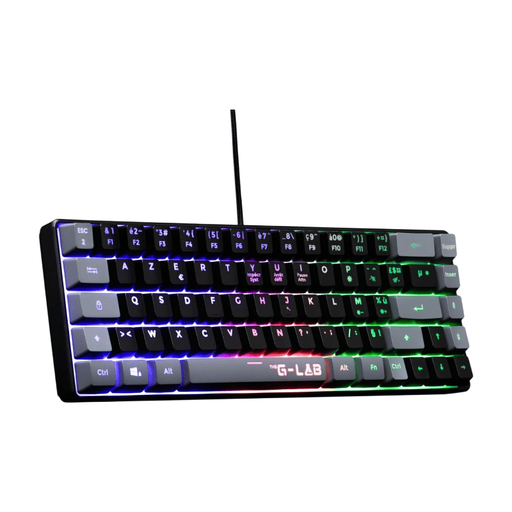
Why we love it: For French gamers who won't compromise on key layout, this model offers an ultra-compact 60% keyboard format in AZERTY. It frees up maximum desk space for wide mouse movements, a critical factor in competitive games.
It sidesteps pitfall #2 by offering a native French layout. Be aware, this is a semi-mechanical model: it's an accessible entry point for those whose absolute priority is a compact AZERTY format.
An AZERTY layout in a 60% format that's rare on the market. It also includes 19-key anti-ghosting, which is sufficient for most games.
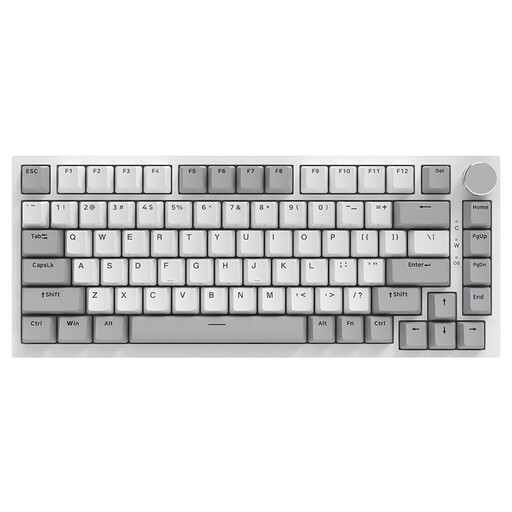
Why we love it: For enthusiasts who like to get their hands dirty, this keyboard is an exceptional base for customisation. Its hot-swappable feature lets you test different switch types without soldering. Its "Gasket Mount" structure and sound-dampening layers provide a muted and very pleasant typing experience. Please note, this model is QWERTY.
It doesn't fall into the "all-RGB" trap. Instead, it focuses on high-end technical features (Gasket structure, hot-swappable) that provide real added value, far beyond simple visual effects.
Hot-swappable switches for limitless customisation. The CNC metal volume knob and durable PBT keycaps are much-appreciated premium touches.
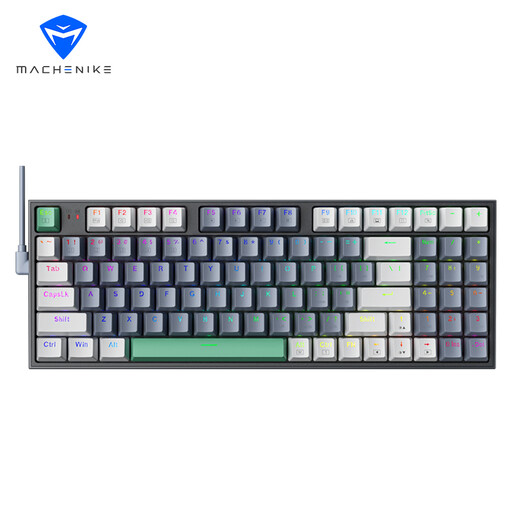
Why we love it: The 90% format is the perfect compromise. It keeps the number pad, which is essential for productivity, but in a more compact layout than a 100% keyboard. Equipped with Brown switches, it's just as comfortable for typing lines of code as it is for racking up frags. Please note, this model is QWERTY.
It avoids the impossible choice: a TKL without a numpad or a bulky 100% keyboard? This 90% format is the smart solution for those who want versatility without sacrificing all their desk space.
The 90% format: the best of both worlds. Its tactile Brown switches make it a prime ally for both gaming and work.
Explore our full selection of keyboards that meet our quality criteria and standards.
The longevity of a mechanical keyboard primarily depends on its switches. A quality switch is rated for 50 to 100 million keystrokes. In practical terms, even with heavy use, this translates to many, many years of service, far beyond what a membrane keyboard can offer.
Yes, absolutely, but it requires a short adjustment period. You just need to switch your operating system's (Windows, macOS) input language to QWERTY. Most games allow you to rebind keys anyway. The advantage? Access to a much wider catalogue of niche models. The main drawback remains daily text typing if you are a die-hard AZERTY user.
For the average user, it's not essential. For an enthusiast, however, it's a golden feature. It allows you to experiment with different types of switches (linear, tactile, clicky) to find the ideal typing feel, or to replace a faulty switch in seconds without throwing out the keyboard. It's a real plus for durability and customisation.