
Livraison le jour même ou le lendemain

Qualité garantie

Débloquez vos offres de bienvenue: Livraison GRATUITE | Jusqu'à -80 % | 30 jours d'essai gratuits à JoyPlus
Téléchargez l'application
With a vast landscape of models, technical jargon, and customisation options, choosing a mechanical gaming keyboard can quickly become a daunting task. Between the different switch types, compact form factors, and connection modes, it's easy to feel lost. Our mission? To cut through the noise and help you find that hidden gem—the keyboard that will adapt not only to your gaming style but also to your desk and your preferences.
This guide provides clear selection criteria and a curated list of tested and approved products to help you make an informed choice, without the marketing fluff.
Before diving into our selection, here are three key points to keep in mind to refine your search.
The key arrangement, or layout, has a direct impact on your comfort and the amount of space you'll have on your desk.
Mechanical switches are the soul of your keyboard. They define the typing feel, the sound, and the responsiveness of each key.
Some keyboards are hot-swappable, meaning you can change the switches yourself without any soldering. The ultimate in customisation!
The choice depends on your usage and your desk aesthetic.
Here are a few gems that stand out from the crowd and meet a variety of needs, from the casual gamer to the customisation enthusiast.
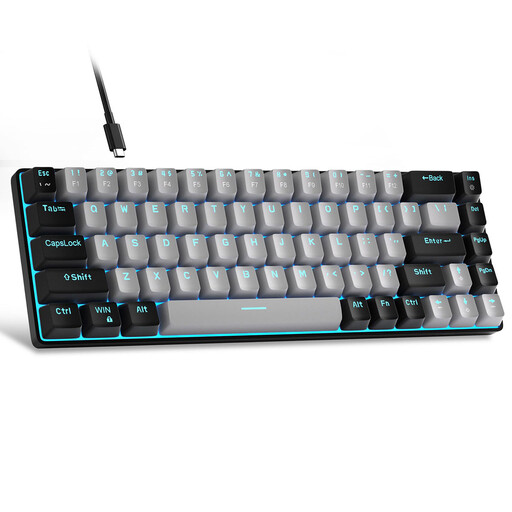
Why does it stand out??
The MageGee MK-Box is an excellent entry point into the world of mechanical keyboards. Its compact 68-key layout (just enough to keep the precious arrow keys) and its detachable USB-C cable make it a great companion for small desks and travel.
Key Features
Who is it for??
Ideal for gamers, students, or remote workers looking for a first mechanical gaming keyboard that is reliable, affordable, and versatile, with a QWERTY layout and a minimalist design.

Why does it stand out??
This keyboard is the king of multi-device setups. Its "Tri-Mode" connectivity allows it to switch on the fly between wired (USB-C), 2.4G wireless, and two Bluetooth channels. The dream tool for a hybrid work environment.
Key Features
Who is it for??
Perfect for mobile users and those who juggle multiple devices. Its mini form factor and RGB keyboard make it an excellent choice for gamers who want a clean, customisable setup.
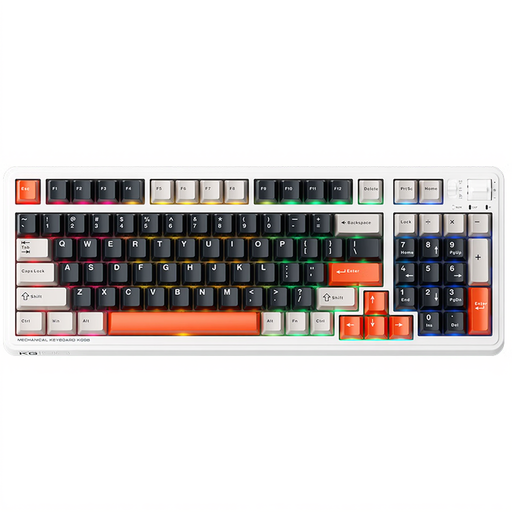
Why does it stand out??
The Machenike KG98 is built for performance and customisation purists. Its trump card? It's hot-swappable, letting you change the switches at will. It comes with pre-lubed linear switches for absolute smoothness, and its 96% layout retains the numpad while remaining very compact.
Key Features
Who is it for??
For keyboard enthusiasts, competitive gamers seeking optimal responsiveness, and professionals who need a numpad but don't want a behemoth on their desk.
Our selection highlights models that meet specific needs. If you want to explore other form factors, switch types, or lighting effects, the world of gaming peripherals is an endless playground.
? Discover our full collection in the PC Gaming Lighting category.
In France, we're used to the AZERTY layout, it's true. But the keyboards presented here are QWERTY (US). Rest assured, a simple setting in Windows or macOS is all it takes for your system to recognise it, while still allowing you to type French accents. It's mostly a matter of habit, and many developers and gamers swear by this layout.
The difference is both tactile and audible. The blue switch is the "loud and proud" option: a clearly audible "?click?" and a sharp tactile bump under your finger with every press. Ideal for typing. The linear switch (like Reds) is the complete opposite: the key press is smooth, gentle, and quiet, allowing you to chain actions at high speed in-game.
No, RGB lighting is purely aesthetic; it has no impact on the responsiveness or performance of your keyboard. It's 100% for style and for creating an atmosphere that reflects you. Its only "impact"? On a wireless keyboard, it consumes battery power. But you can, of course, disable it to maximise battery life.